63
Gentier Real-Time PCR System
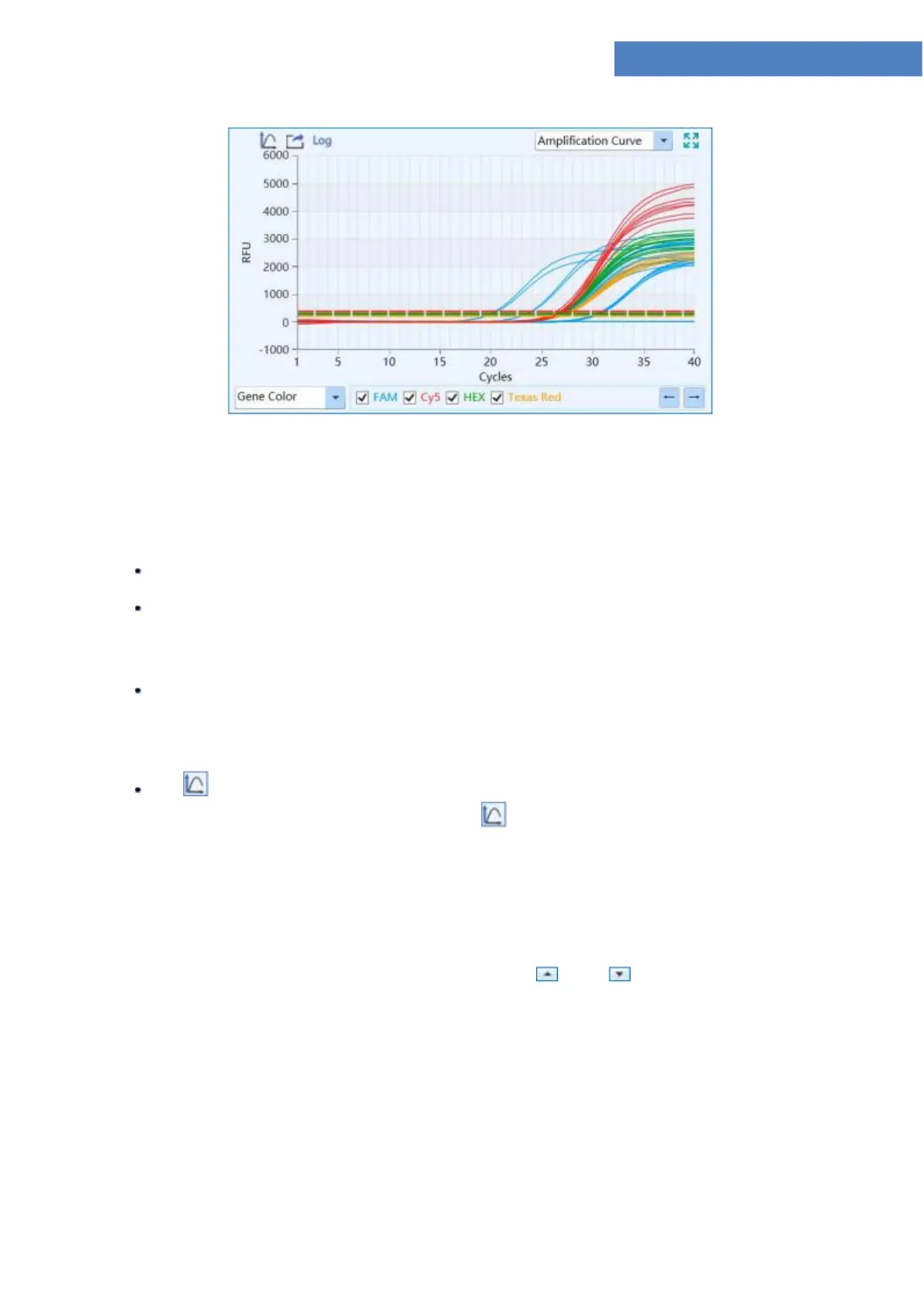
Figure D-9.1 Abs Quant analysis interface - Amplification Curve functional module
▶ Parameter introduction:
X axis represents the cycle number of the current experiment;
Y axis represents the Relative Fluorescence Unit (RFU);
▶ Function key introduction:
User can select the amplification curve display mode from the drop down list on the
bottom left of Amplification Curve functional module. The amplification curve can be
displayed according to Well Color, Dye Color, Sample Color and Gene Color.
< Y-axis Coordinate Adjustment >: user can adjust the Y axis coordinate of the
amplification curve diagram. Please click < Y-axis Coordinate Adjustment > icon and
the coordinate range setting box will pop up automatically, as shown in figure D 9.1a. User
can select Automatic or Manual option in the coordinate range setting box to set the Y axis
coordinate. If the Automatic option is selected, the application software will automatically
adjust the Y axis coordinate according to the detected fluorescence value; if the Manual
option is selected, user can manually enter or use and keys to set the maxmiun
and minimum value of Y axis coordinate range in the Maximum and Minimum input box
and click < OK> to confirm.



 To Next Page