Vigor2950 Series User’s Guide
131
3
3
.
.
1
1
1
1
.
.
2
2
G
G
e
e
n
n
e
e
r
r
a
a
l
l
S
S
e
e
t
t
u
u
p
p
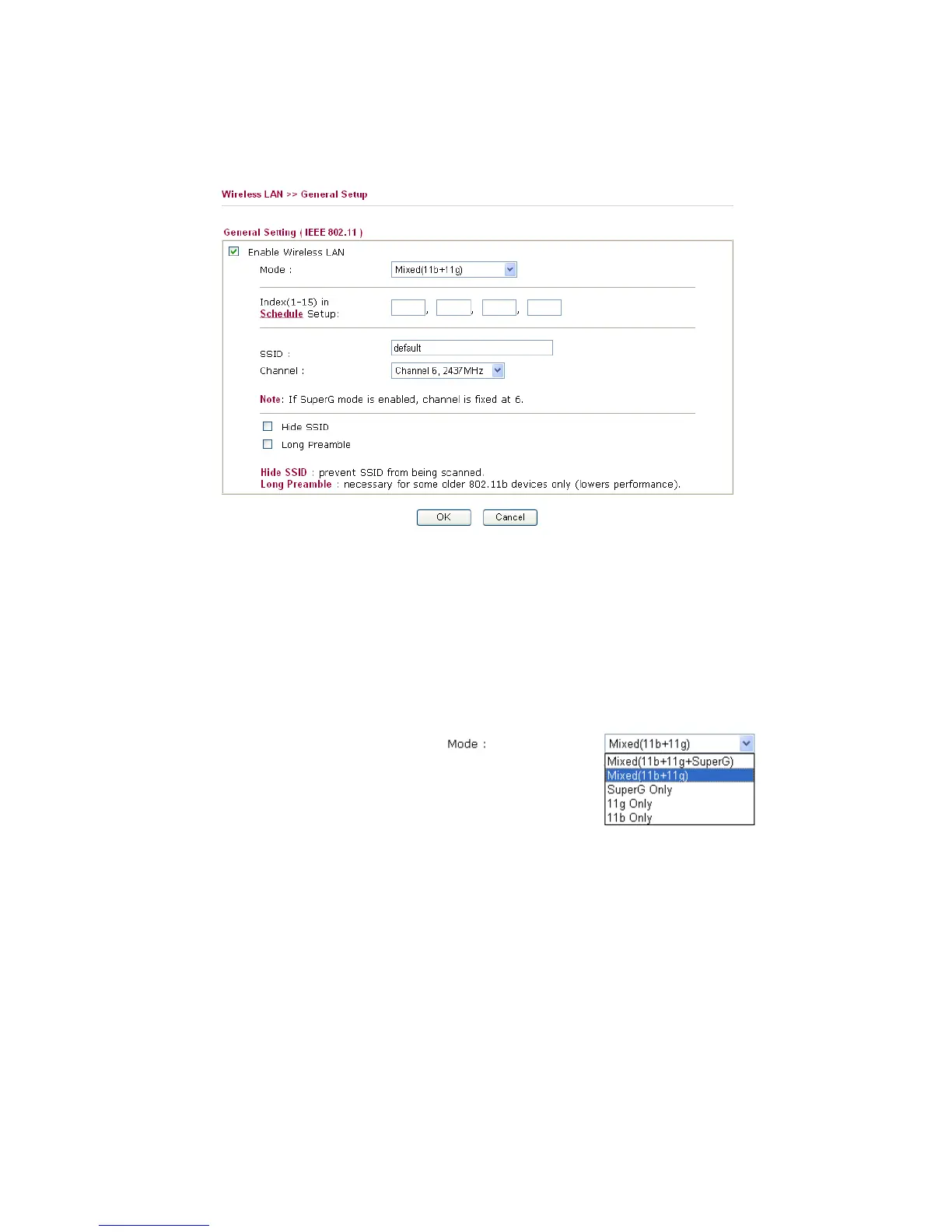
By clicking the General Settings, a new web page will appear so that you could configure
the SSID and the wireless channel. Please refer to the following figure for more information.
Enable Wireless LAN Check the box to enable wireless function.
Mode Select an appropriate wireless mode.
Mixed (11b+11g+SuperG) - The radio can support
IEEE802.11b, IEEE802.11g and SuperG protocols
simultaneously.
Mixed (11b+11g) - The radio can support both
IEEE802.11b and IEEE802.11g protocols simultaneously.
SuperG - The radio only supports SuperG.
11g only - The radio only supports IEEE802.11g.
11b only - The radio only supports IEEE802.11b.
Index(1-15) Set the wireless LAN to work at certain time interval
only. You may choose up to 4 schedules out of the 15
schedules pre-defined in Applications >> Schedule
setup. The default setting of this filed is blank and the
function will always work.
SSID The default SSID is "default". We suggest you change it
to a particular name. It is the identification of the wireless
LAN. SSID can be any text numbers or various special
characters.
Channel The channel of frequency of the wireless LAN. The
default channel is 6. You may switch channel if the














 To Next Page