3
3
3
.
.
P
P
a
a
n
n
e
e
l
l
E
E
x
x
p
p
l
l
a
a
n
n
a
a
t
t
i
i
o
o
n
n
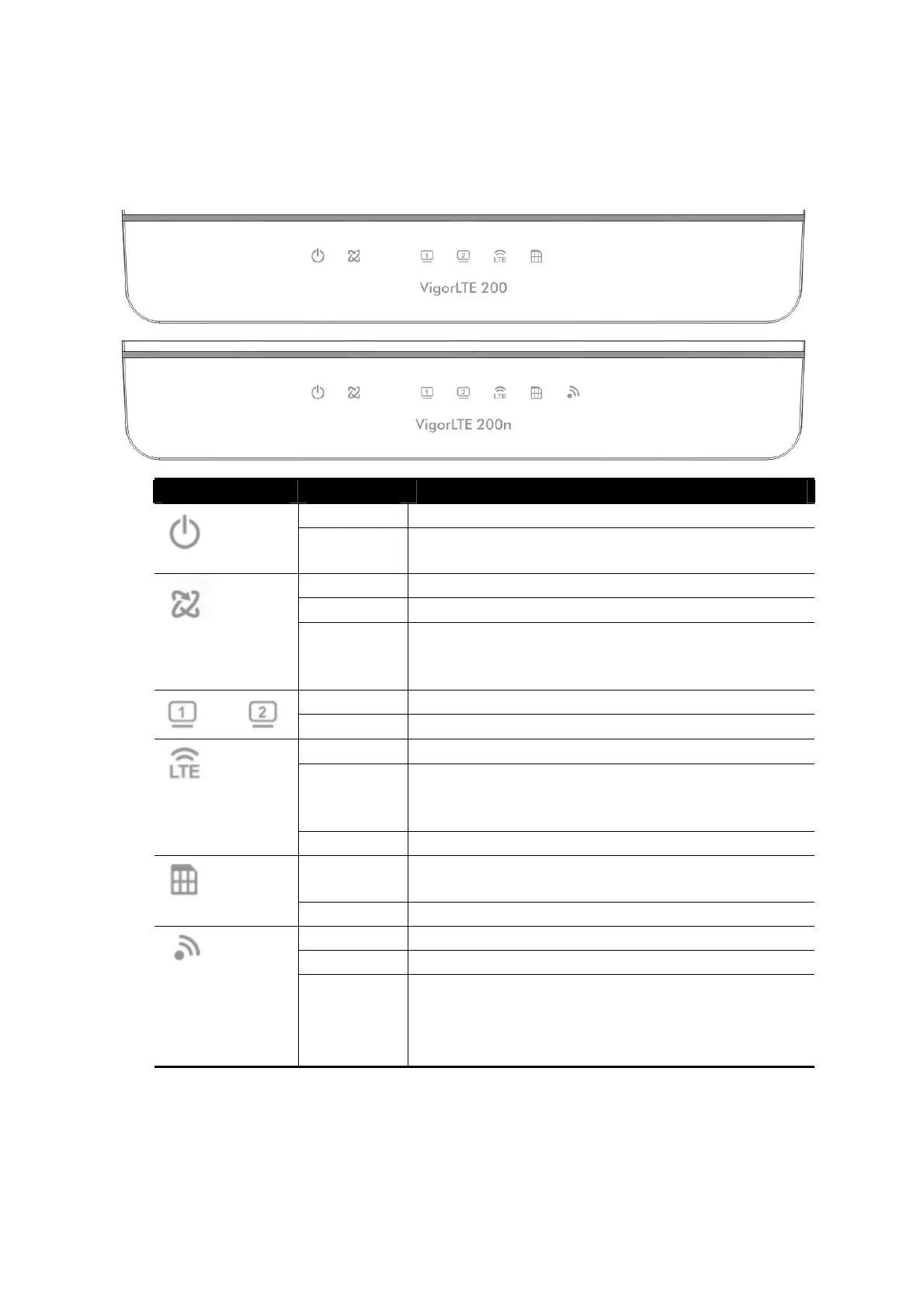
LED Status Explanation
Off The router is powered off.
Blinking The router is powered on and running
normally.
On The router is ready to access Internet.
Off The router is not ready to access Internet.
Blinking Slowly: The network connection is ready.
Quickly: The network connection is
establishing.
On The LAN port is connected.
Blinking The data is transmitting through the LAN port.
On LTE device is connected and ready for use.
Off LTE device is not detected, or has serious
problem (e.g., no SIM card, SIM pin error, SIM
deactivated, and etc.).
Blinking Vigor device performs initial access procedure.
On SIM card is inserted into the slot and detected
by Vigor device.
Blinking No SIM card in detected.
On Wireless function is enabled.
Off Wireless function is disabled.
Blinking The data is transmitting via wireless
connection.
Blinks with one second cycle for two minutes.
The WPS function is active.













 To Next Page