(MON through FRI)
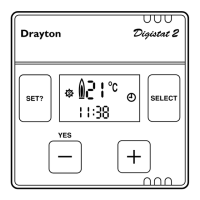
• After setting the third OFF time for Hot water press “SET” button to display MON
• Press SET button and the unit will step through each of the five days. Select the day you wish
to change by pressing the YES button and programme your on/off times as shown previously.
(If you do not wish to change any of the weekdays timings continue by pressing SET button until
SAT SUN is displayed)
You now have to set your Central Heating times for weekends (SAT AND SUN)
The screen will show “SET SAT & SUN”
• Press “YES” to display “SET CH SAT SUN” on screen
• Press “YES” button to display the first ON time “7:00 AM ON”, by pressing either of the
buttons “+” or “-“ SELECT your first ON time.
• Press “SET” button to display the first OFF time “9:00 AM OFF”, by pressing either of the
buttons “+” or “-“ SELECT your first OFF time.
• Press “SET” button to display the second ON time “12:00 PM ON”, by pressing either of the
buttons “+” or “-“ SELECT your second ON time.
• Press “SET” button to display the second OFF time “12:00 PM OFF”, by pressing either of the
buttons SELECT your second OFF time.
(N.B. This second period has been set to the same on and off times; so if you do not want three
switching periods leave these second period settings as they are).
• Press “SET” button to display your third ON time “4.00 PM ON”, by pressing either of the
buttons “+” or “-“ SELECT your third ON time.
• Press “SET” button to display your third OFF time “11.00 PM OFF”, by pressing either of the
buttons “+” or “-“ SELECT your third OFF time.
You now have to set your Hot Water Heating times for weekends (SAT AND SUN)
The screen will show “SET HW SAT & SUN”
• Press “YES” button to display the first ON time “7:00 AM ON”, by pressing either of the
buttons “+” or “-“ SELECT your first ON time.
• Press “SET” button to display the first OFF time “9:00 AM OFF”, by pressing either of the
buttons “+” or “-“ SELECT your first OFF time.








 To Next Page