12
Routine Maintenance
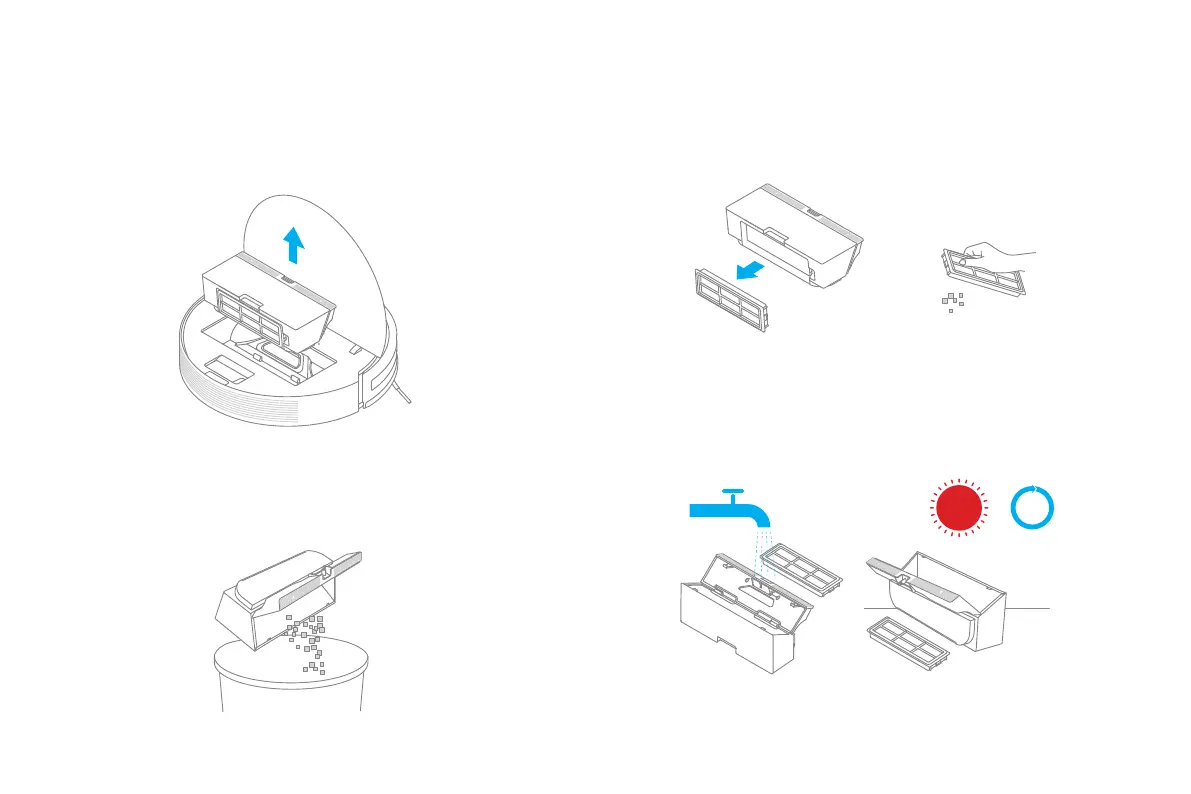
2. Open the bin cover as indicated by the diagram.
Dust Bin and Filter
1. Open the vacuum-mop cover, then pinch the bin clips to remove the dust
bin.
4. Wash the dust bin and lter with water, and then place it aside to
dry fully before reinstalling it.
Note:
• Only clean water should be used to clean the lter. Do not use detergent.
• Filter must be fully dry before use (allow at least 24 hours).
12
6
111
57
210
48
9
24 hrs
3. Remove the lter, rinse repeatedly and tap the iter frame to remove as
much dirt as possible.
Note: Do not attempt to clean the lter with a brush or nger.


 To Next Page