15
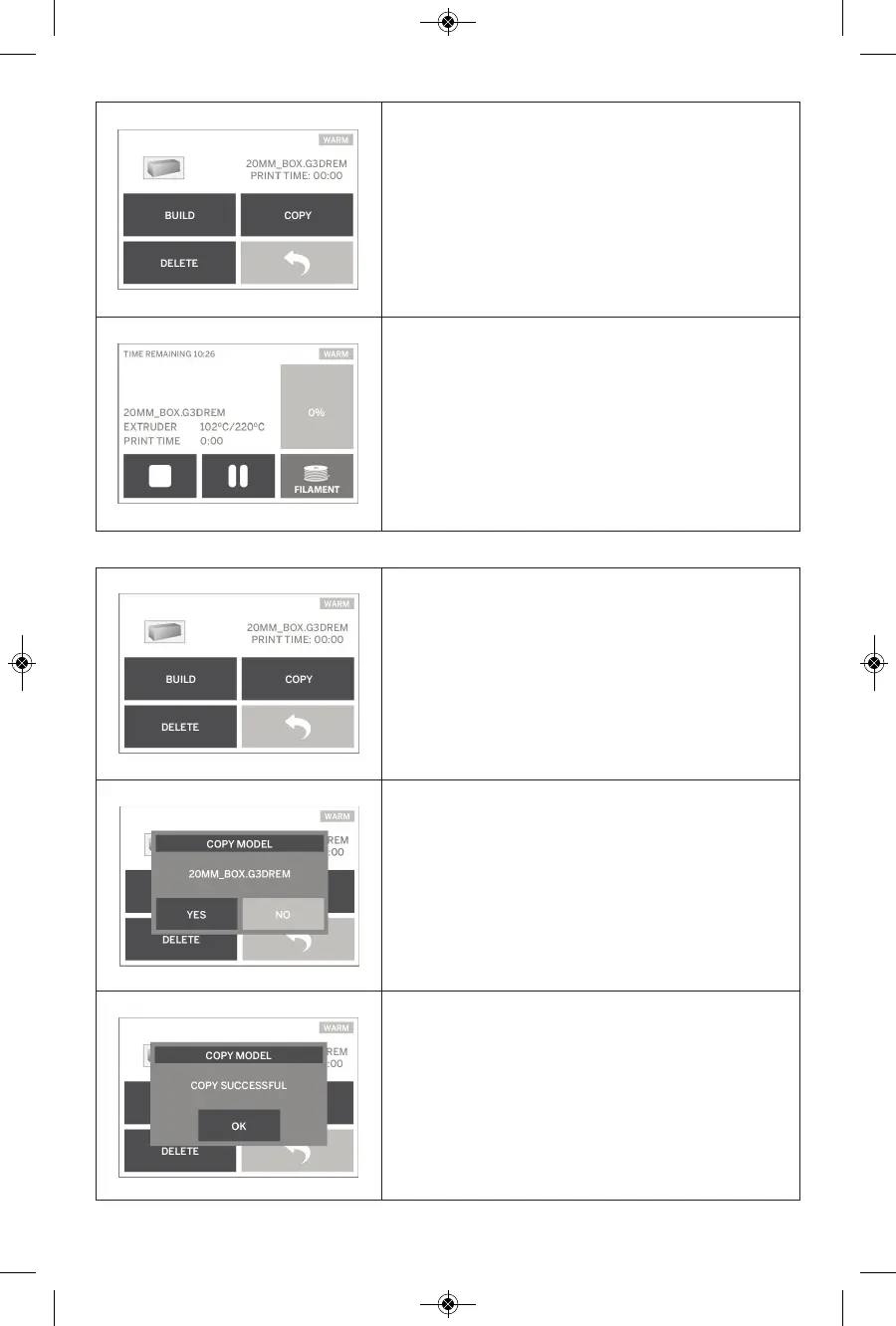
BUILD
Tapping this option will begin the building process
while displaying useful information and object
status.
STOP – Tapping this option will cancel the object.
You will be asked whether to cancel building or
continue building.
PAUSE/PLAY – Tapping this option will pause or
resume the building process. This will allow you to
access the “filament” button.
FILAMENT – Tapping this option will allow you to
load new filament while the build is paused.
COPY
Tapping this option will allow you to copy a model
file from an SD card to your Dremel 3D20 onboard
memory. You cannot copy a model file from your
Dremel 3D20 to an SD card.
COPY MODEL
Tapping this option will confirm your decision to copy
your model file from your Dremel 3D20’s onboard
memory or an SD card.
COPY MODEL SUCCESSFUL
A pop-up alert notifying you that the model file has
been successfully copied.



 To Next Page