07-02282A F571-230V & F571-110V 4 Legend Brands Europe Holdings Ltd.
USER SETTINGS
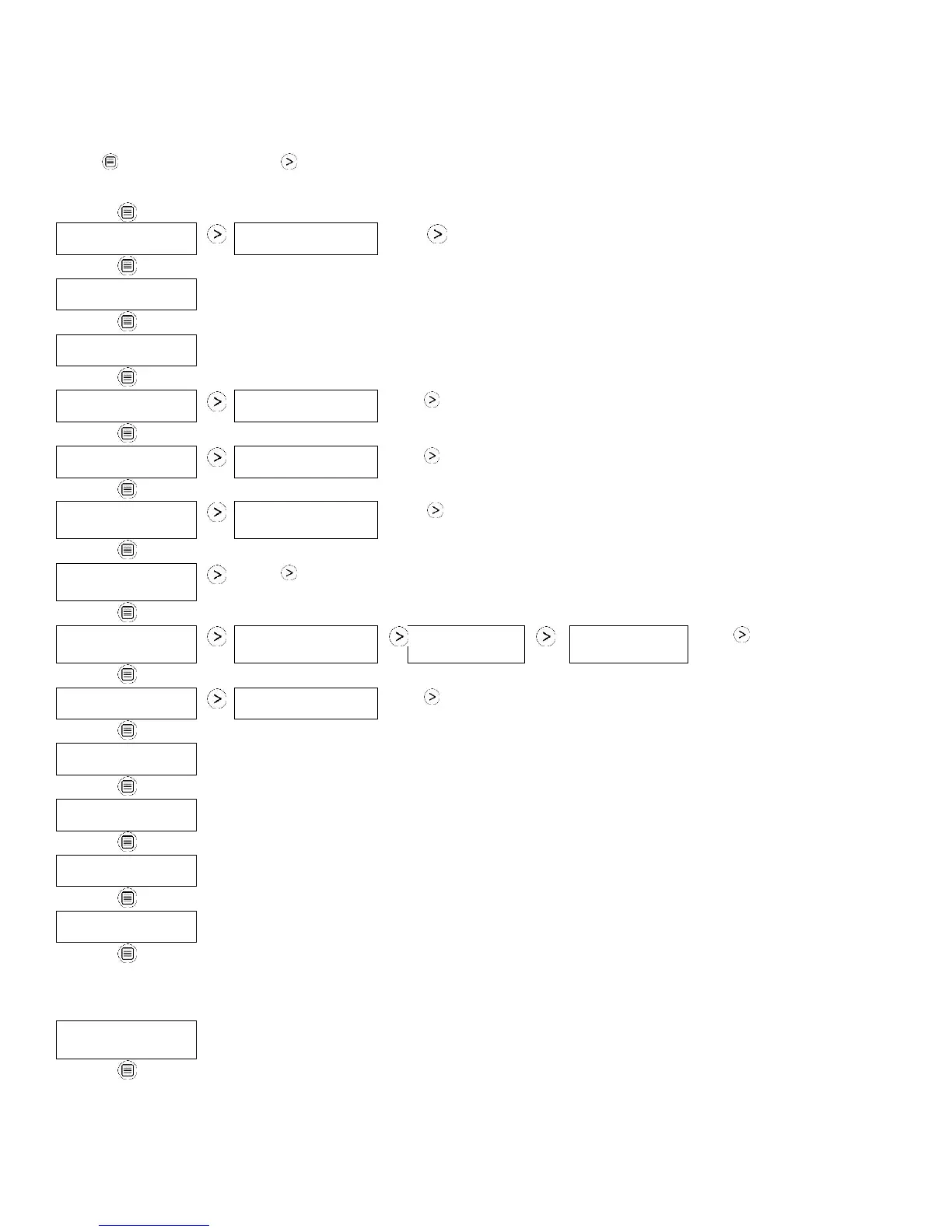
Only menu items followed by a greater-than symbol (>) may be adjusted. If no keys are selected for 5 minutes on when the screen
shows INLET-OUTLET, the display will return to normal display mode. In all the other menu items, the display with return to the normal
display mode after 20 seconds. Items without the symbol (>) are for information only and cannot be changed or reset.
Press DISPLAY
MENU to proceed to
the next menu item. ↓
Press MENU SELECTION to change the setting. →
1. JOB HRS RESET >
PWR INTERRUPT X
1. JOB HR RESET 0
PWR INTERRUPT 0
2. INLET OUTLET
100' 80% 115' 30%
3. INLET OUTLET
XX.X g/kg
4. FILTER CLEANED
XXX HRS >
Press to clear filter hours.
5. COIL CLEANED
XXX HRS >
Press to clear coil hours.
7. HUMIDISTAT
SETPOINT XX% >
Press to cycle through 40%–90% at 5% increments (default is 50%).
Press to change
language options.
Press to change to °F or °C.
12. FIRMWARE
3.0X FXXX-XXX
(Returns to
top menu item.)
The following section available only on wireless-equipped units.
(Returns to
top menu item.)



 To Next Page