SKU 93816 For technical questions, please call 1-800-444-3353. Page 13
Drill
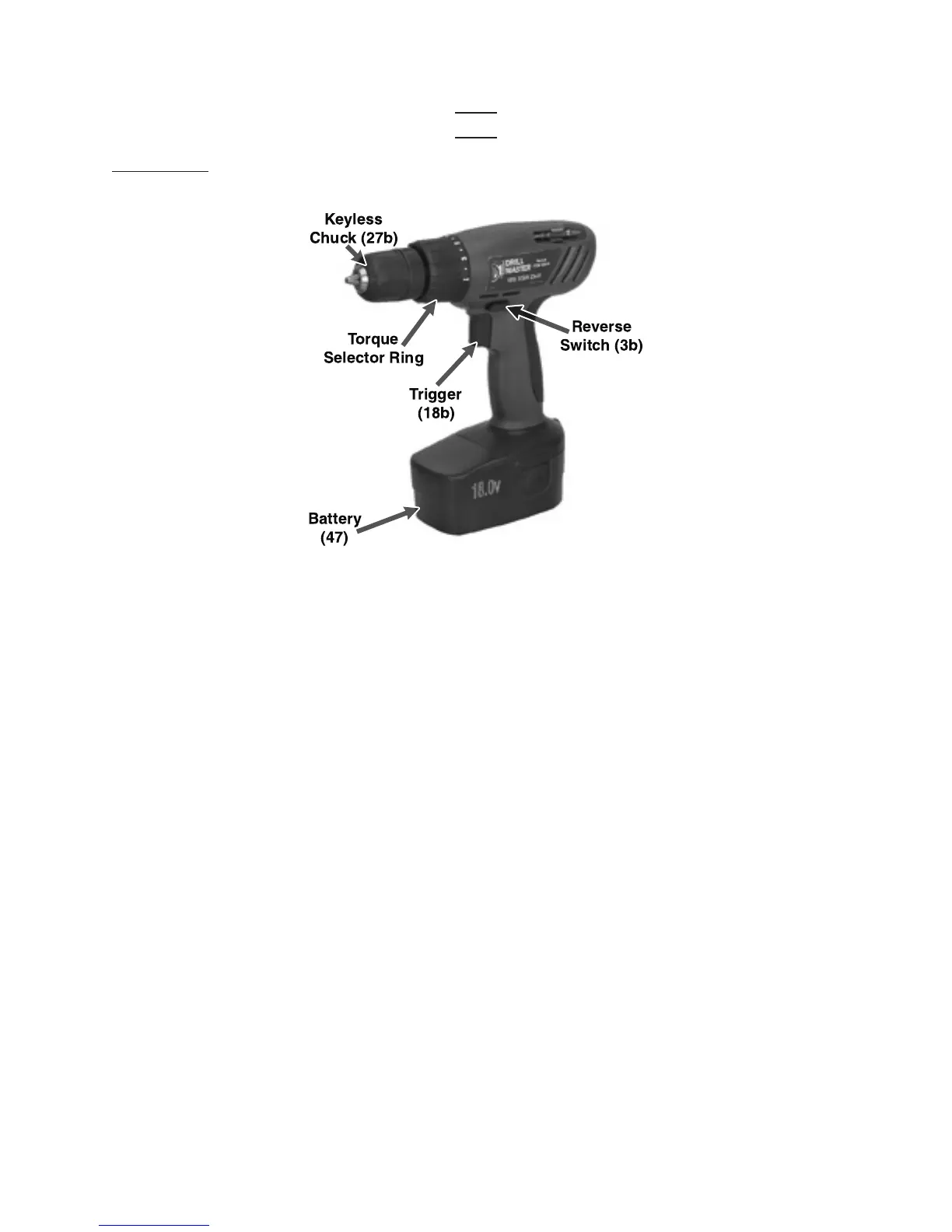
WARNING: Always make sure the Reverse Switch (3b) is in its center, locked position and
the Battery (47) of the Drill is removed
prior
to making any adjustments to the tool.
1. For a clockwise rotation, move the Reverse Switch (3b) to the right.
For a counterclockwise rotation, move the Reverse Switch to the left.
To lock the Trigger (18b), slide the Reverse Switch to the center.
2. The Torque Setting Ring helps you drive screws into a material without damaging
the material. To change the torque setting, simply turn the Torque Setting Ring to
align the arrow on the Left Housing (1b) with the desired setting. Use the lower
numbers for soft/brittle materials, higher numbers for hard/pliable materials, and the
arrow setting for drilling.
3. When installing drill bits or screwdriver bits, make sure the Battery (47) is removed
from the Drill to avoid accidental starting. Then, hold the Chuck Sleeve firmly in
place and turn the Chuck (27b) counterclockwise. Insert the shank of a drill bit all
the way into the Chuck. While holding the Chuck Sleeve in place, turn the Chuck
clockwise to lock the drill bit in place.




 To Next Page