Installing Your Water 1000 Pro Series
Installing Your Water 1000 Pro Series 2-46
Installing Filters
Please note, only the INTERNAL lter (ULTRA+3 ) is required for the appliance to
function. However, this special edition comes with an additional EXTERNAL lter
(Particle) that will, in many cases, extend your primary lters life. We recommend
installing it from the beginning, but can be connected later, as necessary.
Use of the external lter could result in a reduced ow rate, based on your water
pressure, and the distance between your Drinkpod 1000 Pro Series and water
source.
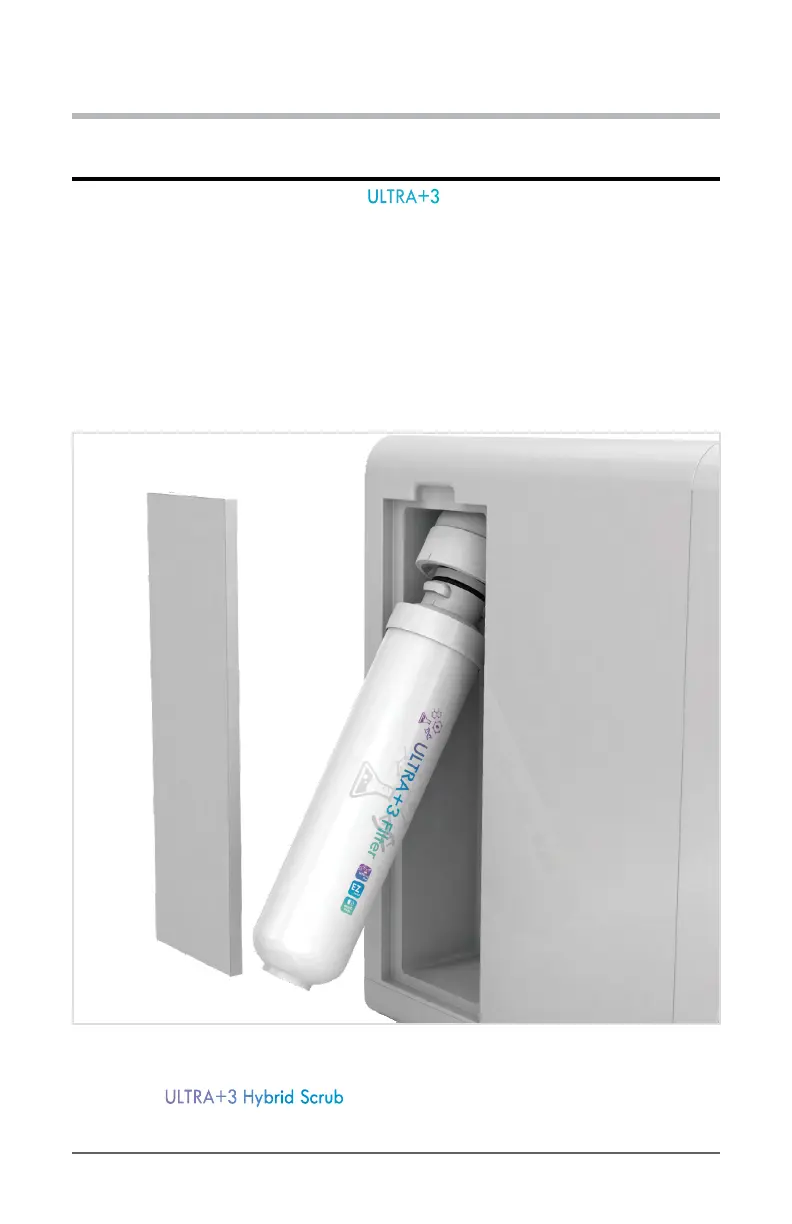
1. Remove the magnetic lter door from the internal lter compartment.
Diagram 2.8.1 - Remove Magnetic Filter Door To Reveal EZ-twist Mount In Water 1000 Pro Series
2. Grab the ULTRA+3 Hybrid Scrub you ushed earlier (to install in the internal slot).


 To Next Page