
 Need help?
Do you have a question about the DRIVEN DR3200BT and is the answer not in the manual?
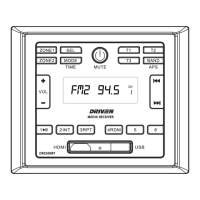
Controls for Zone 1 speaker output on/off.
Controls for Zone 2 speaker output on/off.
Adjust bass, treble, EQ, and volume settings.
Switch between audio sources like USB, BT, HDMI, and RADIO.
Turn the unit on/off and mute/unmute audio playback.
Controls T1, T2, and T3 for speaker LEDs.
Select radio bands such as APS, FM1, FM2, FM3, AM1, AM2.
Increase or decrease the audio volume using VOL+/-.
Navigate previous/next tracks or radio stations.
Access preset stations (P1-P6) and play/pause.
HDMI and USB input connections.
Reset the unit to factory default settings.
Control unit power and mute functions remotely.
Change audio modes and select speaker zones remotely.
Select radio bands and navigate tracks remotely.
Control playback (play/pause) and volume remotely.
Activate optional trigger functions via remote.
Guidelines for selecting a suitable installation site.
Procedure for physically installing the unit.
Basic controls for power, mode, volume, mute, and time adjustment.
Select radio bands and tune stations manually or automatically.
Save and access favorite radio stations.
Automatically find and store the strongest radio stations.
Connect and disconnect USB storage devices.
Play previous or next tracks from USB.
Fast forward or backward within tracks.
Skip forward or backward by 10 tracks.
Control USB playback: play, pause, resume.
Steps to pair and connect a mobile device via Bluetooth.
Manage Bluetooth connections, including disconnect and reconnect.
Remove a paired Bluetooth device from the unit's memory.
Stream audio from a mobile device via Bluetooth.
Details on supply voltage, current consumption, power output, and dimensions.
AM frequency range, sensitivity, and preamp output.
FM frequency range and sensitivity.
Supported audio formats and frequency characteristics.
 General
| Brand | DRIVEN |
|---|---|
| Model | DR3200BT |
| Category | Home Theater System |
| Language | English |

 To Next Page