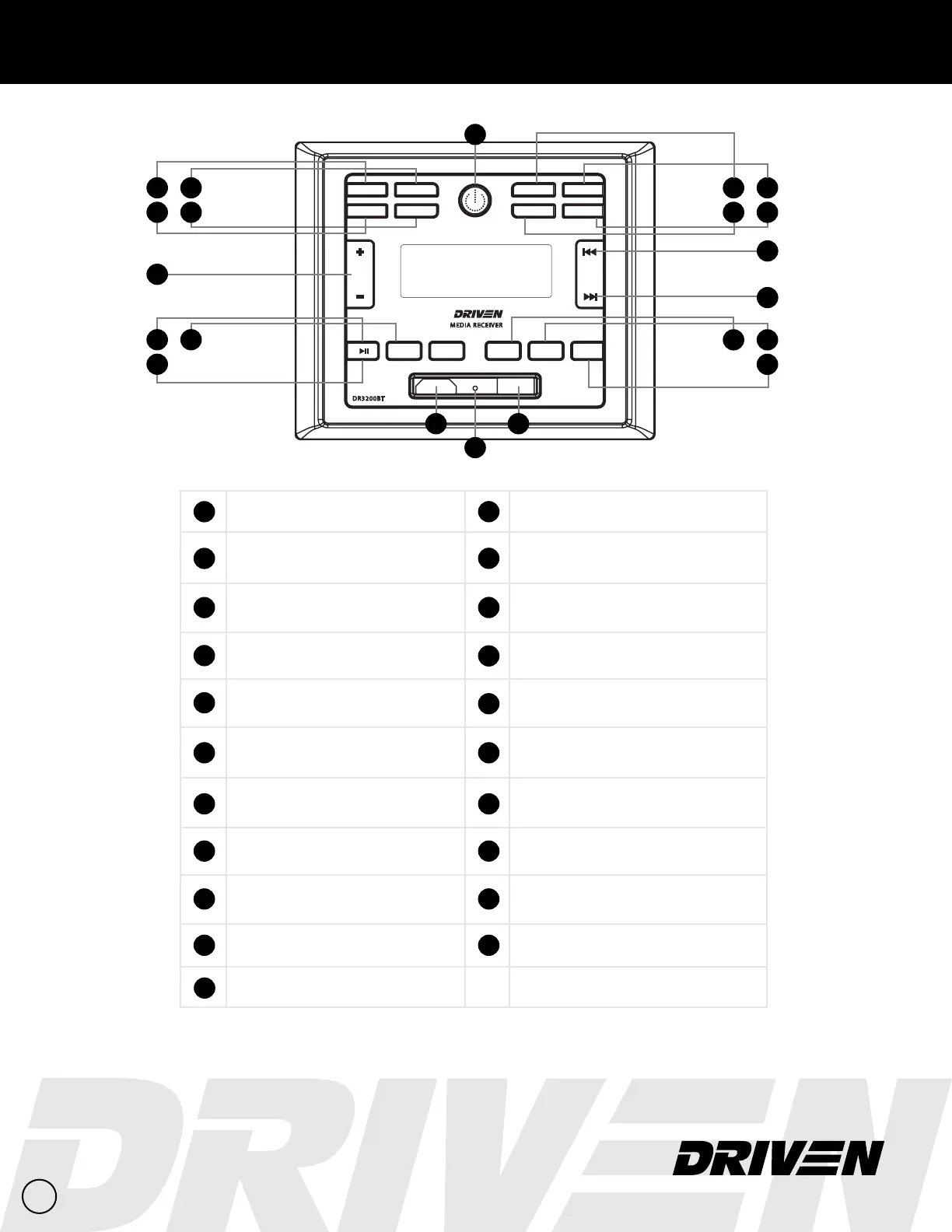
Front Panel Diagram
1
1
2
3
13
14
15
4
Zone 1
Speakers on/o
11
Track Select / Radio Station Search
Previous
12
11
12
10
Track Select / Radio Station Search
Next
10
Volume
VOL+ / VOL-
20
Reset
Press to master reset the unit
21
USB
Input
19
HDMI
Input
2
Zone 2
Speakers on/o
3
Selectable Sound Settings
Bass/Trebble/Sub/Zone Volume/EQ
4
Mode
USB/BT/HDMI/RADIO/AV1/AV2
(Short press to toggle between sources)
5
Power On/Off — Mute
Short press to turn on. Long press to turn o.
(Short press while powered on to mute)
6
T1
Interior Speaker LED
(T1 output switch, turn on/off)
13
Play Pause / P1
Radio Mode: Short press to select station P1, Long press
to save station in P1.
(USB Mode: Play / Pause)
14
INT / P2
Radio Mode: Short press to select station P2, Long press
to save station in P2.
(USB Mode: Song browsing)
15
RPT / P3
Radio Mode: Short press to select station P3, Long press
to save station in P3.
(USB Mode: Repeat playlist)
16
RDM / P4
Radio Mode: Short press to select station P4, Long press
to save station in P4.
(USB Mode: Randomize playlist)
17
P5
Radio Mode: Short press to select station P5, Long press
to save station in P5.
18
P6
Radio Mode: Short press to select station P6, Long press
to save station in P6.
7
T2
Exterior Speaker LED
(T2 output switch, turn on/off)
8
T3
Optional Function
(T3 output switch, turn on/off)
9
Band/Tuner Selection
APS, FM1, FM2, FM3, AM1, AM2
ZONE1
ZONE2
3RPT
INT
2
HDMI USB
4RDM
5
6
VOL
SEL
MODE
TIME
T1
MUTE
T3
T2
BAND
APS
1
MEDIA RECEIVER
DR3200BT
6
8
7
9
16 17
18
5
20
2119
2
FM2 94.5
1
CH


 To Next Page