8. To reset the unit
- 1) Press RESET button with a cuspidal object. The unit will be reset to factory default settings.
Radio Operation
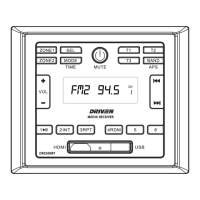
1. To select radio band
Press BAND button repeatedly to select a desired radio band in sequence and circulating as:
-->FM1-->FM2-->FM3-->AM1-->AM2
2. To search for radio station manually or automatically
- In radio mode, press << / >> button to search your desired radio stations up/down manually.
- Press and hold << / >> button to search for the strongest station up/down automatically.
3. To store current station or turn on a preset one
- 1) If you want to store the current station, press and hold one of the digit butttons form 1~6 to store the
current station on the designated preset. You can store up to 30 presets.
- 2) Press one of the 6 buttons from 1~6 to enter the preset station in current band.
4. To auto search and store the top 6 strongest stations In radio mode, press and hold BAND button on the
front panel, the unit will start to search the available stations and check the signal strength from the lowest
frequency. The top 6 strongest stations will be saved to the corresponding preset numbered band 1~6.
USB Operation
1. To insert or pull out the USB stick
To play the tracks in USB disk, insert the USB disk into the USB port. The playing mode will be changed to
USB mode automatically and the USB indicator will be displayed on the LCD.
2. Press << or >> button to play previous or next track.
3. To fast forward or backward
Press and hold << or >> button to play backward or fast forward, release to resume normal playback.
4. To play previous or next 10th track.
Press 5 or 6 button to play previous or next 10th track.
5. How to use 1/PLAY/PAUSE button
During playback, press 1/PLAY/PAUSE button to pause playback,
Press 1/PLAY/PAUSE button again to resume,
Press and hold 1/PLAY/PAUSE button to select the rst track to play.
7


 To Next Page