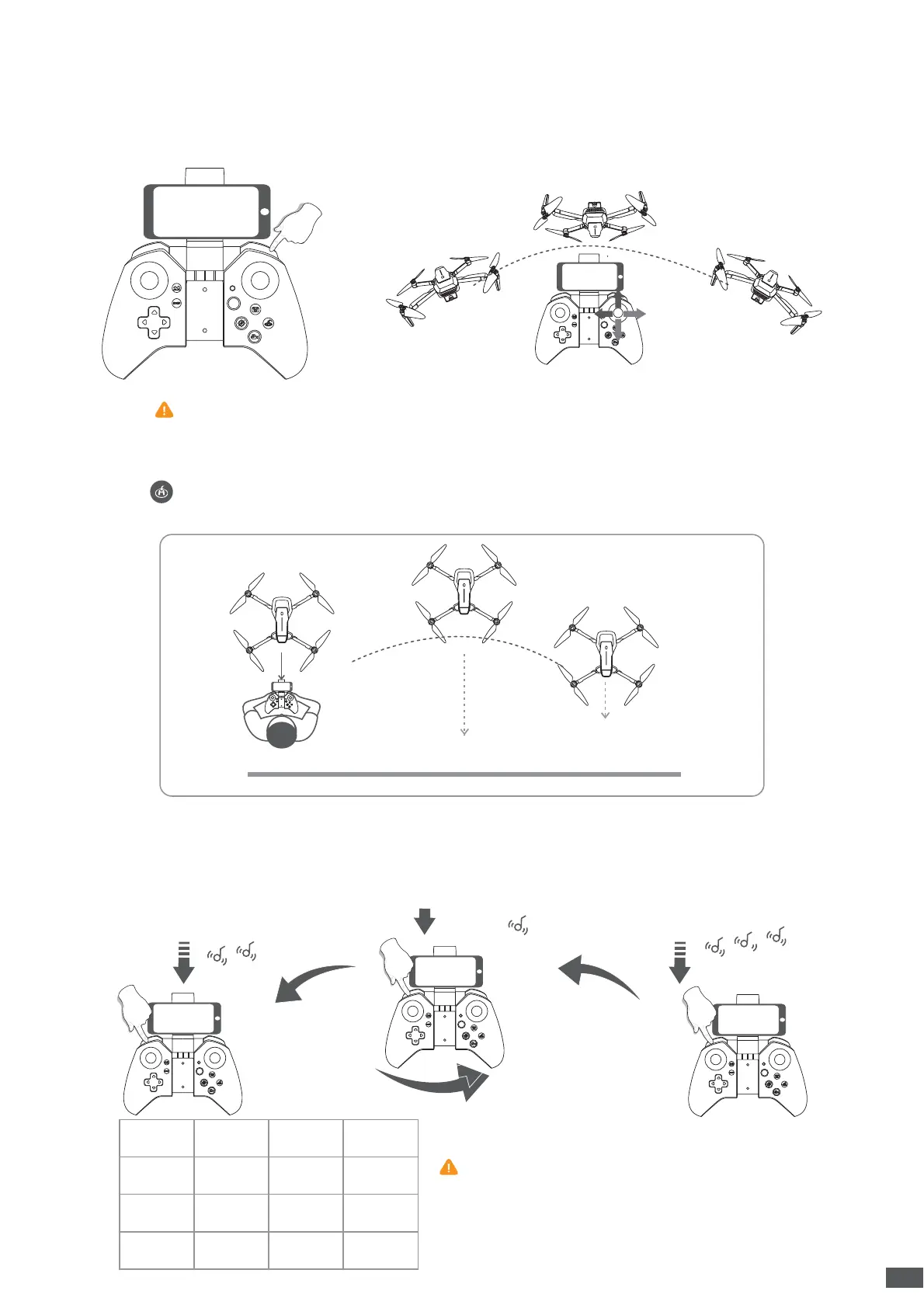
After flying the drone to a height over 2 meters, press the 360 ° flip button to activate 360 °
flip function. Then move the Right Control Stick forward/backward/leftward/rightward to
flip the drone accordingly.
The drone is set to low speed by default. Press the Speed button down once for medium
speed and there are two beeps from the remote. Press it down again for high speed and
there are three beeps from the remote. A third press will get back to low speed and there
is one beep from the remote.
6.8 360 °Flip
6.10 Speed Switch
When you fly in high wind, please
use the high speed to control your drone.
Low
Speed
mph
1-3
4-7
8-12
12-19
6-11
1-5 0.3-1.5
1.6-3.3
3.4-5.4
km/h m/s
Mid
High
Press the button, and then the drone will fly toward its back following a path parallel to
its original take-off path. When the drone is returning, the LEDs on the drone keep flashing.
6.9 One key Reverse
10
This function can’t be activated when the battery of the drone is low.


 To Next Page