Copyright 2019 Baker Hughes, a GE company, LLC (“BHGE”) — All rights reserved.
137M7122 DPI 705E / DPI 705E IS User Manual–English | 23
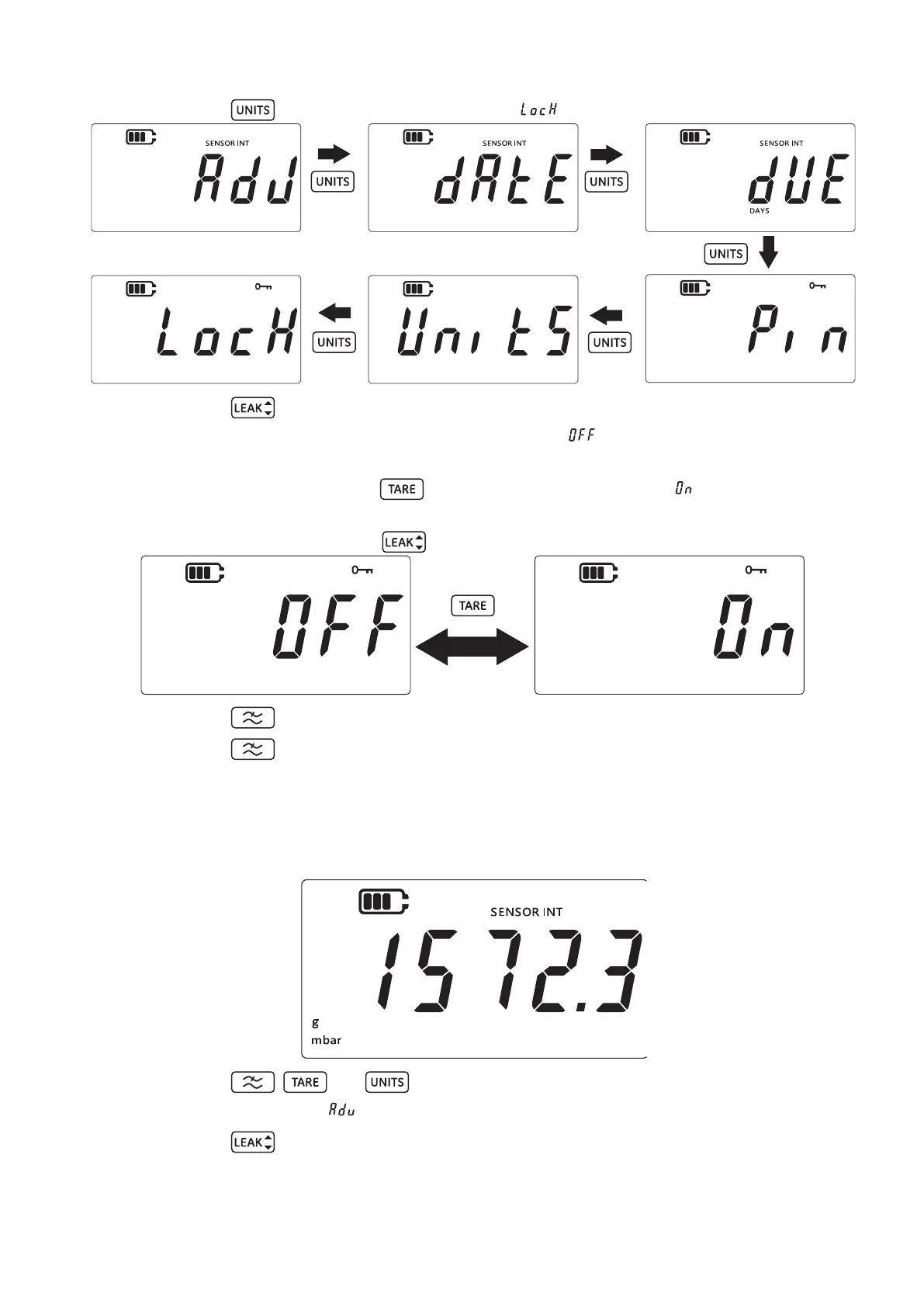
7. Press the key 5 times to navigate to the “ ” (Lock) screen as shown below.
8. Press the key to enter the Lock setting screen.
9. The default Lock /Unlock setting will be displayed as “ ” (Off) which means lock is
disabled.
10. To enable the lock, press the key. The display will now show “ ” (On) which means
lock is enabled.
11. To save the setting press the key.
12. Press the key to return to the Advanced Setting screen.
13. Press the key again to return to the sensor reading screen.
3.1.8 Factory Reset
This feature will allow the instrument to be reset to factory settings.
To perform a factory reset:
1. Ensure the sensor reading screen is shown per below.
2. Press the , and keys simultaneously.
3. The display will show “ ” (Advanced) which indicates that the settings option is selected.
4. Press the key to enter Advanced Settings.
5. Enter Pin. The steps to enter Pin are indicated in above Section 3.1.1.1.


 To Next Page