EasyManua.ls Logo

Drucker Diagnostics 642VFD-Plus - User Manual

Default Icon
26 pages
Print Icon
To Next Page IconTo Next Page
Loading...
1
Drucker Diagnostics
Innovative Solutions for a Healthier World
Drucker Diagnostics
Innovative Solutions for a Healthier World
Operator’s Manual
Model 642VES, 642VFD & 642VFD-
Plus • Laboratory Centrifuge
Bedienungsanleitung
Modell 642VES, 642VFD &
642VFD-Plus • Laborzentrifuge
P/N 03-0-0002-0096 Rev. G
P/N 03
-
0
-
0002
-
0096 Rev. G
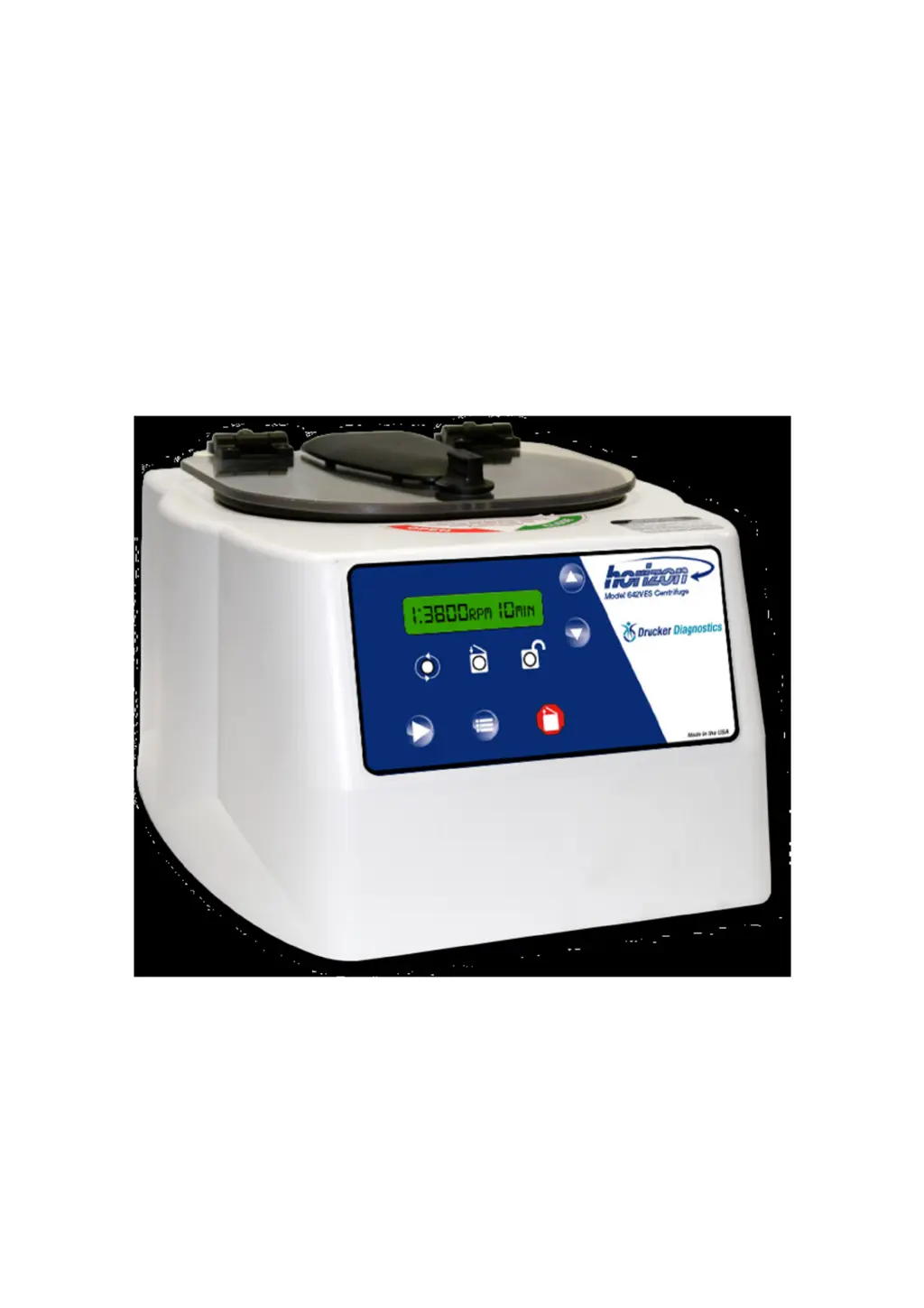
(642VES Shown)
(Abbildung: 642VES)

Questions and Answers

  • L
    Luis ClarkSep 3, 2025
    What to do if my Drucker Diagnostics 642VFD-Plus Laboratory Equipment machine does not unlock after a run?
    • J
      Jessica SnowSep 3, 2025
      The lid should remain locked until the rotor almost stops, then unlock for 60 seconds. For more unlock time, press the 'OPEN / STOP' button while plugged in and stopped. If it remains locked, the electronics may be damaged and require professional assistance.
  • S
    Sydney HutchinsonSep 18, 2025
    How to set run time on Drucker Diagnostics 642VFD-Plus Laboratory Equipment?
    • Z
      zstoutSep 18, 2025
      To set the run time on your Drucker Diagnostics Laboratory Equipment, check the run preset by following the instructions on page 5. If the preset is not the desired length follow the instruction on page 6 to change the run preset time.
  • J
    James GarciaSep 16, 2025
    Why does my Drucker Diagnostics Laboratory Equipment centrifuge cycle stop prematurely and the yellow LED is blinking?
    • K
      Kelli BanksSep 16, 2025
      If the centrifuge cycle stops prematurely and the yellow LED indicator is blinking on your Drucker Diagnostics Laboratory Equipment, the internal tachometer has either not sensed a speed, the sensed speed is out of range, or the wrong rotor is installed. Verify that the rotor being used is programmed correctly in the settings. Reprogram the correct rotor selection if necessary. Remove the rotor following the instructions on page 7. Check to see that there is a small silver reflective sticker on the exterior vertical wall of the rotor. If the reflective sticker is present on the rotor and the correct rotor is programmed in the settings, contact Drucker Diagnostics for further assistance.
  • M
    Matthew GrahamSep 14, 2025
    What does it mean when the yellow and green LED indicators are blinking with 4 short audible beeps on my Drucker Diagnostics Laboratory Equipment?
    • M
      mclaughlinkatieSep 14, 2025
      If the yellow and green LED indicators are blinking with 4 short audible beeps on your Drucker Diagnostics Laboratory Equipment, this indicates that the lid is not properly latched and the cycle has entered the 'paused' state. Turn the knob clockwise to re-latch the lid and resume the cycle. If the cycle does not resume and the knob is fully turned, contact Drucker Diagnostics for further assistance.
  • B
    brendahurstSep 12, 2025
    What does it mean when the yellow and red LED indicators are blinking with 3 short audible beeps on my Drucker Diagnostics Laboratory Equipment?
    • B
      Barbara RobertsSep 12, 2025
      If the yellow and red LED indicators are blinking with 3 short audible beeps on your Drucker Diagnostics Laboratory Equipment, the electrical current to the motor has exceeded the allowable limit, indicating that the full cycle was not completed. Make sure that nothing has fallen into the rotor chamber preventing the rotor from spinning freely. If there is nothing obstructing the rotor, the motor may be damaged. Contact Drucker Diagnostics for further assistance.
  • F
    Frank MurphySep 12, 2025
    What does it mean when all LED indicators are blinking with 2 short audible beeps repeating continuously on my Drucker Diagnostics Laboratory Equipment?
    • M
      Michele SheltonSep 12, 2025
      If all LED indicators are blinking with 2 short audible beeps repeating continuously on your Drucker Diagnostics Laboratory Equipment, it means the imbalance detection threshold has been reached during the cycle, indicating a full cycle was not completed. Check the balance of the load. If it is determined that the detection is too sensitive this can be adjusted by increasing the imbalance detection threshold. Refer to page 6 for programming settings.
  • M
    Michael MurraySep 9, 2025
    What to do if my Drucker Diagnostics Laboratory Equipment machine does not unlock after run?
    • J
      Joseph BraySep 9, 2025
      The lid should remain locked until the rotor has nearly come to a complete stop and then unlock for 60 seconds. If additional unlock time is needed, press the 'OPEN / STOP' button with the machine plugged in and the rotor stopped. If the lid remains locked after this and will not unlock, the electronics may have been damaged. Contact Drucker Diagnostics for assistance. To access the rotor chamber, follow the procedure on page 10, 'Emergency Rotor Chamber Entry'.
  • E
    Edwin LambertSep 7, 2025
    What to do if my Drucker Diagnostics 642VFD-Plus rotor does not spin freely?
    • D
      David HuffmanSep 7, 2025
      If the rotor of your Drucker Diagnostics Laboratory Equipment does not spin freely, ensure the unit has power and the lid latch is turned completely clockwise to its stop position. The latch makes contact with a switch underneath the front top of the cabinet. If this switch is not activated, the light will not turn on and the machine will not run. Also, check for any obstructions in the rotor chamber. If there are no obstructions, contact Drucker Diagnostics for further assistance.
  • S
    Sara GaySep 5, 2025
    Why does the rotor on my Drucker Diagnostics 642VFD-Plus not spin freely?
    • A
      Andrew TravisSep 5, 2025
      Ensure nothing is obstructing the rotor chamber. If there are no obstructions, further assistance is needed.
  • V
    Vanessa HebertAug 20, 2025
    What to do if my Drucker Diagnostics Laboratory Equipment centrifuge does not run?
    • J
      Jon SnyderAug 20, 2025
      If your centrifuge isn't running, first check the electrical outlet and ensure the lid latch is fully clockwise to its stop position, which should illuminate the latch light. Also, inspect the circuit breaker switch at the bottom left of the machine; if it's white, the breaker has tripped. If these steps don't resolve the issue, further assistance is needed.

Summary

Model Description and Intended Use

Centrifuge Features

Centrifuge Specifications

Speed, RCF, Capacity, Dimensions, and Weight

Details on speed range, RCF, maximum capacity, overall dimensions, and weight.

Setup Location Requirements

Initial Setup Procedure

Power Connection and Initial Checks

Steps for connecting power, turning on the unit, and performing initial lid latch and rotor checks.

Lid Unlock and Entry

Explains how the lid unlocks after a cycle and how to gain entry for sample retrieval.

Verifying Settings (642 VFD;642 VFD-Plus)

Programming Settings (642 VFD;642 VFD-Plus)

Setting Run Time and RPM

Steps to program desired run time and RPM by pressing the START button.

Setting Brake and Imbalance Sensitivity

How to program brake setting and imbalance detection sensitivity using the START button.

Operation Guide

Preparing for Operation

Instructions on opening the lid, inserting cushions, and placing samples in the rotor.

Starting and Monitoring a Spin Cycle

Steps for closing the lid, starting a spin, and monitoring the RUN indicator.

Handling Process Interruptions

Guidance on what to do if a problem occurs during centrifugation, including pressing OPEN/STOP.

Balanced Load Procedures

Rotor Removal and Installation

Troubleshooting Common Issues

Rotor Not Spinning Freely

Troubleshooting steps for a rotor that does not spin freely, checking for obstructions or contacting support.

Excessive Noise During Operation

Guidance for addressing excessive noise, checking load balance, and motor issues.

Centrifuge Not Running

Steps to troubleshoot a centrifuge that does not run, checking power, lid latch, and circuit breaker.

Machine Fails to Unlock

Steps to take if the machine does not unlock after a run, including checking for damage or using emergency entry.

Imbalance Error Diagnosis

Troubleshooting the imbalance detection threshold and checking load balance.

Motor Power Error

Diagnosing motor power errors, checking for obstructions, and potential motor damage.

Safety Features and Verification

Lid Safety Switch and Interlock System

Details on the lid safety switch and the 0 RPM interlock system preventing operation with open lid.

Circuit Breaker and Emergency Access

Drucker Diagnostics 642VFD-Plus Specifications

General IconGeneral
BrandDrucker Diagnostics
Model642VFD-Plus
CategoryLaboratory Equipment
LanguageEnglish

Related product manuals