EasyManua.ls Logo

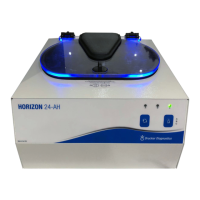
Drucker Diagnostics HORIZON 24-AH - User Manual

Drucker Diagnostics HORIZON 24-AH
74 pages
Print Icon
To Next Page IconTo Next Page
Loading...
03-0-0002-0148 Rev. A
HORIZON
Model 24-AH
Operator’s Manual
Operator’s Manual ........................................................... 1
Manual del Operador ....................................................... 13
Manuel de l’utilisateur ...................................................... 25
Benutzerhandbuch ........................................................... 37
Manual do Operador ........................................................ 49
Manuale dell’operatore .................................................... 61

Table of Contents

Questions and Answers

  • B
    Brianna ClarkAug 16, 2025
    Why is my Drucker Diagnostics Laboratory Equipment centrifuge making excessive noise?
    • A
      Ashley ArmstrongAug 16, 2025
      If your Drucker Diagnostics Laboratory Equipment centrifuge is making excessive noise or vibrating, first check that all four feet are properly seated on a flat surface. Next, ensure that the load is balanced. Also, make sure nothing has fallen into the rotor chamber.
  • S
    Sarah CraigAug 19, 2025
    What to do if my Drucker Diagnostics HORIZON 24-AH Laboratory Equipment centrifuge does not run?
    • A
      annrobertsAug 19, 2025
      If your Drucker Diagnostics Laboratory Equipment centrifuge isn't running, first ensure it's powered on and that one of the LED lights is lit. Also, check that the lid latch is turned completely clockwise to its stop position. If it still doesn't run, contact Customer Service.
  • T
    trichardsonAug 22, 2025
    Why does my Drucker Diagnostics Laboratory Equipment centrifuge stop and beep?
    • B
      Brian Atkins MDAug 22, 2025
      If your Drucker Diagnostics Laboratory Equipment centrifuge stops and beeps continuously, it means the load is not balanced. Press the UNLOCK button, open the lid, and balance the load as recommended.
  • J
    Jose CampbellAug 25, 2025
    What to do if my Drucker Diagnostics HORIZON 24-AH Laboratory Equipment centrifuge does not unlock?
    • T
      Taylor HallAug 26, 2025
      If your Drucker Diagnostics Laboratory Equipment centrifuge doesn't unlock after a run, first wait until the rotor has completely stopped. If the lid knob still won't rotate, press the UNLOCK button and try again. If no LED light is on, remove the latch label and use a pen to manually disengage the locking mechanism by pulling it towards the control panel, then unlatch and open the lid. If the unit is damaged, contact Customer Service for assistance.
  • T
    Tracy JohnsonAug 28, 2025
    How to open the lid of my Drucker Diagnostics Laboratory Equipment centrifuge?
    • S
      Steven NelsonAug 28, 2025
      If the lid of your Drucker Diagnostics Laboratory Equipment centrifuge doesn't open, first make sure the lid knob is turned fully counterclockwise. If it can't be turned counterclockwise, turn it fully clockwise, press UNLOCK, and then turn it counterclockwise. If the lid remains locked, contact customer service for assistance.
  • S
    Sean MartinezAug 31, 2025
    Why is my Drucker Diagnostics HORIZON 24-AH Laboratory Equipment centrifuge making a rattling noise?
    • C
      clarence04Aug 31, 2025
      If your Drucker Diagnostics Laboratory Equipment centrifuge is making a rattling noise, stop the centrifuge and open the lid. Wearing PPE, remove tubes and tube holders/buckets and look for fallen objects or debris, then carefully reach inside the rotor chamber with a tool to remove them. Inspect the rotor, tube holders, or buckets for damage. If the tube holders or buckets have any damage, safely dispose of them and replace them. If the rotor appears damaged, contact Customer Service for further assistance.
  • D
    Debra PachecoSep 3, 2025
    What to do if the rotor of my Drucker Diagnostics HORIZON 24-AH centrifuge does not spin freely?
    • T
      taylorbrandonSep 3, 2025
      If the rotor of your Drucker Diagnostics Laboratory Equipment centrifuge does not spin freely, make sure nothing has fallen into the rotor chamber. If nothing obstructs the rotor, it may be damaged and you should contact Customer Service for further assistance.
  • A
    Amy SmithSep 6, 2025
    What to do if my Drucker Diagnostics HORIZON 24-AH centrifuge is stuck on a setting?
    • M
      melvin95Sep 6, 2025
      If your Drucker Diagnostics Laboratory Equipment centrifuge is stuck on one of the settings, it means the cycle selection is locked. Press the UNLOCK button for 5 seconds.
  • L
    lisamckenzieSep 9, 2025
    Why is the clicking noise during braking loud on my Drucker Diagnostics HORIZON 24-AH Laboratory Equipment centrifuge?
    • A
      Arthur BlankenshipSep 9, 2025
      If the clicking noise during braking gets loud on your Drucker Diagnostics Laboratory Equipment centrifuge, make sure that the screw in the center of the rotor is tight.
  • P
    Peter PattersonSep 12, 2025
    How to fix a Drucker Diagnostics HORIZON 24-AH Laboratory Equipment centrifuge lid that does not stay up?
    • L
      leah07Sep 12, 2025
      If the lid of your Drucker Diagnostics Laboratory Equipment centrifuge does not stay up, tighten the center screw on the lid hinge.

Summary

Model Description and Features

Key Features

Lists key features like 2-button interface, pre-set cycles, lid lighting, and audible alerts.

Intended Use

Specifies the centrifuge's use for separating biological and chemical samples in a lab setting.

Warranty Information

States the warranty period for the centrifuge against defects in workmanship and parts.

Initial Setup

Quick Start Guide

Control Panel Operations

Explains the function of key buttons and indicators for starting, stopping, and selecting cycles.

Settings Configuration

Standard Settings Overview

Presents the factory pre-set RPM and Time values for Settings A, B, and C.

Review Cycle Settings

Procedure for checking the current programmed cycle time and speed via LED indicators.

Change Cycle Settings

Instructions on how to modify the time and speed parameters for different cycles.

Labeling Cycles for Identification

Centrifuge Operation Procedure

Operating Steps

Details the sequence of actions for loading, starting, stopping, unlocking, and removing samples.

Balancing Loads

Load Balancing Rules

Key principles for loading tubes symmetrically and ensuring equal weight distribution for safe operation.

Care and Preventative Maintenance

Maintenance Procedures

Guidelines for cleaning, disinfection, and inspection of tube holders and components.

Troubleshooting Common Issues

Unit Not Running or Spinning

Diagnoses for centrifuges that do not start, spin freely, or exhibit rattling noises.

Noise, Vibration, and Error Conditions

Addresses issues like excessive noise, continuous beeping, or being stuck on settings.

Unlock and Lid Issues

Solutions for when the lid does not unlock after a run or the lid itself does not open.

General Specifications

Calculating G-Force

Product Compliance and Disposal

Regulatory Compliance

Details product certifications, patents, and compliance with safety standards.

WEEE Disposal Instructions

Provides instructions for the proper disposal of waste electrical and electronic equipment.

Drucker Diagnostics HORIZON 24-AH Specifications

General IconGeneral
BrandDrucker Diagnostics
ModelHORIZON 24-AH
CategoryLaboratory Equipment
LanguageEnglish

Related product manuals