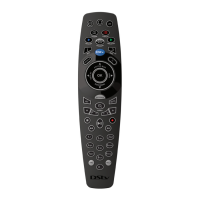
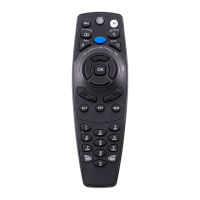
Name Description
STATUS BAR
The Status Bar gives you more information about your current viewing
position. This button also doubles up as the UP arrow.
Quick tip: The Status Bar is also a great way to quickly “jump” through
content. When displayed, press FF or REW to easily and quickly “jump”
within the content.
BOOKMARK
Pressing this button creates a bookmark. Bookmarks mark a selected
spot in recorded content, allowing you to easily find these at a later
stage. This button also doubles up as the DOWN arrow.
REPLAY
Press the replay button to instantly jump video back 10 seconds at a
time. This button also doubles up as the LEFT arrow.
GRID Displays the channel grid which lists available channels in an easy to
use grid. Use the arrows to move the highlight and see what’s on other
channels. This button also doubles up as the RIGHT arrow.
OK OK allows you to select onscreen items, and also allows you to find out
everything you can do with content.
Quick tip: When highlighted, press OK on any programme to see the
available actions (from setting a reminder, to setting series recordings or
even finding out when the programme is on again in the next 8 days.)
ALT
Switches between the last two viewed channels.
MUTE Mutes the audio.
Quick tip: Can also be set to “half mute” mode. See “User Preferences”
in “Settings”.
OPTIONS Press OPTIONS on any screen to see the available choices. When
viewing TV, you can change Language or Aspect Ratio (and more) and
when in the menus, you can change the order of items on screen or
change the display.
P+ / P- Changes channels.
Quick tip: when scrolling through a list, you can press P+/P- to scroll a
page at a time, and in the TV GUIDE, to scroll one day at a time.
The Remote Buttons



 To Next Page