SOLO7 Transmitter User Guide
Copyright © 2013 Domo Tactical Communications (DTC) Limited. All rights reserved.
Commercial in Confidence
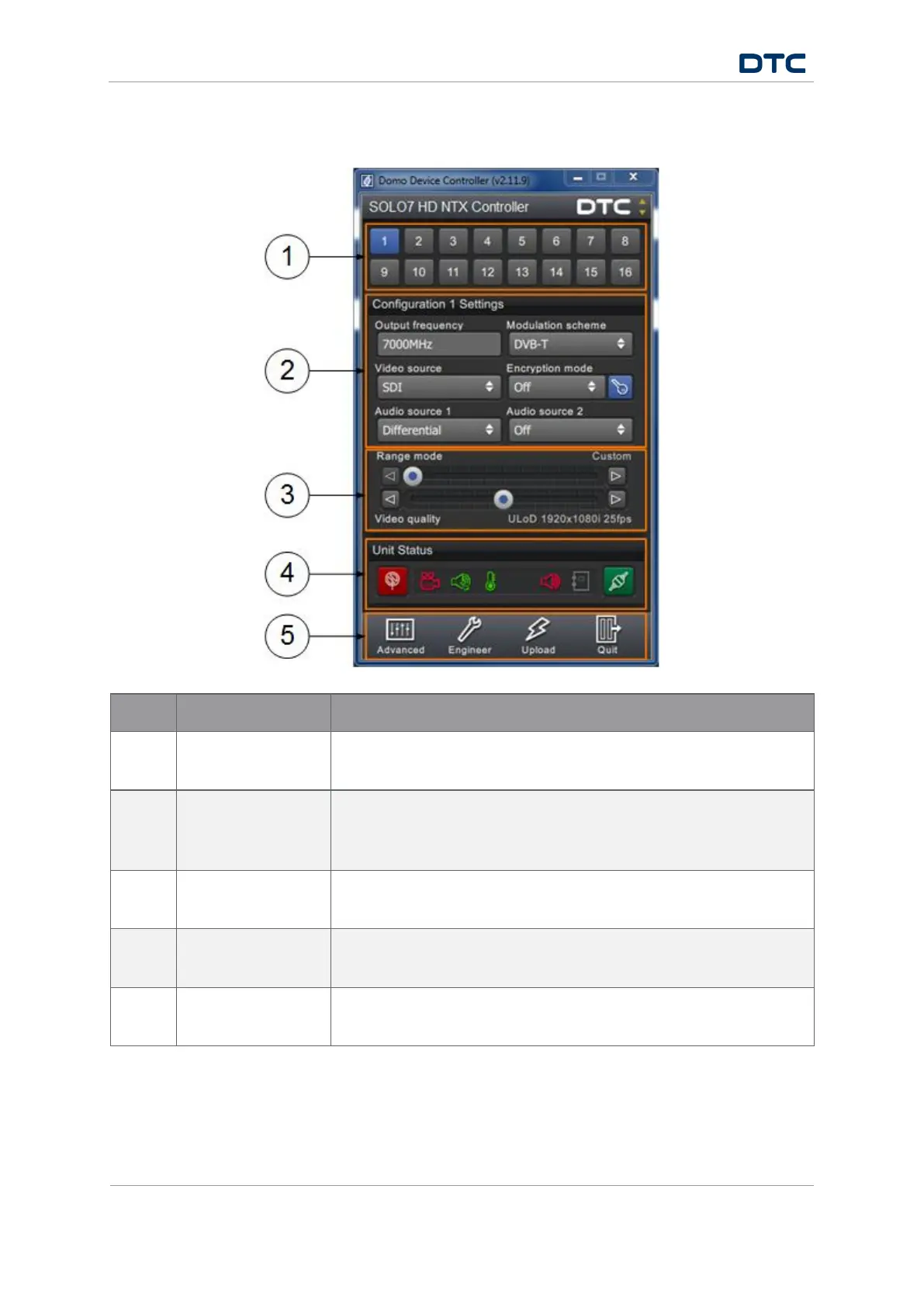
4.3 Domo Device Controller Primary Window
No Name Description
1
Configuration
presets
Sixteen (or eight) preset configurations can be stored. The blue button
is the currently active preset.
2 Basic settings When you have selected a preset, the basic settings for that
configuration can be edited from the primary window. These can also
be configured in the Advanced window.
3 Range mode and
video quality
The modulation and video settings will be automatically selected for
optimum performance by using these sliders.
4 Unit status
Indicators to report things like RF Status, Video Lock, Audio Lock,
Temperature and Connection Status.
5 Switch panel Buttons to take you to: The Advanced window, the Engineer window, the
Upload window and to quit the Domo Device Controller.


 To Next Page