EasyManua.ls Logo

Dual 704 - Muting Switch; Adjustment Points; Troubleshooting: Stylus Issues; Stylus Slips Out of Groove

Dual 704
22 pages
Print Icon
To Next Page IconTo Next Page
To Previous Page IconTo Previous Page
Loading...
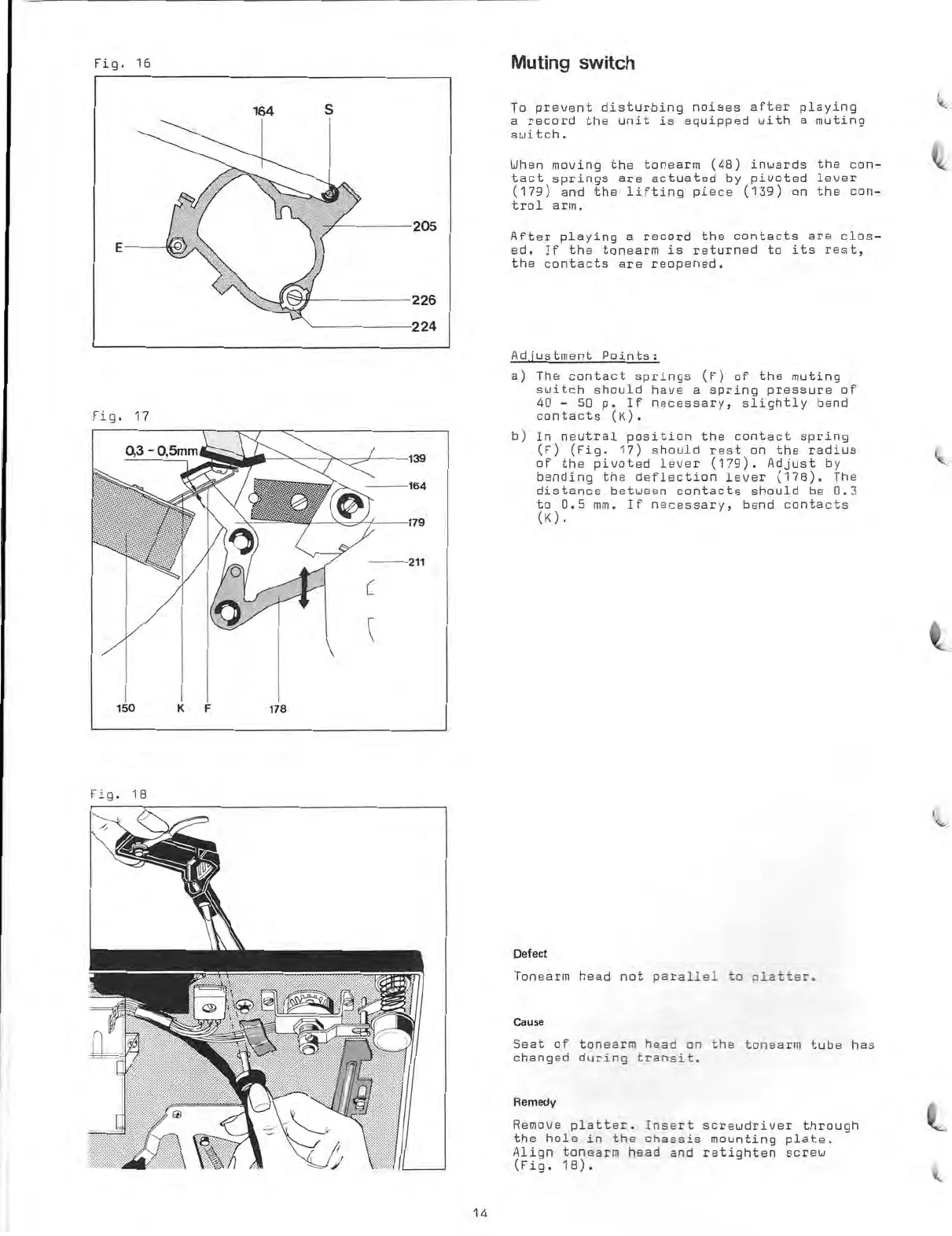
Fig.
16
Muting
switch
Fig.
17
Fig.
18
To
prevent
disturbing
noises
after
playing
a
record
the
unit
is
equipped
with
a
muting
switch.
When
moving
the
tonearm
(48)
inwards
the
con-
tact
springs
are
actuated
by
pivoted
lauer
(179)
and
the
lifting
piece
(139)
on
the
con-
trol
arm.
After
playing
a
record
the
contacts
are
clos-
ed.
If
the
tonearm
is
returned
to
its
rest,
the
contacts
are
reopened.
Adjustment
Points:
a)
The
contact
springs
(F)
of
the
muting
switch
should
haue
a
spring
pressure
of
40
-
50
p.
If
necessary,
slightly
band
contacts
(K).
b)
In
neutral
position
the
contact
spring
(F)
(Fig.
17)
should
rest
on
the
radius
of
the
pivoted
lever
(179).
Adjust
by
bending
the
deflection
lever
(178).
The
distance
between
contacts
should
be
0.3
to
0.5
mm.
If
necessary,
bend
contacts
(K).
Defect
Tonearm
head
not
parallel
to
platter.
Cause
Saat
of
tonearm
head
on
the
tonearm
tube
has
changed
during
transit.
Remedy
Remove
platter.
Insert
screwdriver
through
the
hole
in
the
chassis
mounting
plate.
Align
tonearm
head
and
retighten
screw
(Fig.
18).
14

Other manuals for Dual 704

Related product manuals