EasyManua.ls Logo

Dual 704 - Mounting Instructions for Dual EDS 900; Component Removal; Motor Replacement; Setting Nominal Speeds

Dual 704
22 pages
Print Icon
To Next Page IconTo Next Page
To Previous Page IconTo Previous Page
Loading...
Mounting
Instructions
for
Dual
EDS
900
For
repair
of
the
Dual
EDS
900
special
tools
4.
Pull
off
motor
electronic
system
from
and
measuring
means
are
required.
Work
on
motor
(18)
carefully.
the
motor
or
motor
electronic
system
should,
therefore,
only
be
carried
out
by
an
autho-
rized
Dual
service
station.
Expenses
arising
from
unauthorized
interference
will
be
char-
5.
6.
Fix
replacement
motor
electronic
system
on
motor
(18).
Solder
connecting
cables
(see
connection
ged
to
the
conisgnor.
diagram
Fig.
6).
7.
Slide
cover
over
power
pack
and
fix
it
by
means
of
machine
screws
(117).
Removal
8.
Slide
cover
(175)
over
motor
electronic
1.
Extract
unit
plug
from
power
line.
Lift
system
(172)
and
fix
it
by
means
of
off
platter
(4).
Bring
unit
into
head
position.
Remove
machine
screws
(174)
and
washers
(173).
Lift
off
cover
(175).
9.
machine
screws
(174).
With
the
unit
in
normal
position
connect
it
to
power
line.
Switch
on
unit
and
2.
Remove
machine
screws
(117)
and
cover
of
check
power
consumption
on
operation:
power
pack
(123).
220
V/50
Hz
approx.
20
mA
3.
Unsolder
leads
for
operating
voltage
on
110
V/60
Hz
approx.
40
mA
line
transformer
(124).
Unsolder
connec-
ting
leads
on
fine
speed
control
(197)
and
knob
(242).
Attention:
Da
not
unsolder
cable
on
motor
(172).
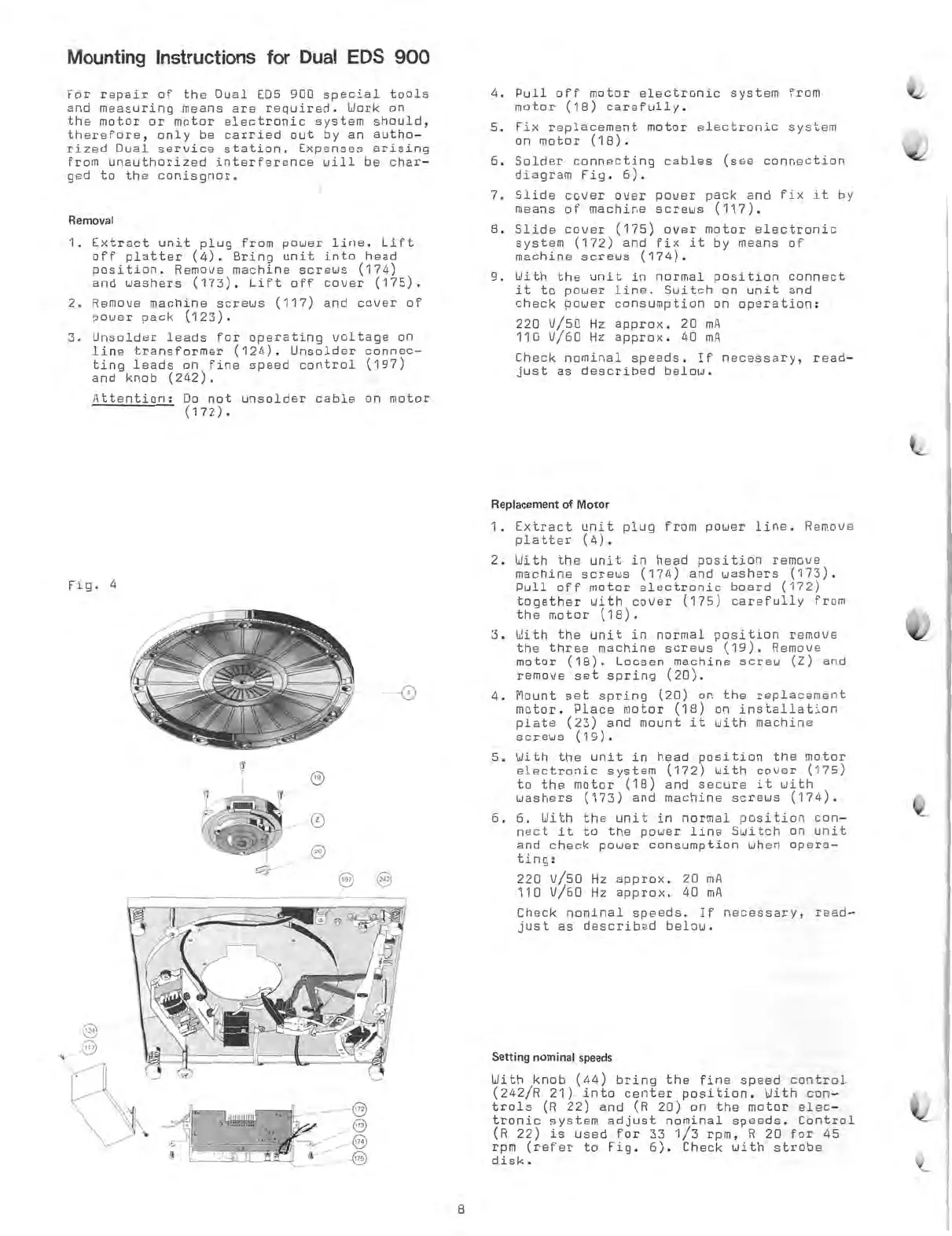
Fig.
4
0
Check
nominal
speeds.
If
necessary,
read-
just
as
described
below.
Replacement
of
Motor
1.
Extract
unit
plug
from
power
line.
Remove
platter
(4).
2.
With
the
unit
in
head
position
remove
machine
screws
(174)
and
washers
(173).
Pull
off
motor
electronic
board
(172)
together
with
cover
(175)
carefully
from
the
motor
(18).
3.
With
the
unit
in
normal
position
remove
the
three
machine
screws
(19).
Remove
motor
(18).
Loosen
machine
screw
(z)
and
remove
set
spring
(20).
4.
Mount
set
spring
(20)
on
the
replacement
motor.
Place
motor
(18)
on
installation
plate
(23)
and
mount
it
with
machine
screws
(19).
5.
With
the
unit
in
head
position
the
motor
electronic
system
(172)
with
cover
(175)
to
the
motor
(18)
and
secure
it
with
washers
(173)
and
machine
screws
(174).
6. 6.
With
the
unit
in
normal
position
con-
nect
it
to
the
power
line
Switch
on
unit
and
check
power
consumption
when
opera-
ting:
220
V/50
Hz
approx.
20
mA
110
V/60
Hz
approx.
40
mA
Check
nominal
speeds.
If
necessary,
read-
just
am
described
below.
Setti
ng
nominal
speeds
With
knob
(44)
bring
the
fine
speed
control
(242/R
21)
into
center
position.
With
con-
trols
(R
22)
and
(R
20)
on
the
motor
elec-
tronic
system
adjust
nominal
speeds.
Control
(R
22)
is
used
for
33
1/3
rpm,
R
20
for
45
rpm
(refer
to
Fig.
6).
Check
with
strobe
disk.
8

Other manuals for Dual 704

Related product manuals