12 13
TECHNICAL PARAMETERS
14kg
See the data plate on the base of the machine
W: 430 mm x H: 413 mm x D: 512 mm
560 slices per hour
CLEANING - DAILY
Before cleaning your DCT2i, tie hair back and ensure that you are wearing no loose clothing or jewellery.
1. Never allow a build up of crumbs in the Crumb Tray as this may cause a re. Clean
daily.
2. Remove the Crumb Tray. From a cold start, set the DCT2i to standby and select toast setting 9. As the
conveyor rotates, clean the exposed section of the belt. For lightly soiled belt, wipe with a damp, non-
abrasive cloth. For heavily soiled belt, wipe with a dry, lightly abrasive pad, then with a damp cloth.
3. Unplug from mains, all to cool for a minimum of 1 hour, then wipe all external surfaces with a damp,
non-abrasive cloth.
4. Ensure the Crumb Tray is removed and tip out all the crumbs, then clean with a damp cloth and
replace.
5. Ensure the area around the DCT2i is clean and crumb free.
6. With the machine turned off and cool, clean the fan air intake with a damp, non-abrasive cloth.
STANDBY MODE
During periods of inactivity, you can use Standby Mode to reduce the power consumption of your
appliance by up to 70%. When you are ready to go again, switch the control dial to either ‘TOAST’ or
‘BAGEL’ and, in normal conditions, your machine will be ready to toast in just 2 minutes; that’s a 50% time
saving over Quick Start.
After 15 minutes on standby, your DCT2i will have used the same amount of energy as it would to get
from room temperature to Quick Start temperature. As such, Dualit recommends switching the device
off if you don’t intend to use it for longer than 15 minutes.
ANTI-TAMPER
Your DCT2i features a removable Anti-Tamper Guard. Note: Before setting up your DCT2i, ensure that
you remove the legs and Anti-Tamper Guard from the polyfoam insert in the bottom of the box. For
buffet environments, Dualit recommends tting the Anti-Tamper Guard to avoid customers adjusting
the Toast Settings Dial. The Guard should be tted using M4 x 10.0mm screws and a Phillips head
screwdriver. After selecting the correct toast settings, the Anti-Tamper Guard can be tted as follows.
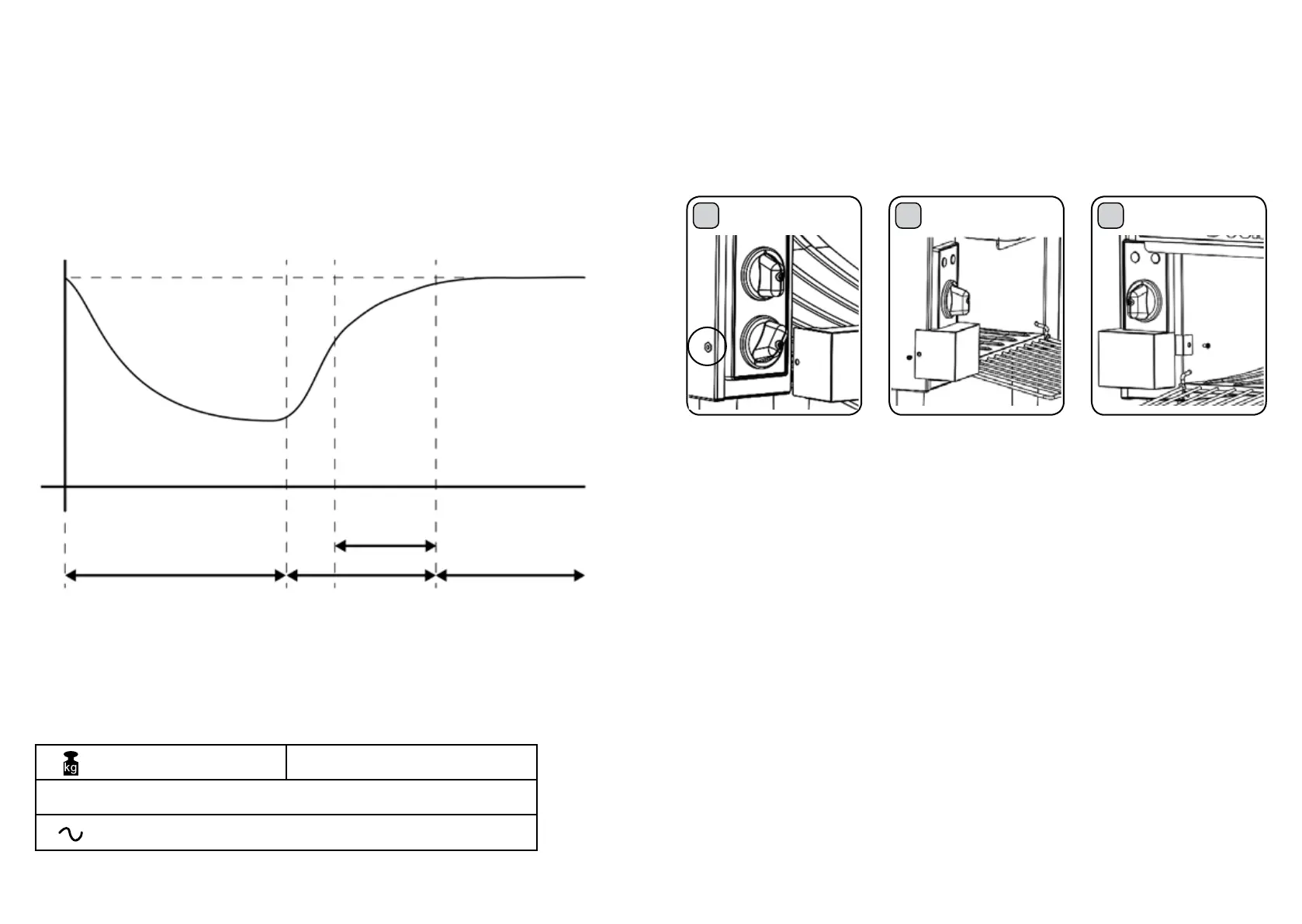
TOASTER STANDBY CHART
TEMPERATURE OF TOASTER
FULL TEMPERATURE
START STANDBY
MODE
STANDBY TIME (15 MINS)
WARMING UP (15 MINS)
∞
DURING THIS
PERIOD THE
TOASTING
SETTING WILL
NEED TO BE
MONITORED
AND REDUCED
AS THE
TOASTER
WARMS UP
FULL TEMPERATURE-
TOASTING
STABILISED, NO
NEED TO ADJUST
TOASTING SETTING
UNLESS BREAD
TYPE OR USAGE
CHANGES
TIME (APPROX.)
QUICK START
(13 MINS)
1
REMOVE SCREWS
LEFT SCREW
2
RIGHT SCREW
Insert and tighten the left-hand
screw.
Insert and tighten the right-
hand screw. To remove, repeat
in reverse order.
3
Remove the two screws seen
on the left and right-hand sides
of the controls. Align the Anti-
Tamper Guard with the screw
holes.
Your toaster is tted with a temperature limiting thermostat. During periods of inactivity, longer than 5
minutes, the elements will turn off (indicated by the red power indicator going off). Only introduce bread
to the conveyor when the red light is on and the elements are glowing cherry red.






 To Next Page