Customising the RIDING MODE
All of every riding mode can be customised.
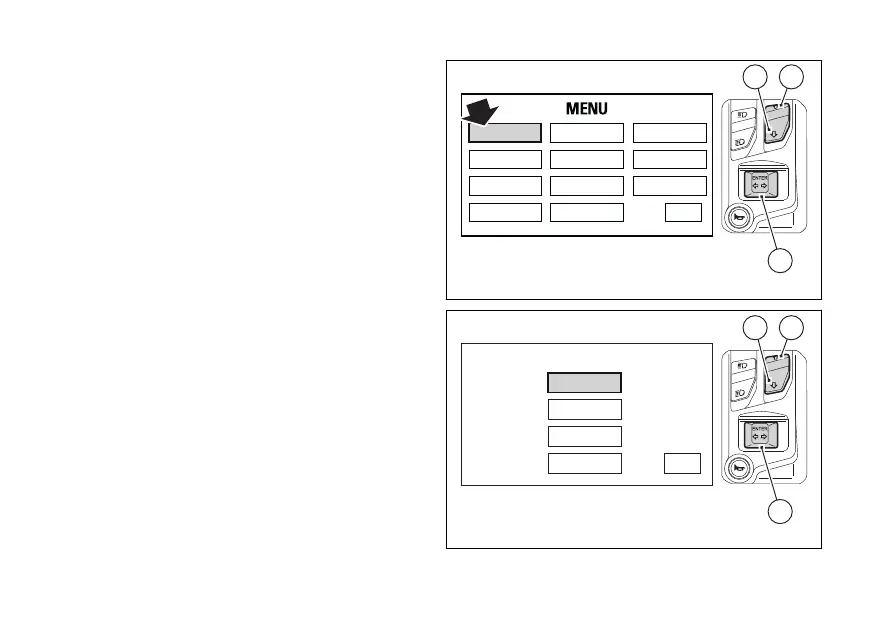
You enter the Menu.
Select "RIDING MODE" option, by pressing
(1) or (2). Once function is highlighted, press
CONFIRM MENU (4).
Enter the "RIDING MODE" menu. Select the desired
riding mode (SPORT, TOURING or URBAN), by
pressing (1) or (2). Once the desired mode is
highlighted, press CONFIRM MENU (4). You
open the selected riding mode customisation Menu.
While if you highlight "EXIT" and press (4)
you quit the sub-menu and go back to previous page.
The parameters that can be customised for every
riding mode are the following:
●
ABS
●
DTC
●
DWC
●
ENGINE
●
DQS (if available)
●
DEFAULT
Press (1) and (2) to highlight the
customisable parameters one by one: in
use (1) to highlight the following item and
(2) to highlight the previous item.
RIDING MODE
LAP SERVICE
DISPLAY
UNIT SETTING
PIN CODE
DATE & CLOCK
DRL CONTROL
BLUETOOTH
INFO
TIRE SETTING
EXIT
2
4
1
Fig 118
SPORT
TOURING
URBAN
DEFAULT
RIDING MODE
EXIT
2
2
1
Fig 119
200



 To Next Page