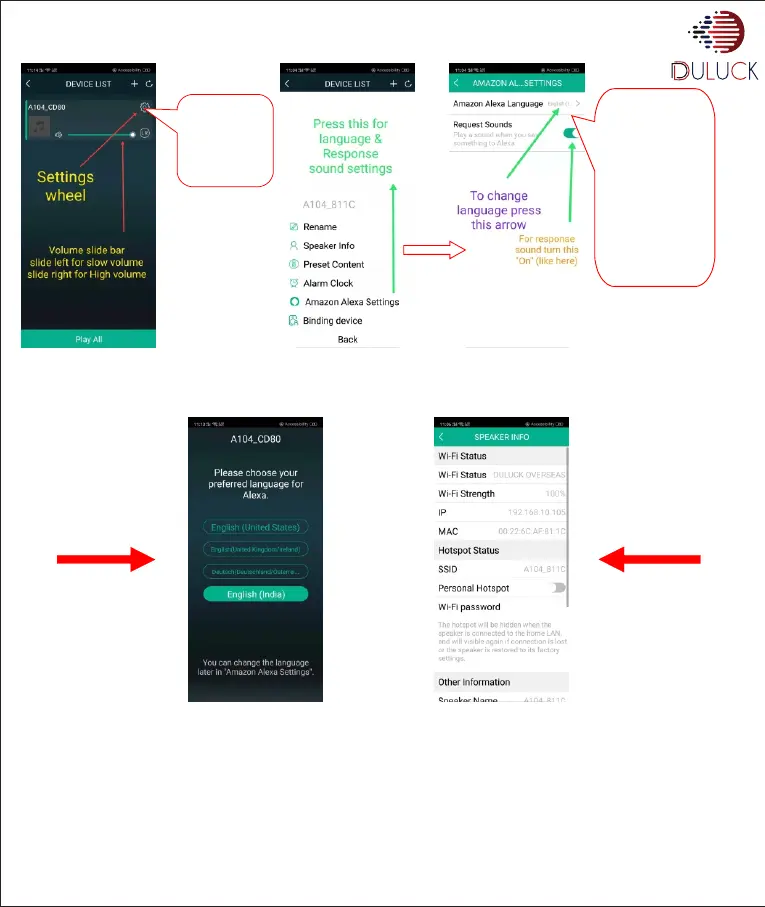
After successful binding you will see the following screen with newly added Duluck-Alexa enabled -Device.
• Press “Speaker info” and in “Hotspot Status” options, Turn slider button “On”
• Press “Wi-Fi password” option and enter the password you want for your “Hotspot-Wifi”. Now after this user can see the Wifi name in
his smart phone wifi list with the name written in SSID column
www.duluckos.com, Customer care:- +918083666333, Email:- help.duluckoverseas@gmail.com
Press-setting
icon “Wheel”
on the right
corner of your
device name.
Press Amazon-
Alexa settings.
Select your
language by
pressing
“Amazon
Alexa
language” and
set request
sound “On”.


 To Next Page