To gain maximum use / utilization of Duluck-Alexa-speaker, kindly read the following booklets supplied with Duluck-Alexa-device. Or Check
www.duluckos.com and read “Alexa in our life”
Duluck-Alexa user mini guide.
Duluck-Alexa voice commands.
Duluck smart controllers.
Procedure:-
• Connect your phone to Wi-Fi network.
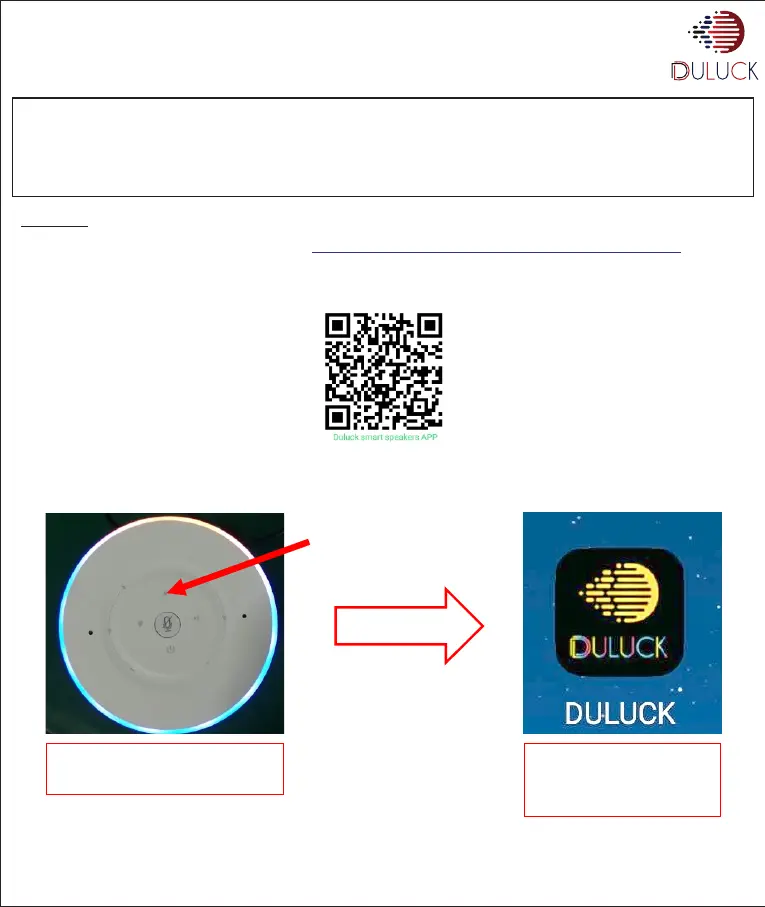
• Download Duluck-APP from Apple/Google APP store ( ) Or https://play.google.com/store/apps/details?id=com.wifiaudio.DULUCK
• By copying the APP-Download link in Duluck website www.duluckoverseas.com and open in cellphone browser
Or
Connect the Power adopter supplied with device. When you hear the power-on prompt sound, enter the network configuration state directly
or long touch the WPS ("Awakening/ Networking") key for 5 seconds, and the panel UI Led ring will keep rotating and running. Your Duluck
device will say “Entering setup mode.”
www.duluckos.com, Customer care:- +918083666333, Email:- help.duluckoverseas@gmail.com
Long press Awakening / Networking key
button to enter the network configuration
state mode.
First, check whether the phone has
WIFI on and connect to the router to
be connected.
Click the mobile desktop to enter the
APP


 To Next Page