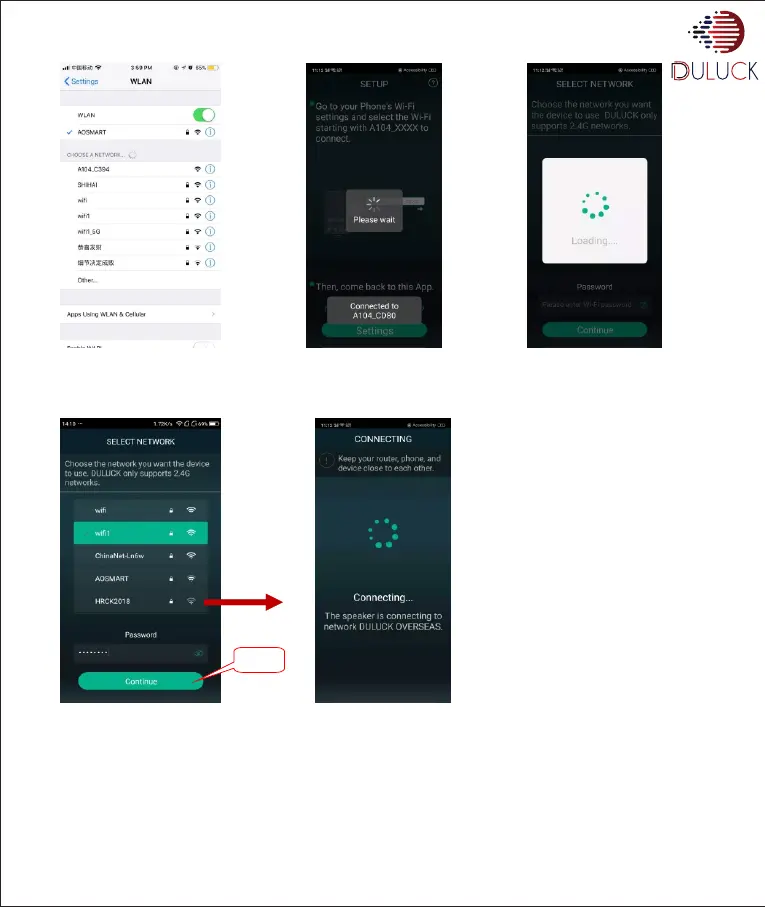
The app will take you to the Wifi setting screen of your phone showing available Wifi networks.
• Press “DULUCK model no. A104_XXXXX” in available wifi list.
• Your speaker will say “You are now connected to your speaker”.
• Above screen’s will appear with list of available wifi networks near your location
• Select the Wifi network you wish to connect and enter password. Press “continue”
• After this, APP will take about 45 to 120 seconds and following screen will appear. When your speaker is connected to wifi, it says
“Connected to Wifi”
Note:- After completing the process of Wi connection, some times following screen will appear. Follow the instructions
mentioned on the screen. Make sure your phone & speaker both should be connected to same network.
www.duluckos.com, Customer care:- +918083666333, Email:- help.duluckoverseas@gmail.com
Click


 To Next Page