www.duluckos.com, Customer care:- +918083666333, Email:- help.duluckoverseas@gmail.com
P.T.O.
Click
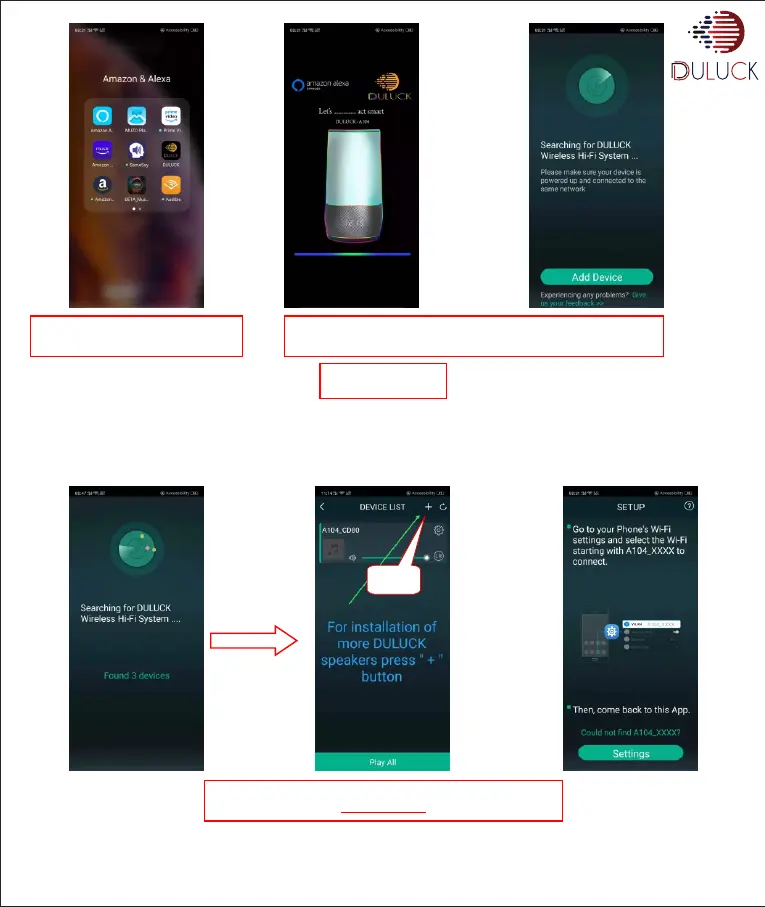
Press Duluck-APP icon on your
phone screen.
The APP will start searching the Duluck-Alexa-Devices near by and
you will see a radar searching the same.
To add New device press “ + “ on the right corner of the screen.
Press “Settings”
Press “Add Device”
OR
Note:-
If some Duluck-Alexa enabled -Devices are already connected on the same wifi network on which your phone is connected, then you will see
the following screen with number of devices written in the middle and after that, the app will display list of devices already connected to the
same wifi network.


 To Next Page