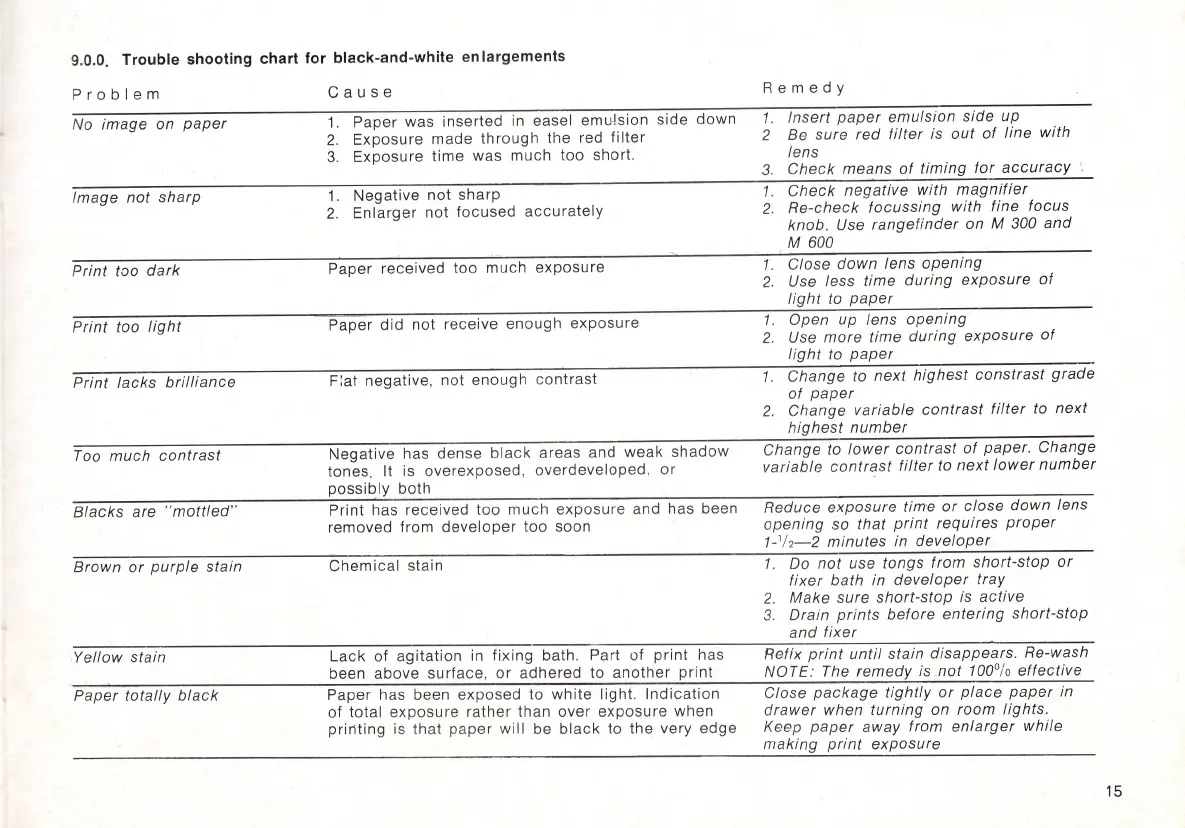
9.0.0. Trouble shooting chart for black-and-white
en
largements
Problem
No
image
on
paper
Image
not
sharp
Print
too
dark
Print
too
light
Print
lacks
brilliance
Too
much
cont
rast
Blacks
are "
mottled"
Brown
or
purple
stain
Yellow
stain
Paper
totally
black
C a
use
1.
Paper was inserted in easel
emu~sion
side
down
2.
Exposure made
through
the
red
filter
3.
Exposure time was
much
too
short.
1.
Negative
not
sharp
2.
Enlarger
not
focused
accurately
Paper received too much
exposure
Paper
did
not
receive enough
exposure
Fiat negative, not enough
contrast
Negative has dense
black
areas and
weak
shadow
tones. It is overexposed, overdeveloped,
or
possibly
both
Print has received
too
much
exposure
and has been
removed from
developer
too
soon
Chemical
stain
Lack
of
agitation
in fixing bath.
Pa
rt
of
print
has
been above
surface
,
or
adhered
to
another
print
Paper has been exposed to
white
light.
Indication
of
total
exposure
rather than
over
exposure
when
pririting
is that
paper
will
be
black
to
the
very
edge
Remedy
1.
Insert
paper
emulsion
side
up
2 Be sure
red
filter
is
out
of
line
with
lens
3.
Check
means
of
timing
for
accuracy
1.
Check
negative
with
magnifier
2.
Re-check
focussing
with fine
focus
knob. Use
rangef
i
nder
on
M 300
and
. M 600
1.
Close
down
lens
opening
2.
Use less
time
during
exposure
of
light
to
paper
1.
Open up lens
opening
2.
Use
more
time
during
exposure
of
light
to
paper
1.
Change
to
next
highest
constrast
grade
of
paper
2.
Change
variable
contrast
filter
to
next
highest
number
Change
to
lower
contrast
of
paper.
Change
variable
contrast
filter
to
next
lower
number
Reduce
exposure
time
or
close
down
lens
opening
so
that
print
requires
proper
1-'
/2
-2
minutes
in
developer
1. Do
not
use
tongs
from
short-stop
or
fixer
bath
in
developer
tray
2.
Make
sure
short-stop
is
active
3.
Drain
prints
before
entering
short-stop
and
fixer
Refix
print
until
stain
disappears.
Re-wash
NOTE: The
remedy
is .
not
100%
effective
Close
package
tightly
or
place
paper
in
drawer
when
turning
on
room
lights.
Keep
paper
away
from
enlarger
while
making
print
exposure
15



 To Next Page