45
RMO40TD Error Messages
8 Error Messages
Any operational error is indicated by a red LED and accompanied by an alarm.
Furthermore, the display indicates an error status message.
To stop the alarm buzzer, remove the status message on the display, and return to the Current or TapC
menu, press STOP.
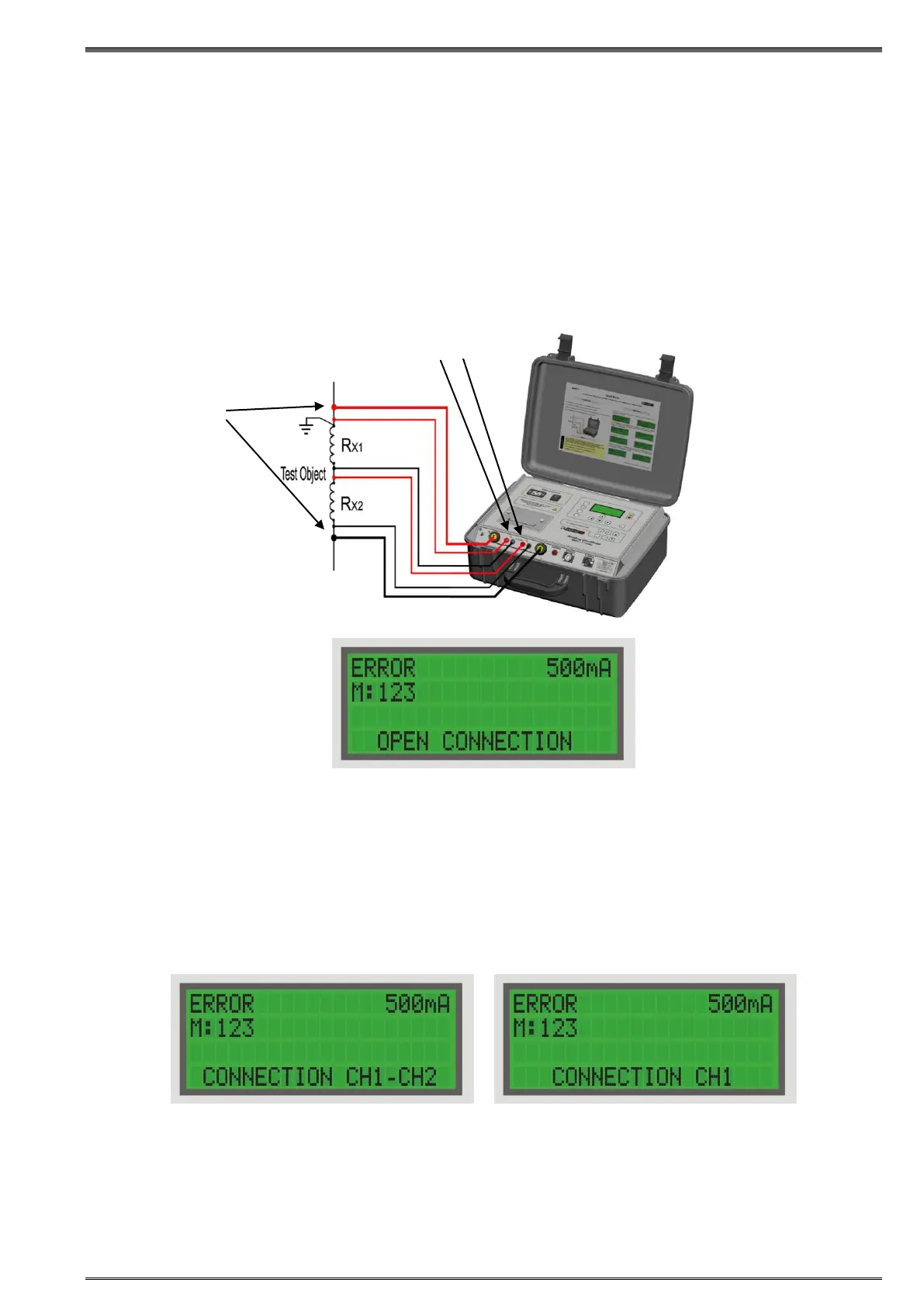
8.1 Error Message "Open connection"
The Error message "Open connection" is displayed if:
- either + or current cable, or both disconnected either on the side of device, or the side of test object.
8.2 Error Message "Connection CH1-2", "Connection CH1"
The Error message "Connection CH1-2" is displayed if both, CH1 and CH2 are not connected in the
Current mode. This message is displayed if either + or voltage sense cable or both are disconnected
either on the device side, or the side of the test object.
The Error message "Connection CH1" is displayed only if CH1 is not connected in the TapC mode. This
message is displayed if either + or voltage sense cable or both are disconnected either on the device
side, or the side of the test object.
These messages are displayed only at the beginning of a test.
Figure 8-1:
Connecting a
test object to
RMO40TD


 To Next Page