G2030-II-S
Apr ‘19
- 14
‘CSC300’ Controller
Description of Controller.
The ‘CSC300’ Controller is the ‘brains’ of the G series Rotary Screw Compressor Units. It monitors, enables, and
indicates the various functions of the Unit. The Controller voltage requirement is 24 volts +/- 15%.
The Controller is comprised of several levels of access, segregated into:
- Operator Level (Access Code: ‘2012’)
- indicates the main operating parameters (eg, temperature, pressure, etc) and faults of the unit.
- Service 1 Level (Access Code: ‘2515’)
- allows access to change the Unit pressures, etc and indicates any Unit faults.
- an Access Code is required.
- Service 2 Level
- allows access to change some of the more restricted parameters.
- an Access Code is required.
- Factory Level
- allows access to areas of the Controller that only factory personnel can access.
- an Access Code is required.
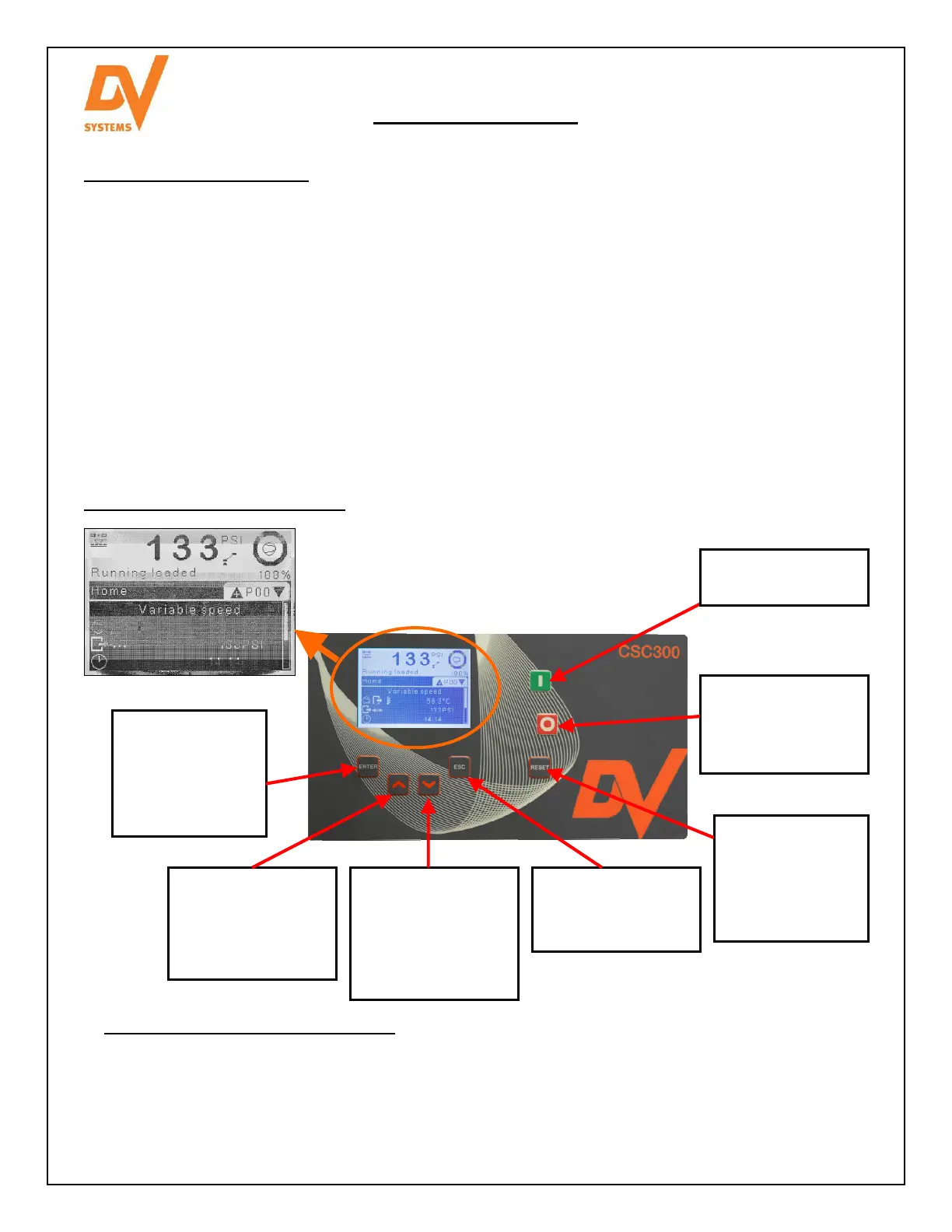
Controller Operator Interface.
Up.
Scrolls up through
the parameters, or
increases the value
of a parameter.
Stop.
Causes the Unit to
enter ‘Idle’ mode
and then shut off.
Down.
Scrolls down
through the
parameters, or
decreases the value
of a parameter.
Reset.
Allows the Unit to
be re-started after
an error has
occurred.
Escape.
Allows you to move
back one menu
Enter.
Used to enter a
new page, etc, or
pressed to save
changes to a
parameter.
Start.
Starts the Unit.
The Display above and at left indicates:
• The system pressure is 133 psi
• The Unit is running loaded (compressing air)
• The Unit is running at 100% of its full speed
• The temperature of the oil leaving the Air End is 58.3°C.



 To Next Page
 Loading...