EasyManua.ls Logo

Dymo 5500 - User Manual

Dymo 5500
5 pages
Print Icon
To Next Page IconTo Next Page
Loading...
2
B
A
E
a ?¿#%
b&.,@$¢£
c ¥+–×÷±=
d */:;()°
e<>[\]^
f {}~µß
gλØøφ
"
1
/
2
h 燃
i éÍíÓóÚú
j ÀàÈèÌìÒ
k ò ù ÄäËë Ï
l ïÖöÜüÿÂ
m âÊêîôûÅ
n åÇçÆæŒœ
o ÃãÑñÕõF
p
!
1
.
.
.
2
.
.
.
3
.
.
.
4
.
.
.
5
.
.
.
6
.
.
.
q
©®™
2345
r
6789
23
s
7
t
u
×
M
8
9
`
F
D
= 9/12mm
= 6mm
= 19mm
C
.
SIZE
VERT
LENGTH
USER
=
-
£
/
C
$
0
9
8
7
6
5
4
3
21
+
˜
P
O
I
U
Y
T
R
E
W
Q
A
L
K
J
H
G
F
D
SA
O
Æ
M
N
B
V
C
X
Z
/
'
:
Ñ
ç
'
ˆ
Œ
DEL
CLEAR
SYMBOL
BARCODE
JUST
CAPS
ITALICS
BOX/UL
.
%
?
!
!
123.N
PRINT
RECALL

Questions and Answers

  • M
    Maria MaxwellJul 26, 2025
    Why is my Dymo 5500 not printing properly?
    • W
      Walter GarrettJul 26, 2025
      If your Dymo Label Maker is not printing or the text quality is poor, try the following: * Replace discharged batteries. * Check that the tape cassette is installed correctly. * Clean the print head. * Replace the tape cassette.
  • M
    Maxwell OdonnellJul 31, 2025
    What to do if the tape is jammed in my Dymo Label Maker?
    • K
      Kyle CarterJul 31, 2025
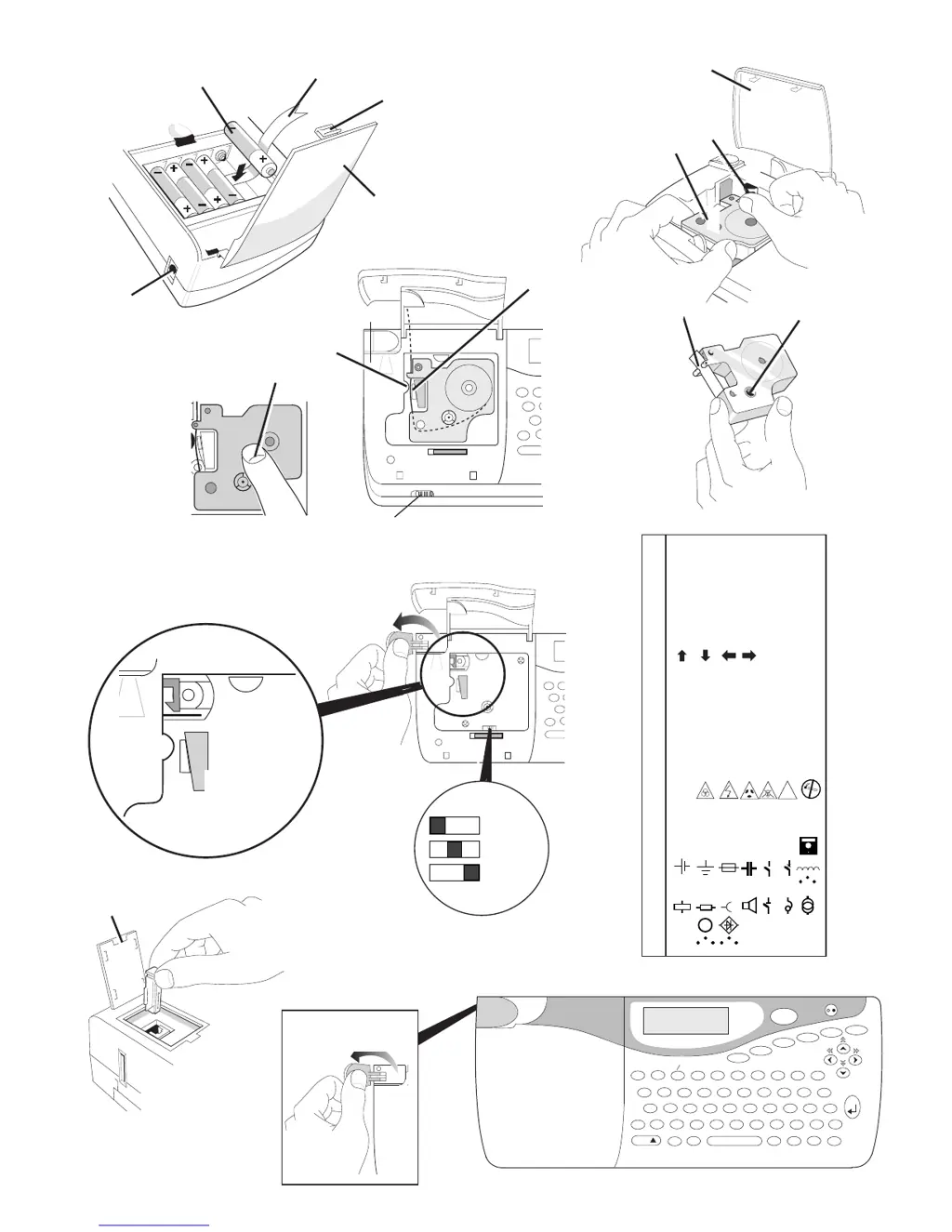
      If the tape is jammed in your Dymo Label Maker, carefully lift out the tape cassette. Then, remove or release the jammed tape. Do not cut the ink ribbon; instead, turn spool B to tighten it. Cut off any excess label tape and refit or replace the tape cassette.
  • W
    william00Aug 5, 2025
    What to do if my Dymo 5500 doesn't respond to the print key?
    • B
      brendabaileyAug 5, 2025
      If your Dymo Label Maker isn't responding when you press the print key, it could be due to a printer jam, indicated by '!!!!!!!!!!' on the display. Press any key to return to the normal display, then open the cassette compartment and clear the jam. Alternatively, flashing display could mean the batteries are discharged. Press any key and replace the batteries.
  • S
    Sarah YorkAug 10, 2025
    How to fix a Dymo 5500 Label Maker with no display?
    • L
      levineandrewAug 10, 2025
      If your Dymo Label Maker's display is blank, ensure the machine is turned on. If it is on, try replacing discharged batteries or check the AC adapter.
  • J
    Joseph RobertsAug 15, 2025
    How to improve poor cutter performance on a Dymo 5500 Label Maker?
    • K
      Kevin MaddoxAug 15, 2025
      To improve poor cutter performance on your Dymo Label Maker, clean the cutter blade regularly.
  • A
    Alan PerezAug 20, 2025
    How to fix poor tab cuts on a Dymo 5500 Label Maker?
    • B
      Brenda WilkinsonAug 20, 2025
      To fix poor tab cuts on your Dymo Label Maker, replace the tab cutter blade. Remove door F, then locate and pull hard upwards to remove the cutter block.

Summary

Power Supply

Changing the cassette

Printing Operations

PRINT

Prints the label. Use cutter lever to release and tab-cut.

Advanced Settings

PERSONALISED (USER) LABEL SETTINGS

Stores and recalls custom label settings.

PERSONALISED (USER) SYMBOLS

Stores and recalls up to nine custom symbol characters.

Barcodes

To create a bar code

Step-by-step guide for generating various barcode types.

Cleaning

Troubleshooting

No display

Checks for power issues, discharged batteries, or AC adaptor problems.

No printing or poor text

Addresses battery, cassette, and print head issues.

Tape jammed

Steps to clear jammed tape and ensure proper loading.

Poor cutter performance

Guidance on cleaning or replacing the cutter blade.

Poor tab cuts

Instructions for replacing the tab cutter blade.

Dymo 5500 Specifications

General IconGeneral
BrandDymo
Model5500
CategoryLabel Maker
LanguageEnglish

Related product manuals