7
CONNECTING THE POWER
Selection Switch
(Heater’s thermostat, External thermostat)
Heater’s
thermostat
External
thermostat
M
M
L1
L2
GND
1
2
External
thermostat
240AC or 208AC
60HZ
1000Wx3
1000W
1000W
Heater's
thermostat
Selected
switch
Switch
Overheating
protection relay
3
4
LINE
RED
LOAD
BLACK
External thermostat
Terminal station
1
2
E
M
M
L1
L2
GND
1
2
External
thermostat
240AC or 208AC
60HZ
1000Wx3
1000W
1000W
Heater's
thermostat
Selected
switch
Switch
Overheating
protection relay
3
4
LINE
RED
LOAD
BLACK
External thermostat
Terminal station
1
2
E
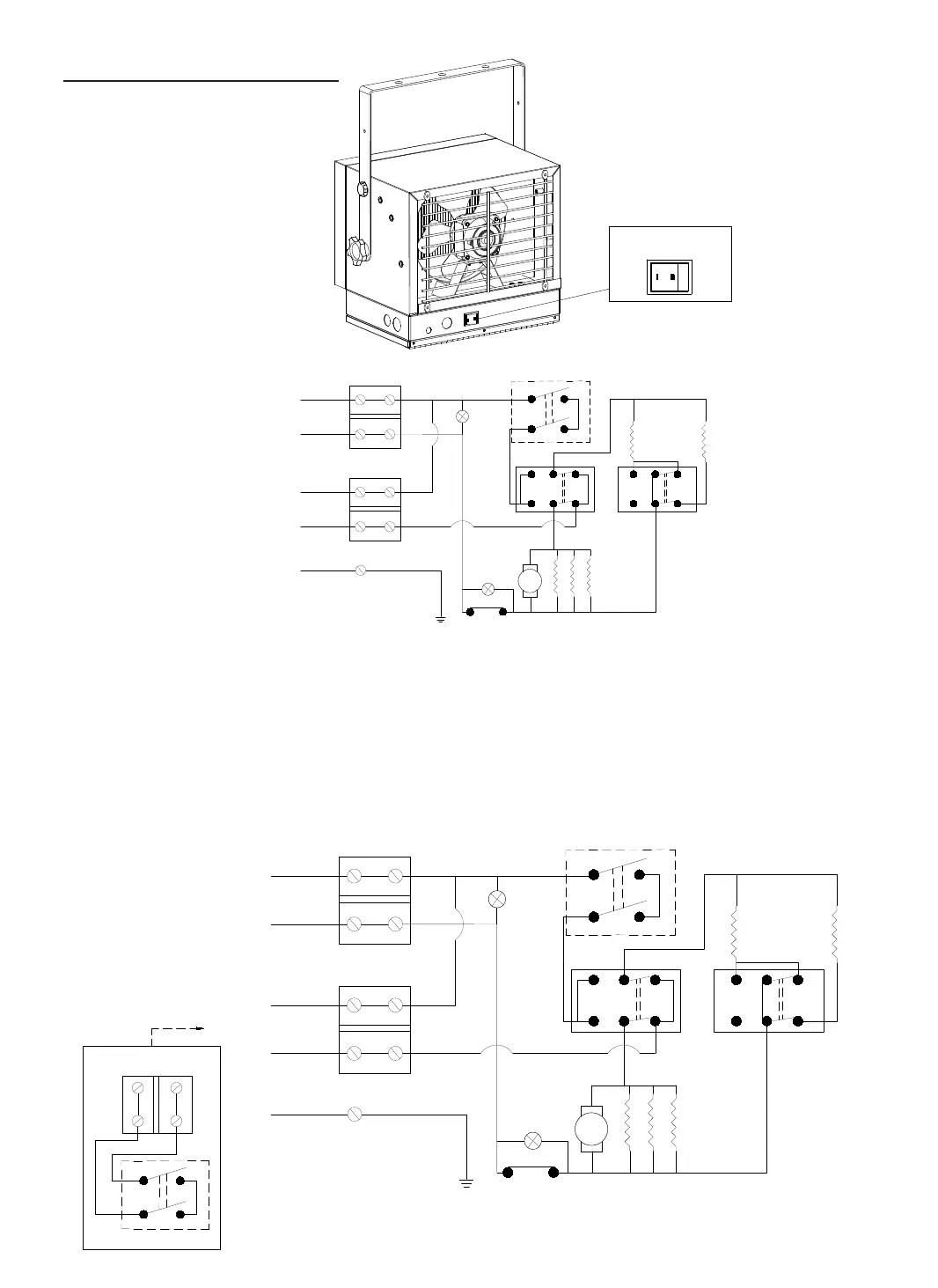
If you will use an external temperature control (external thermostat) to
control the heater, please follow below
diagram:
1. Make sure that the heater's temperature control knob (thermostat knob) is
turned fully clockwise.
2. Connect the wire according to below wiring diagram.



 To Next Page