EasyManua.ls Logo

Dynascan DW551DR4 - Page 21

Dynascan DW551DR4
31 pages
Print Icon
To Next Page IconTo Next Page
To Previous Page IconTo Previous Page
Loading...
20
Black Level
RGB Full
Selects the black level to adjust the screen
gray scale. "Limited" for video source uses
16 to 235 levels for R/G/B, such as HDMI.
"RGB Full" for video source uses all levels
from 0 to 255 levels.
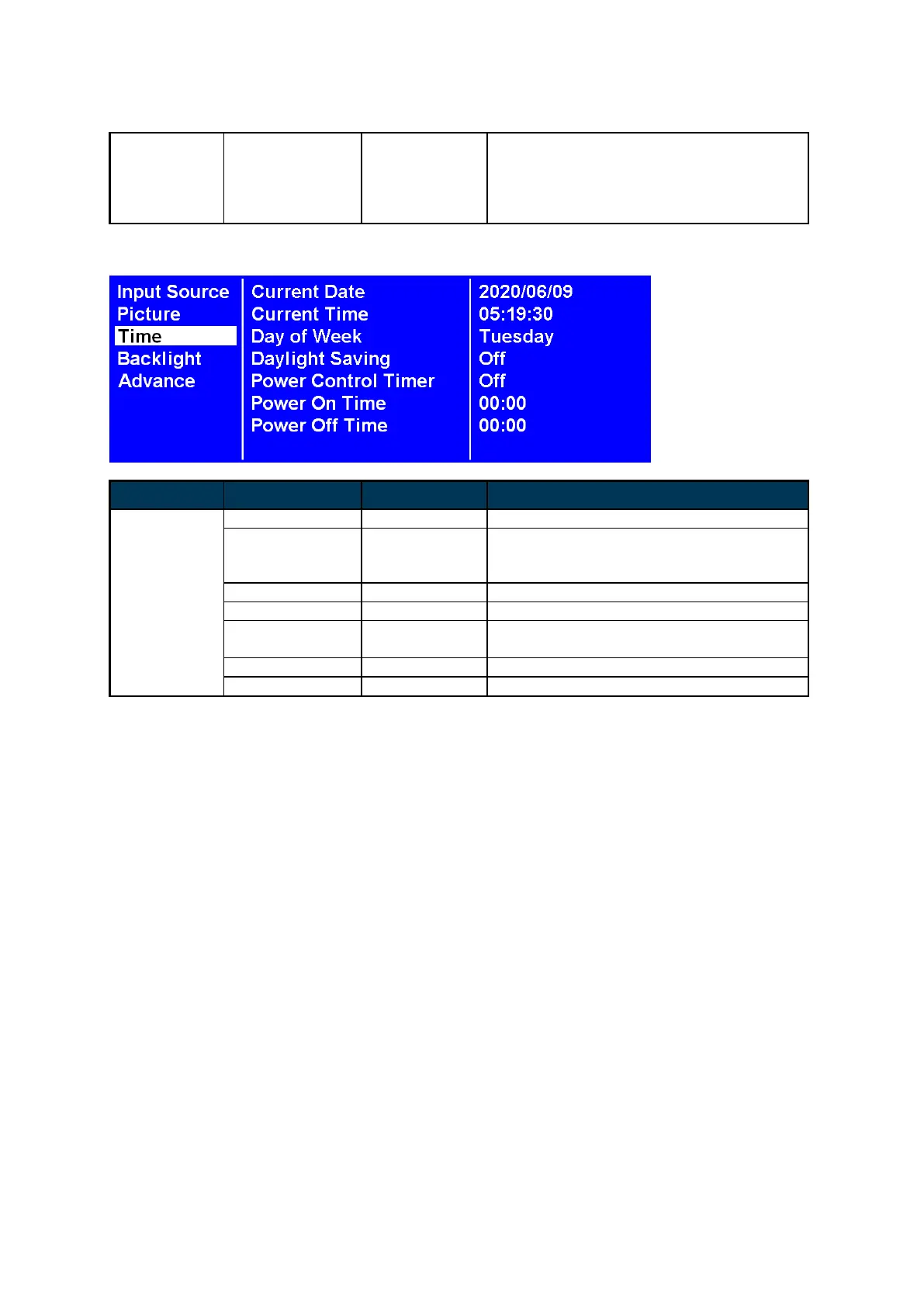
3. Time
ITEM 1
ITEM 2
DEFAULT
DESCRIPTION
Time
Current Date
YYYY:MM:DD
Set the date.
Current Time
HH:MM:SS
Set the clock.
Note: The internal clock will continue to
function when the power is turned off.
Day of Week
Set the day of week. (Monday to Sunday)
Daylight Saving
Off
Turn on / off DST setting.
Power Control
Timer
Off
Automatic power on / off schedule function.
Power On Time
00:00
Set turn-on time.
Power Off Time
00:00
Set turn-off time.