Open the protective cap 8 of the USB port on
Bafang system
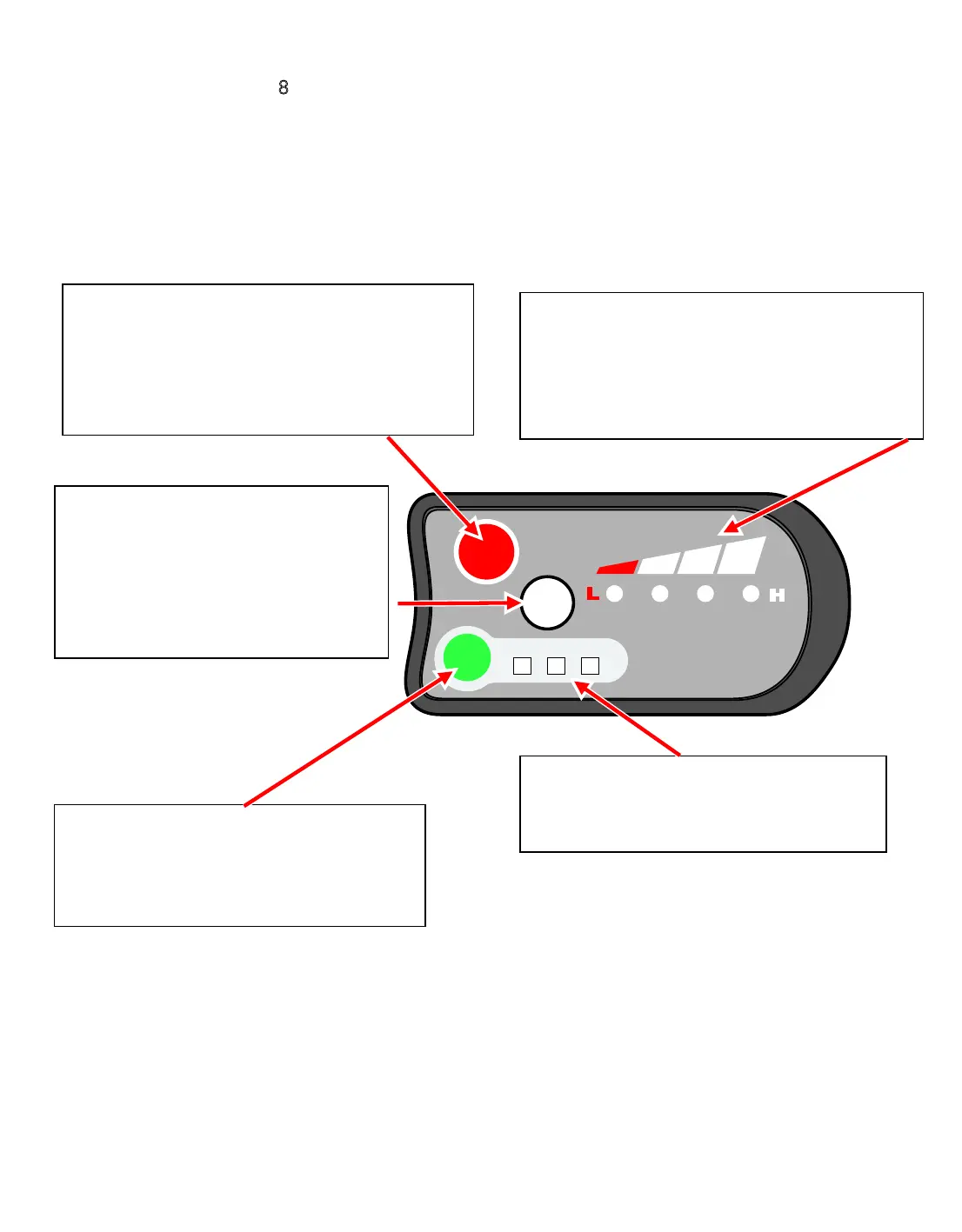
Here is a description of the handlebar control unit. It will allow you to choose between the
following available use options:
1. The ON/OFF button will control the power supply of the controller for your e-bike .When the
status is ON, the display will supply the current of 0-300mA for the controller. When the status is
OFF, the total current will be less than 1uA.
2. The button of MODE will switchover the maximum PWM value of the output of the controller to
change the speed.
When you press MODE, you can select the PAS levels, the default setting is 2-3-1-2-3-1.
Switch on
Push the buttons and the LEDs light.
Switch off
Push the buttons and the LEDs will go out.
Press and hold to start the walk
assist and the motor will move the
bicycle at 6km/h. move the bicycle
or vehicle at 6km/h.on the display,.
Do not use this function when riding.
Push the button to toggle between the
levels of pedal assistance provided by
the motor
Indicates the level of pedal assistance
4 LEDs lit indicates full charge
2 LEDs lit indicates half charge
1 LED lit indicates low charge. Likely to
ON/OFF
6km/h
MODE
LOW MED HIGH
F O R M E B I K E S . C O . U K



 To Next Page