RLanglois 10.26.16
7
Viewing Your Film
What you should now see in the middle of your computer screen is a
projection of the film you have loaded. Don’t worry that you don’t
see any content yet, you will need to move your film forward to get
to the first of the images you want to view. To do this you will need to
use the Motorized Roll Film Control.
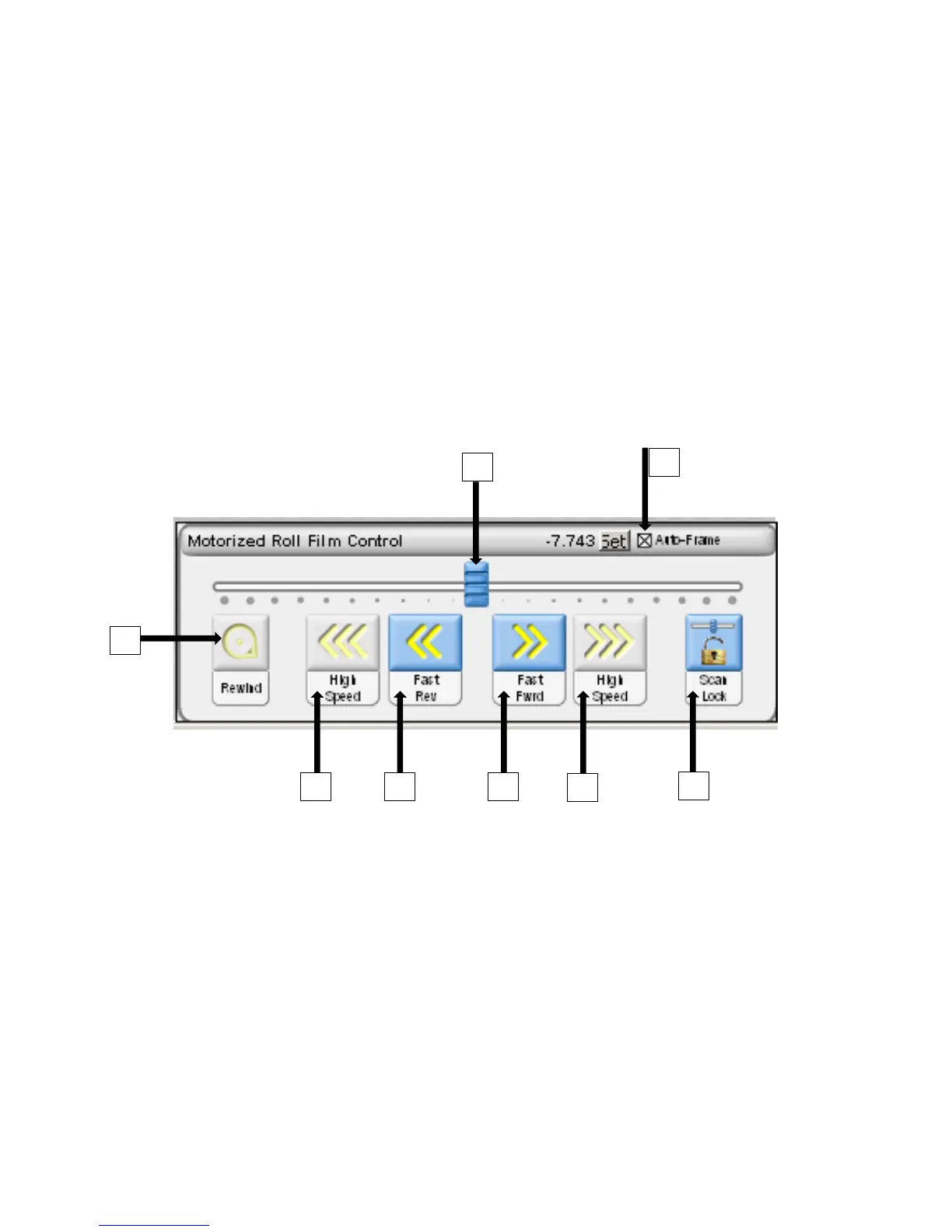
Motorized Roll Film Control
The film controls can be found in the bottom right hand corner.
These are the controls that allow you to rewind and fast-forward the
film along at varying speeds.
The Motorized Roll Film Control has 8 controls (labeled above):
1. Rewind – Double click to rewind film (when glass is open)
2. High Speed Reverse – Click and hold to quickly move film
backward (when glass is open)
3. Fast Reverse – Click and hold to move film backward (when glass
is closed)


 To Next Page