Software Installation
0202 USB 2.0 Owner’s Manual 11
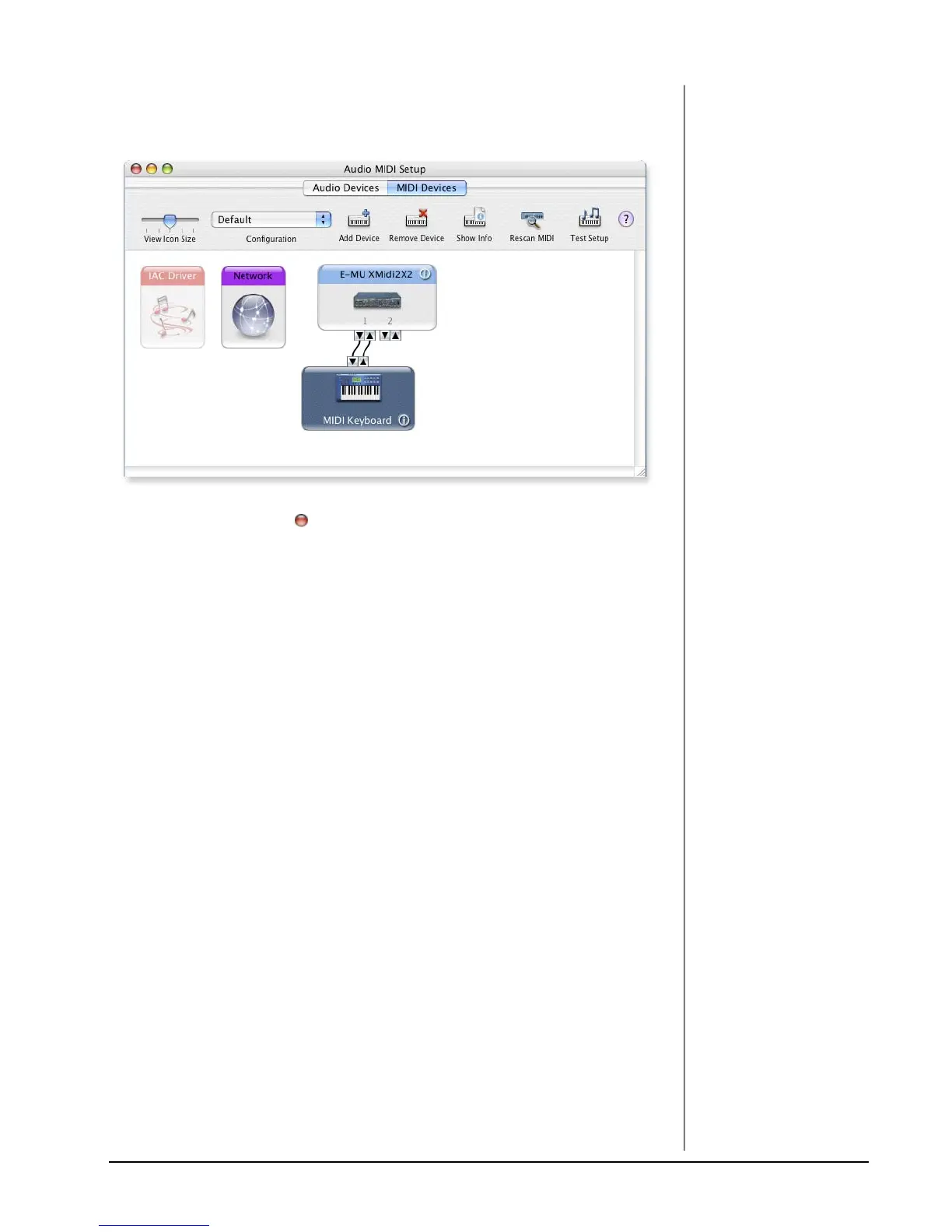
17. Connect the new external device to the E-MU 0202|USB by dragging between
the input and output connectors.
18. The window below shows a properly connected MIDI device.
19. Press the close button to close the Audio MIDI Setup window.
Install the Production Tools Software Bundle
20. Insert the Macintosh Production Tools CD into your CD-ROM drive.
21. Double-click on the installer package.
22. The installation splash screen appears. Follow the instructions on the screen.
23. Continue to install applications from the bundle as desired,
Uninstalling the Audio Drivers and Applications
At times you may need to uninstall or reinstall the 0202 USB 2.0 application and
device drivers to correct problems, change configurations, or upgrade outdated
drivers or applications. Before you begin, close the E-MU USB 2.0 Audio control
panel application. Applications running during the uninstallation will not be
removed.
1. Open the Applications folder.
2. Open the Creative Professional folder.
3. Open the E-MU USB Audio folder.
4. Click the E-MU USB Audio Unistaller and follow the instructions.


 To Next Page