Tutorials
0202 USB 2.0 Owner’s Manual 19
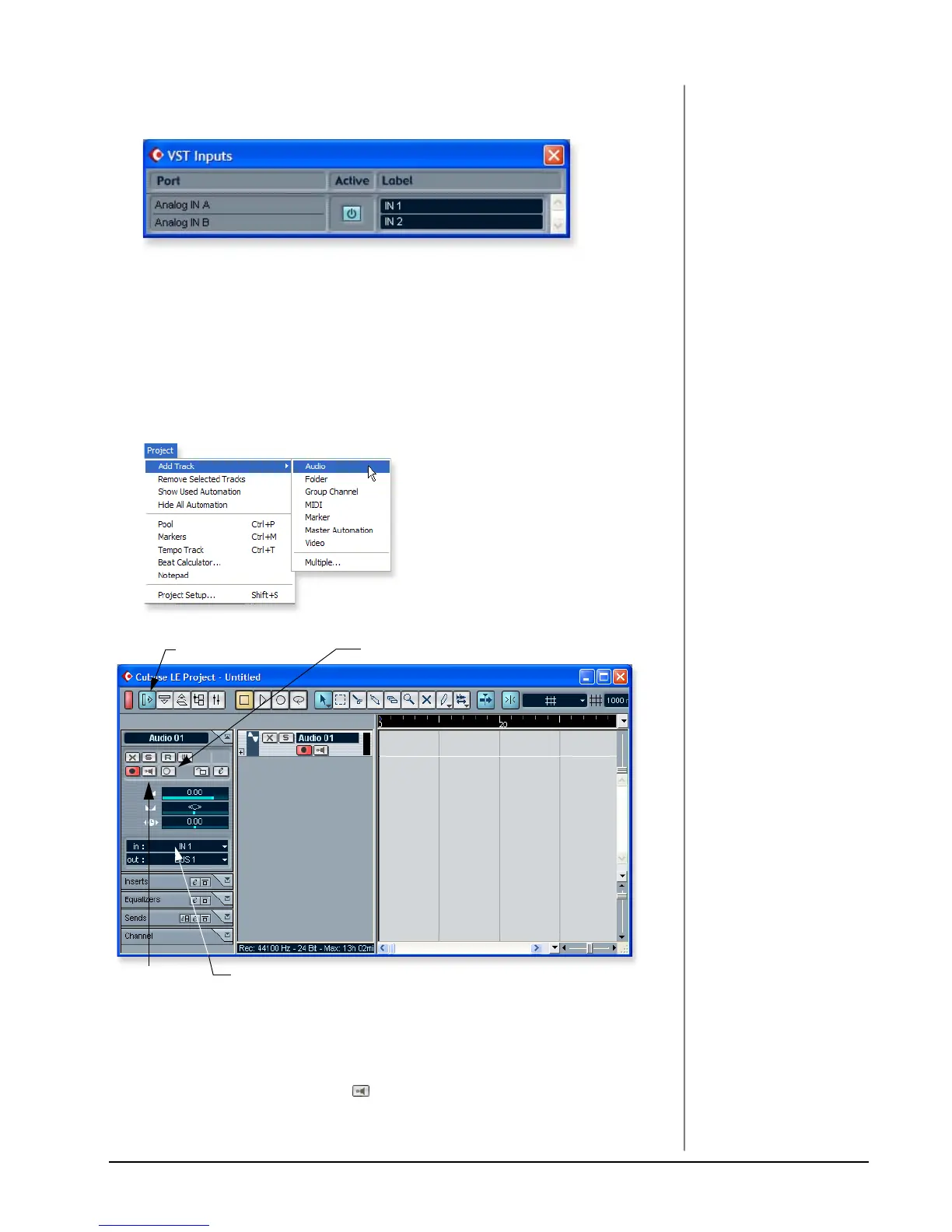
14. Select VST Inputs from the Devices menu. This is where you enable the inputs
you wish to use. Make the inputs active.
2 - Basic Multitrack Recording
This tutorial assumes you’re using a single input or a pair of inputs. For more
advanced recording, refer to the Cubase LE manual.
Add an Audio Track
1. From the Cubase LE menu bar, select Project, Add Track, Audio. An audio
track is added to the project window.
NOTE
If the Inputs aren’t available,
check Devices, VST Inputs.
2. The screen shows the “L” input of the 0202|USB. Note that IN 1 is shown in
the Track Input field (Input L =IN1, Input R =IN2). If you want to record in
stereo, turn the Stereo/Mono button On and select IN 1 + IN 2 for the Track
Input.
3. Make sure the Monitor button is OFF. You will be monitoring the input
through the 0202 USB 2.0.
Inspector button
Stereo/Mono button
Track InputMonitor


 To Next Page