Tutorials
0202 USB 2.0 Owner’s Manual 39
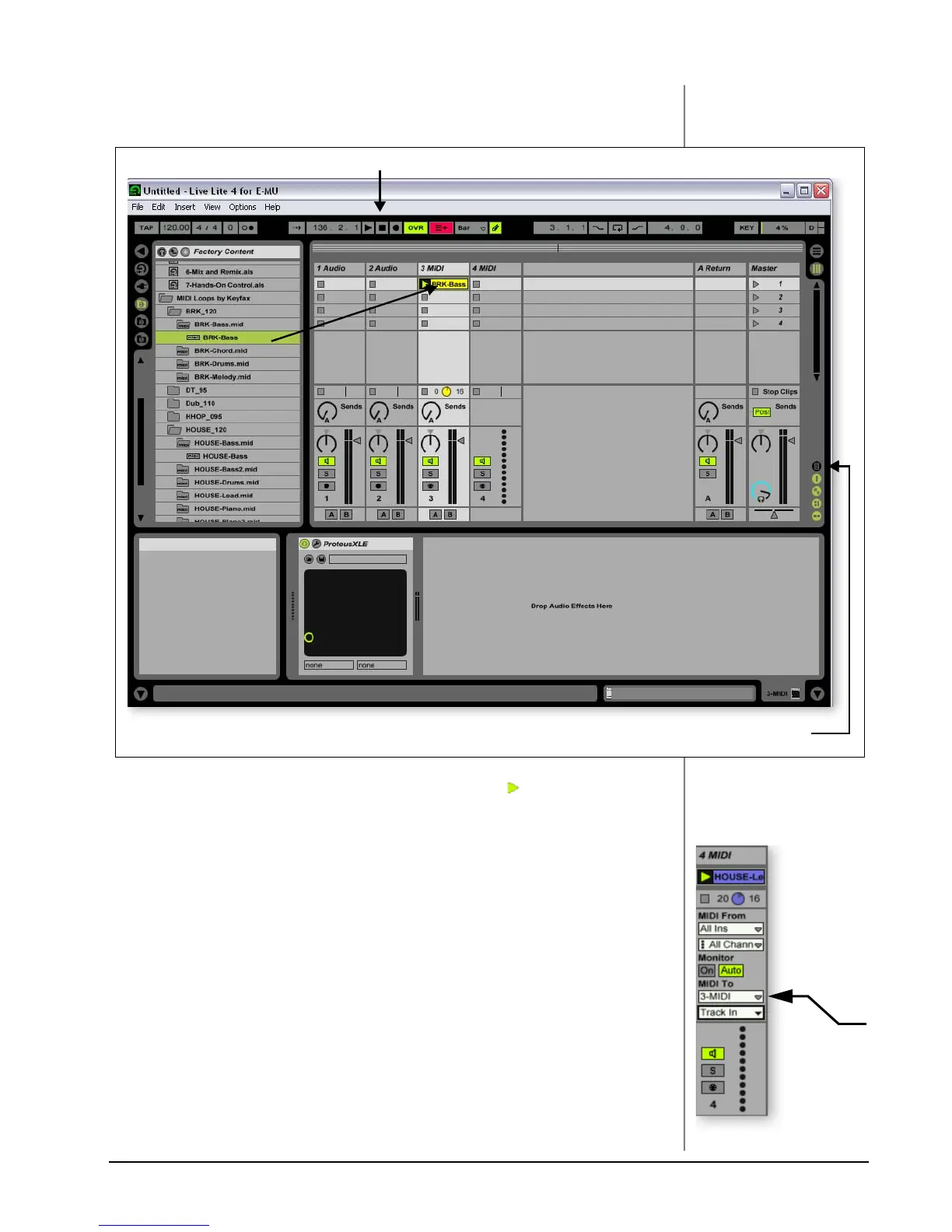
17. Click and drag BRK-Bass over one of the clip slots in the 3 MIDI strip as
shown below.
18. Now click on the Clip Launch Button (little triangle) on the MIDI clip you
just dragged over. The MIDI bass loop begins playing the bass preset on
Proteus VX. To stop playing, press the Stop button.
19. Find some other MIDI loops and drop them into the other slots of the track.
Hint: look in different folders. Click on the Clip Launch Buttons to switch
between clips.
Add Another MIDI Track
Ableton Live Lite 4 allows four MIDI tracks, so let’s play a different MIDI loop and
sound on track 4 MIDI.
20. Choose a different MIDI loop such as House-Lead, (located in the HOUSE-
120 folder) and drop it onto one of the 4 MIDI clip slots.
21. Currently, the MIDI To box reads “No Output”. Instead, select 3-MIDI.
Another option box labeled “Track In” now appears beneath 3-MIDI.
22. Click on the Track In box to see the list of MIDI channels.
Show/Hide In/Out Section
Stop
Select
3-MIDI


 To Next Page