P139-HD Audio System User Manual
GA063-3 Rev G 08/25/2015 Page
of 35
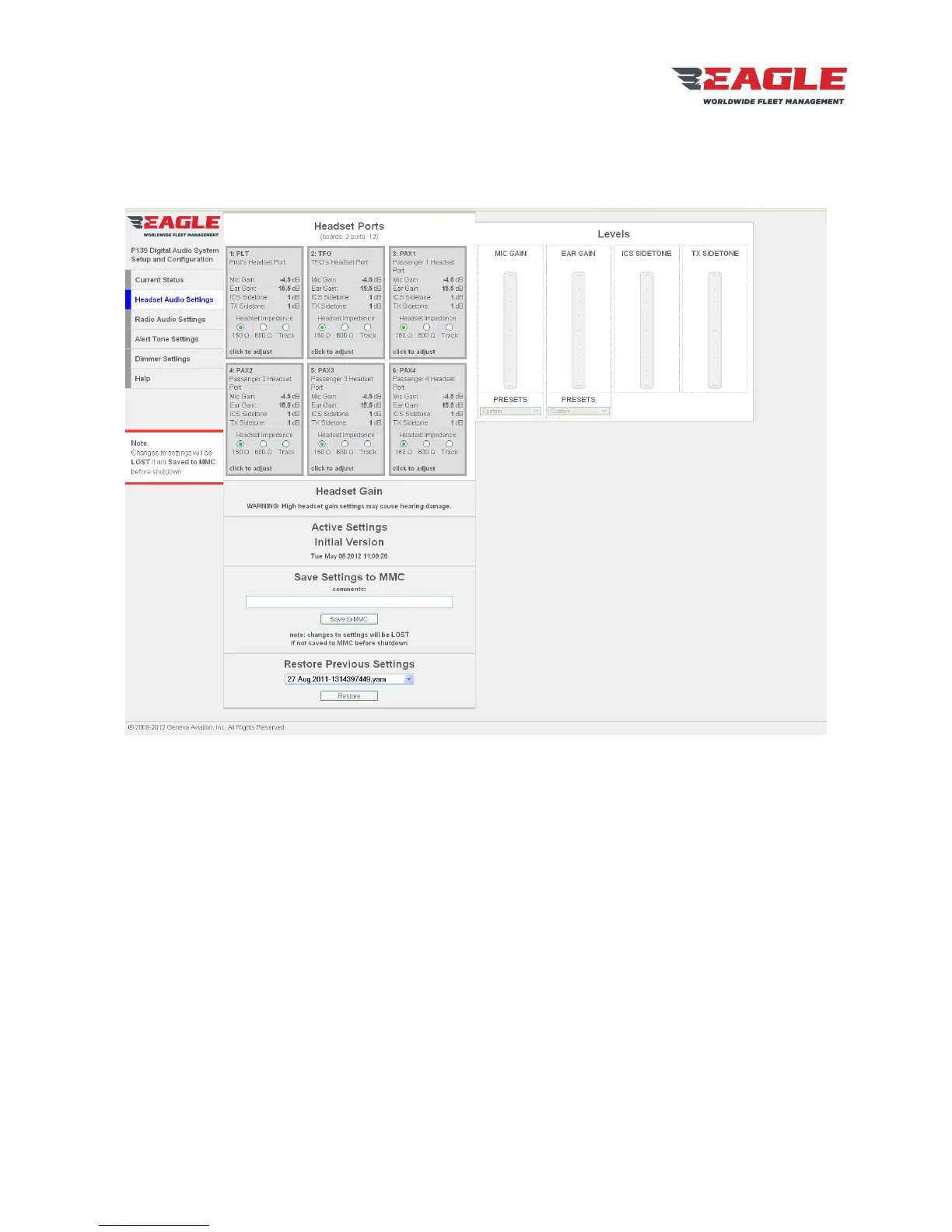
9.5. Headset Audio Settings Page
The Headset Audio Settings Page (Figure 6) gives access to the user-adjustable settings for each
headset port enabled in the Customer Configuration.
Figure 6 Headset Audio Settings Page
The grid on the left of the page shows all available headset ports. Ports may be selected by clicking on
them. Multiple ports may be selected by clicking on each port while holding down the SHIFT key. Ports
that are selected will have a blue background.
The following settings may be changed for each headset port:
MIC GAIN: Sets the input gain for the headset microphone in dB. Raising the Mic Gain will increase the
sensitivity of the microphone.
EAR GAIN: Sets the amplifier gain for the earphones in dB. Raising the Ear Gain will increase the
maximum volume from the earphone.
PRESETS: The drop-down boxes below MIC GAIN and EAR GAIN contain presets for some industry-
standard levels. The presets may be overridden by moving the sliders to the desired value, which will set
the preset to “Custom”.
ICS SIDETONE: Sets the level of sidetone heard in this headset when the user keys ICS.
TX SIDSETONE: Sets the level of sidetone heard in the headset when the user keys a Radio for transmit.


 To Next Page