26
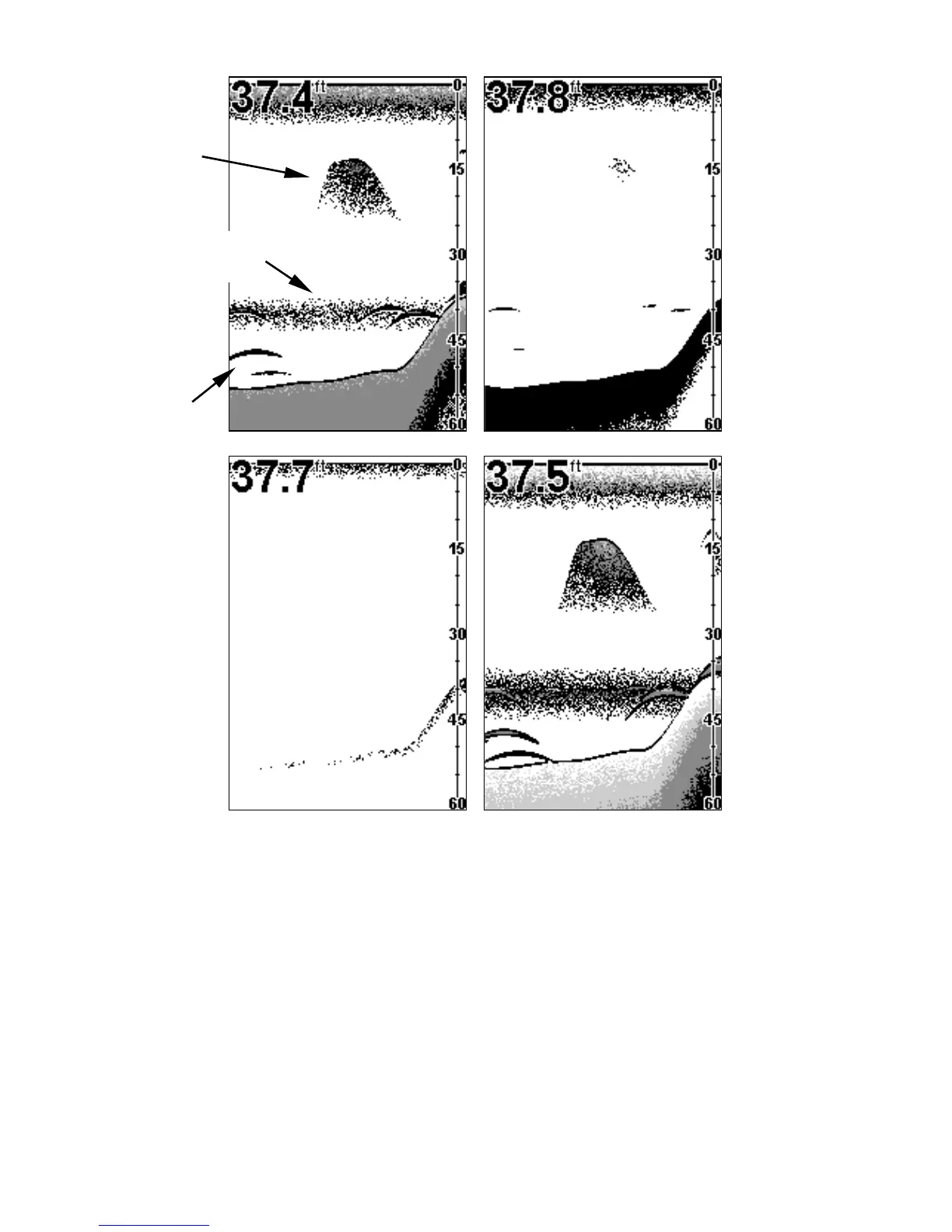
These figures show results of different sensitivity levels on the same
location. Fig. 1: Sensitivity at 87 percent, determined by Auto Sensitiv-
ity. Typical of full auto mode. Fig. 2: Sensitivity set at 50 percent. Fig.
3: Sensitivity set at 20 percent. Fig. 4: Sensitivity set at 100 percent.
You can change the sensitivity level whether you are in Auto Sensitiv-
ity mode or Manual Sensitivity mode. The adjustment method works
the same in both modes, but it gives you slightly different results.
Adjusting sensitivity in Auto Sensitivity Mode is similar to manually ad-
justing a car's speed with the accelerator pedal while cruise control is on.
You can tell the car to run faster, but when you let off the gas the cruise
control automatically keeps you from running slower than the minimum
speed setting. In your unit, auto mode will let you increase sensitivity to
Fig. 1 Fig. 2
Fig. 3 Fig. 4
Bait
school
Thermocline
with fish
Fish
arches


 To Next Page