Operation Screen:
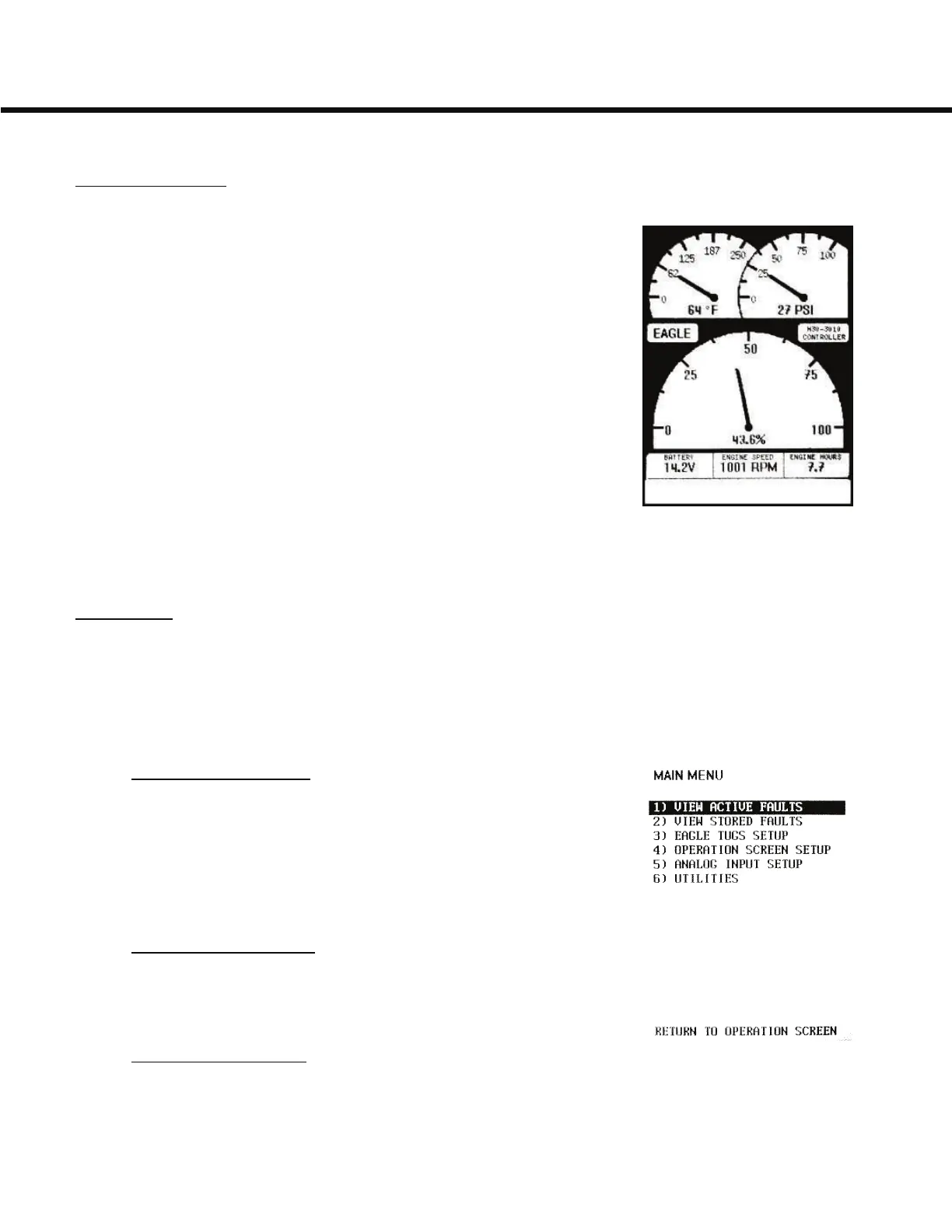
The Operation Screen is the main screen and provides
gauge and other engine/truck operating information. The
Operation Screen is set by default to show the Fuel level
(large center gauge), Oil Pressure (upper right), and Coolant
Temperature (upper left) as the three large analog gauges.
Supplemental gauges are shown as text at the bottom of the
display in the gauge strip (battery voltage, engine rpm, and
engine hours as shown). The visible supplemental gauges,
as well as several additional ones can be cycled through by
using the Right and Left buttons. The priority and display of
gauges can be modified by the user, please see the customi-
zation section for details.
The Operation Screen will also show fault codes and warning and informational
messages.
Main Menu:
The Main Menu can be accessed by pushing the Enter button once either
when the engine is running or before starting the engine. The Main Menu will
give you some control over how information is displayed on the H30.
1) View Active Faults:
Engine fault codes are displayed on the H30 Operation
Screen, as well as stored in memory and accessible through
this menu option. In the rare event that you experience an
engine fault, providing these codes to Eagle and/or Yanmar
technical support will speed up the resolution.
2) View Stored Faults:
You can store faults for later viewing. They are accessible
through this menu option.
3) Eagle Tugs Setup:
This menu is for Eagle Tugs configuration of the display unit and provides no
functionality to the user.
General Usage
5-4



 To Next Page