47
Turn off the water tap,
unload the baskets
3. OPERATION INSTRUCTION
IMPORTANT: To get the best performance from your dishwasher, read all
operating instructions before using it for the first time.
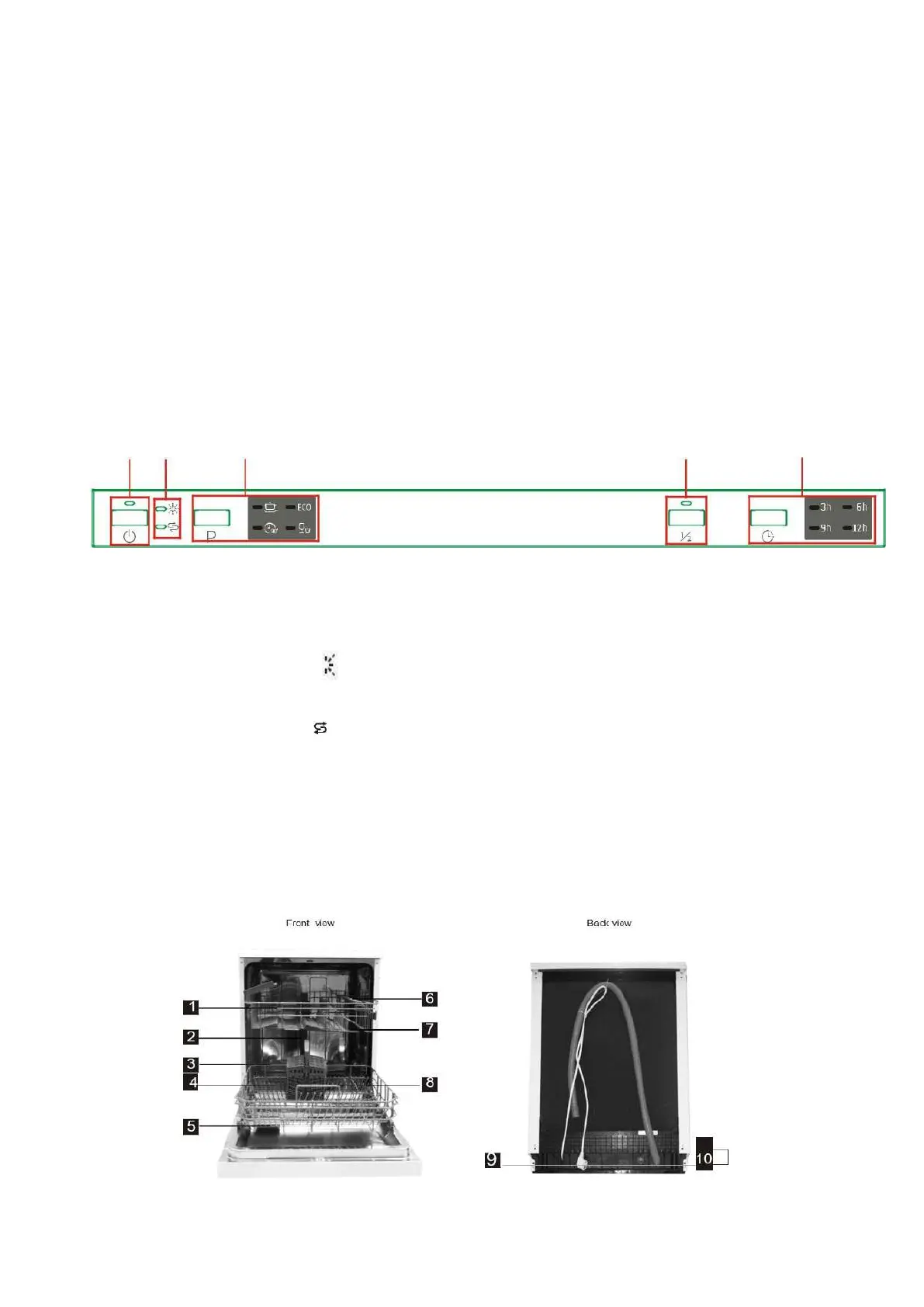
3.1 Control panel
1. ON/OFF Button and indicator
To turn on/off the appliance.
2. Rinse aid indicator and add salt
Indicator:
Rinse aid indicator:
Indicates when the dispenser needs
to be refilled.
Add salt indicator:
Indicates when the dispenser needs
to be refilled.
3. Program button and indicators:
Press the button to select a
wash program.
3.2 Dishwasher features
Warning: wait a few minutes (about 15 minutes) before
unloading the dishwasher to avoid handling the dishes
and utensils while they are still hot and more susceptible
to break.
They will also dry better. Unload the appliance, starting
from the lower basket.
4. Half load function Button and indicator:
To select half load function.
(With this function you can only use when you
have only about or less than 6 place settings
dish wave, and you will see less water and
energy consumption, can only be used with
Intensive, ECO and 90min.
5. Delay button:
Press the button to select a delay time.


 To Next Page