-2-
Prog Prog Prog Prog Prog
Prog
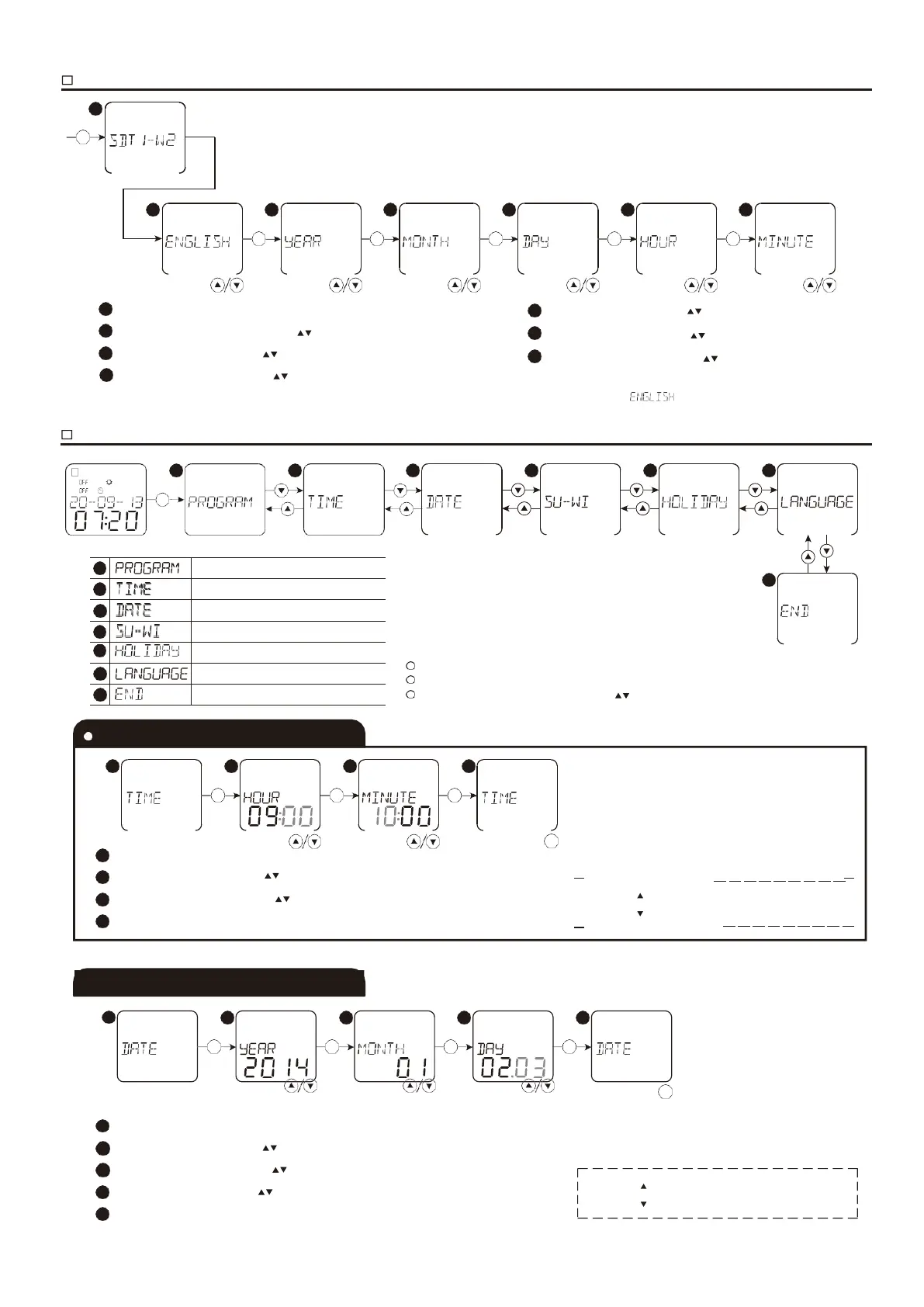
Press “Menu” key, the model of the device will display for 2 seconds
Select the desired language with “ ” keys and press “Ok” key.
Select adequate year with “ ” keys and press “Ok” key.
Select adequate month with “ ” keys and press “Ok” key.
Select adequate day with “ ” keys and press “Ok” key.
Select adequate hour with “ ” keys and press ” Ok” key.
Select adequate minute with “ ” keys and press ” Ok” key.
Note: If the settings were not ended and without operating by keys for 2 minutes, device will return to menu. and backlight is switched
off. Pressing any keys can switch on display and backlight.
Press MENU key to enter menus setting, and symbol Prog appears.
If not operated for 1 minute, the device will automatically exit from setting.
Select the desired menu by pressing “ ” keys
2 3 4
Prog Prog Prog Prog
OK OK OK OK
Select DATE and press “Ok” key.
Choose adequate year with“ ” keys and press“Ok” key. adjusting range is 2000~2095. Choose
adequate month with“ ” keys and press“Ok” key.
Choose adequate day with“ ” keys and press“Ok” key. Exit
from the setting by pressing“Menu” key.
Prog
Menu
0.5s, increase the numerical value quickly
0.5s, decrease the numerical value quickly
1
Select TIME and press “Ok” key.
2
Choose adequate hour with“ ” keys and press “Ok” key. adjusting range is 0~23.
3
Choose adequate minute with“ ” keys and press“Ok ” key. adjusting range is 0~59.
4
Exit from the setting by pressing“Menu” key.
Long press 0.5s, increase the numerical value quickly
Long press 0.5s, decrease the numerical value quickly
Summer/winter setting menu
Holiday mode setting menu
End settings and exit from menu



 To Next Page