DVR AND NETWORK SETUP
12
DDNS
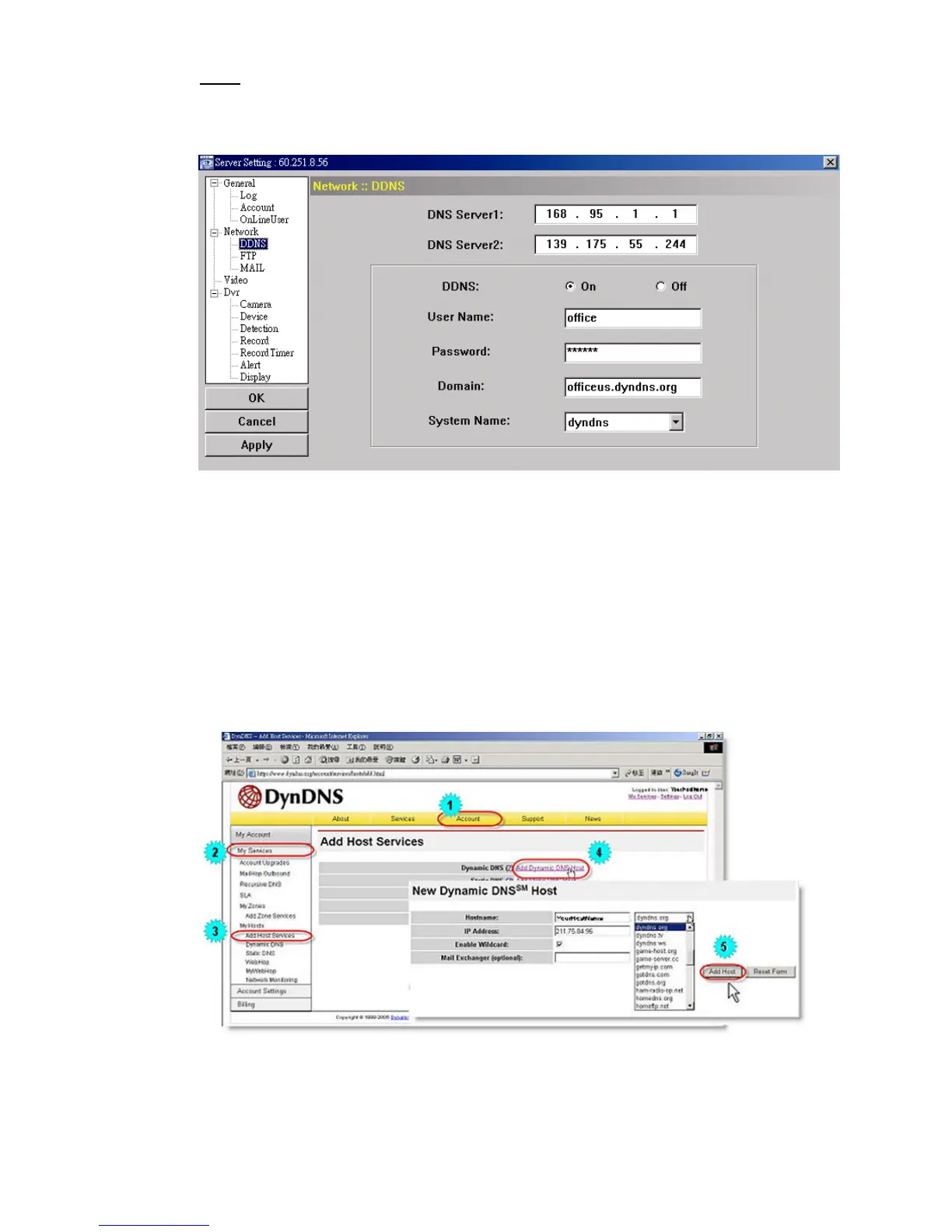
You need to apply a DDNS account before setting PPPOE or DHCP connection. DDNS is a service for
transforming the dynamic IP corresponding to a specific “host name”. Go to a website which provide free
DDNS services and apply a host name.
DDNS Apply:
a). Go to a website which provide the free DDNS service, for example, http://www.dyndns.org.
b). Create an account in DynDNS.
c). After creating one account, users will receive a confirmation E-mail within a few minutes. To complete
the registration, please follow the instructions received.
Users must complete these steps within 48 hours to complete the registration. If the confirmation
E-mail was not received within an hour, request “password reset”
(http://www.dyndns.org/account/resetpass/).
d). Use the DDNS username and password to log into the DynDNS.
e). Create a host name:
After login, click “Account” → “My Service” → “Add Host Services” → “Add Dynamic DNS Host”.
Enter and choose a host name, and click “Add Host”. Then, your DDNS host name is created.



 To Next Page