English EasyN IP Camera User Manual
www.easyn.com MFE-E-A3
22
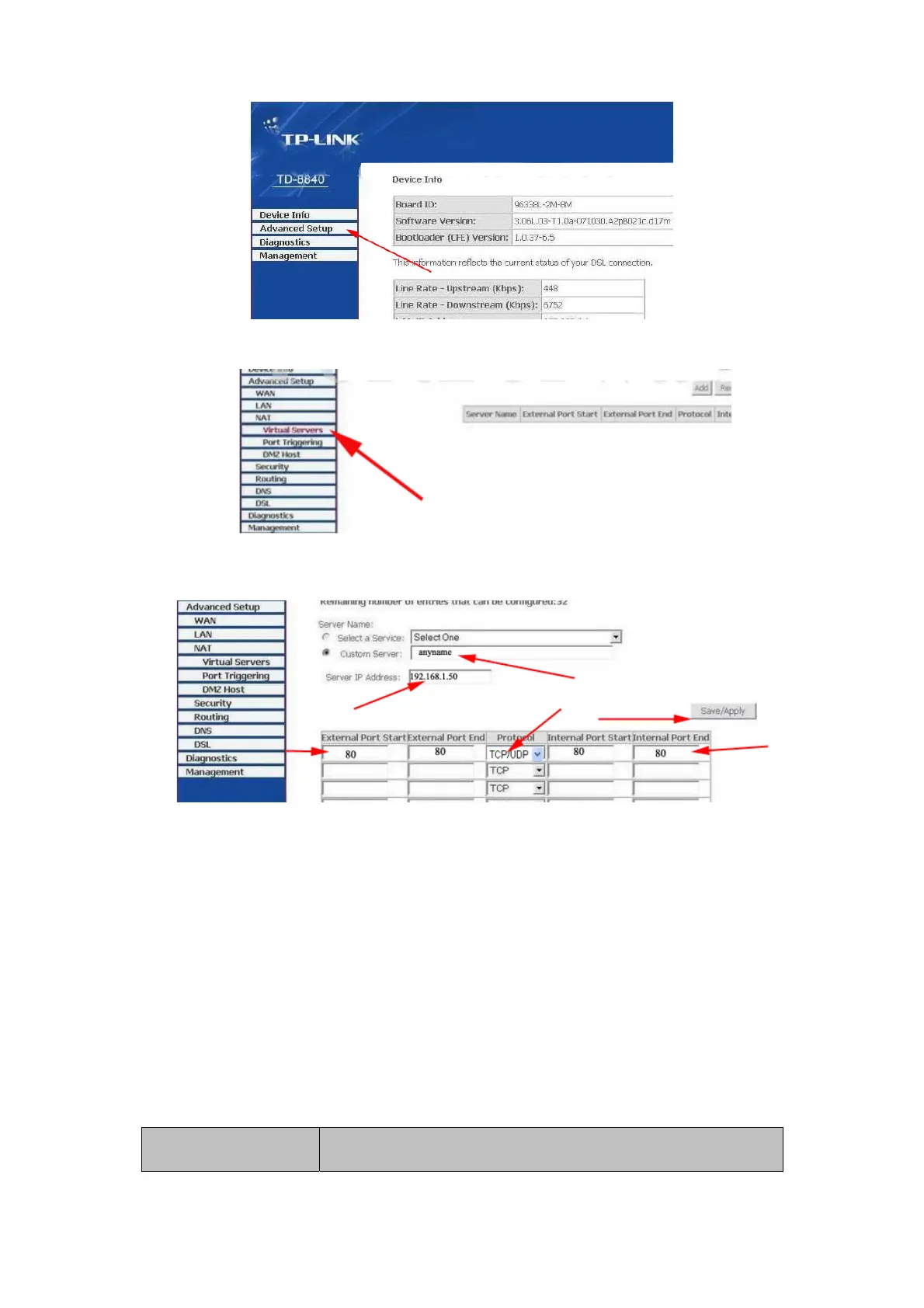
3. Click “virtual server” in the unfolded menu.
4. Fill “80” under the right port start or port end, "192.168.1.50" under Server
IP address, select "TCP/UDP"OR”“TCP” for protocol. Don’t forget to click
“"save/apply”.
After completing port forwarding, you can visit the IP camera through device
code in outer net remotely;
Default visit addresses for common used router are as followed:
1. TP-LINK ex-factory definition router address is 192.168.1.1
2. DLINK ex-factory definition router address is 192.168.0.1
3. Linksys ex-factory definition router address is 192.168.1.1
4. 3com ex-factory definition router address is 192.168.2.1
5. Microsoft ex-factory definition router address is 192.168.2.1
6. Net gear ex-factory definition router address is 192.168.1.1
7. Asus ex-factory definition router address is 192.168.1.1
6.2. F series Production Specification (Part)
The F series have products with various configured specification. Users can choose
the best one according to their requirements.
Image Specification



 To Next Page