6
ENGLISH
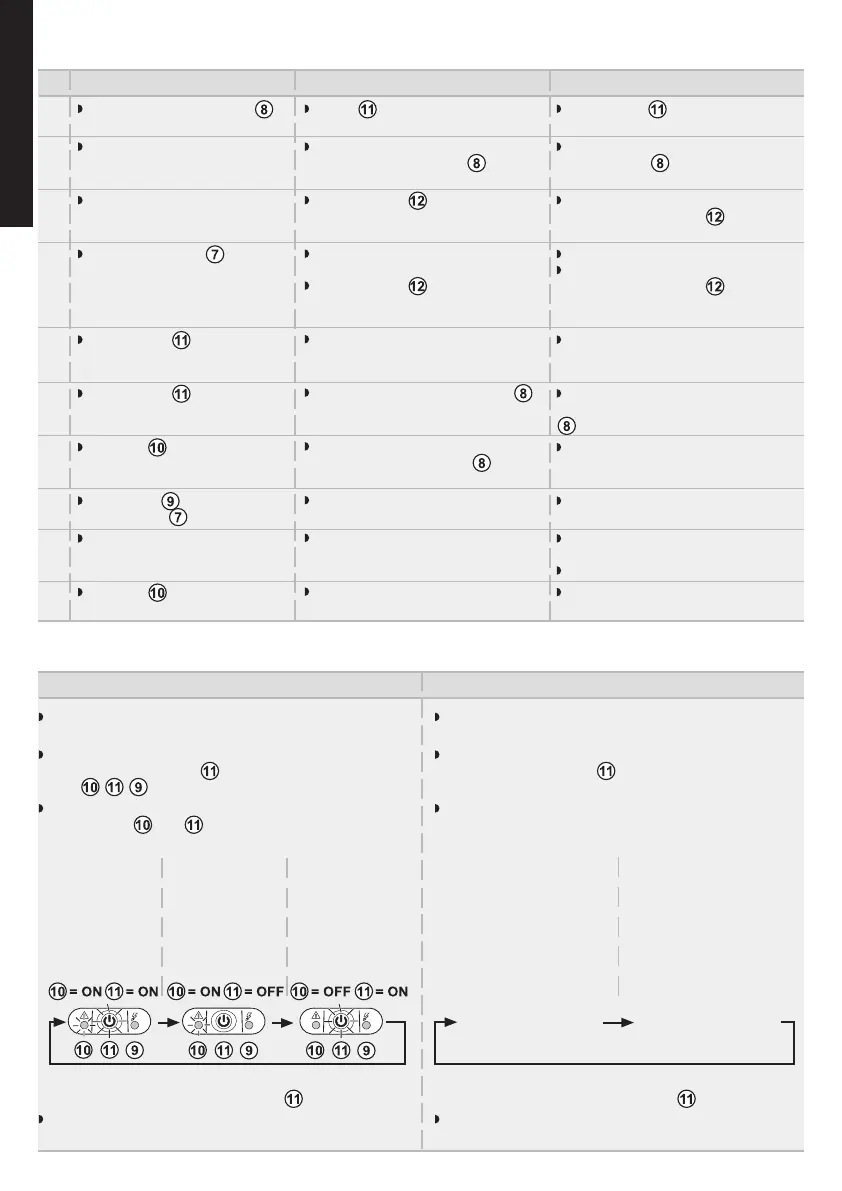
Troubleshooting
The battery backup outlets
are not supplied with power.
The connected devices are not
supplied when AC power fails.
AC power is available, but the
UPS operates on battery power.
The filtered outlets are not
supplied.
Green button flashes
frequently and audio alarm beeps
every 5 seconds.
Green button flashes
frequently and audio alarm is
continuous.
Red LED is on and the
audio alarm beeps every 30
seconds.
Green LED is off and the
filtered outlets
are supplied.
The telephone line is disturbed
or modem access is not possible.
Red LED is ON.
noituloScitsongaiDmelborP
Button is not pressed.
The devices are not connected to
the battery backup outlets
.
Circuit breaker has been tripped
by an overload on the UPS output.
The wall outlet is not supplied.
Circuit breaker has been tripped
by an overload on the UPS output.
The UPS frequently operates on
battery power because the AC power
source is of poor quality.
The UPS battery backup outlets
are overloaded.
A fault has occurred on the UPS.
The battery backup outlets
are no
longer supplied.
Surge protection is no longer
provided.
Surge protection on the telephone
line is no longer provided.
The battery has reached the end of
its service life.
Press button and check that it
turns green.
Connect the devices to the battery
backup outlets
.
Disconnect excess equipment and
reset the circuit breaker
by pressing
the corresponding button.
Supply power to the wall outlet.
Disconnect excess equipment and
reset the circuit breaker
by pressing
the corresponding button.
Have the electrical installation
checked by a professional or use
another wall outlet.
Disconnect excess equipment
connected to the battery backup outlets
.
Call after-sales support.
Call after-sales support.
Disconnect the telephone line from
the wall outlet.
Call after-sales support.
Have the battery replaced.
1
2
3
4
5
6
7
8
9
10
Advanced customizing of your UPS:
Sensitivity to variations of the AC power supply
Only to be used if frequent switching to the UPS battery
due to large variations in the AC supply voltage.
Accessing the programming mode: with the device
switched off, press button
for 6 s and release it once
LEDs
have come on.
Display of the 3 possible voltage ranges according to the
status of LEDs
and :
Audio alarm
Possibility of deactivating the audio alarm when the UPS
is operating on the battery.
Accessing the programming mode: with the device
switched off, press button
for 11 s and release it once
the audio alarm sounds.
Display of the 2 possible audio alarm modes:
Normal mode
(factory
configuration):
AC supply
between 184V
and 264V
Low range
mode:
AC supply
between 160V
and 264V
Low and high
range mode:
AC supply
between 160V
and 284V
Memorizing the mode: 10 s after the last press of the
button.
Memorizing the mode: 10 s after the last press of the
button.
Normal mode (factory
configuration):
the UPS emits a beep every
5 s when operating on its
battery.
Silent mode:
the UPS emits a single
beep when switching to
battery operation and then
remains silent.
Normal mode
activated:
Buzzer emits long
beep.
Silent mode
activated:
Buzzer emits
short beep.
Change from one mode to another by
successively pressing button
.
Change from one mode to another by
successively pressing button .




 To Next Page