47
Keyboard Diagnostic Mode
The keyboard diagnostics allows the user to test each of the front panel keys, the
display, and the analog and relay outputs if present in the unit.
Caution: performing the keyboard diagnostic tests will turn ON the analog
and relay outputs if they are installed in the unit. Remove power from the
counter and disconnect any output that should not activate its load during the
diagnostic tests.
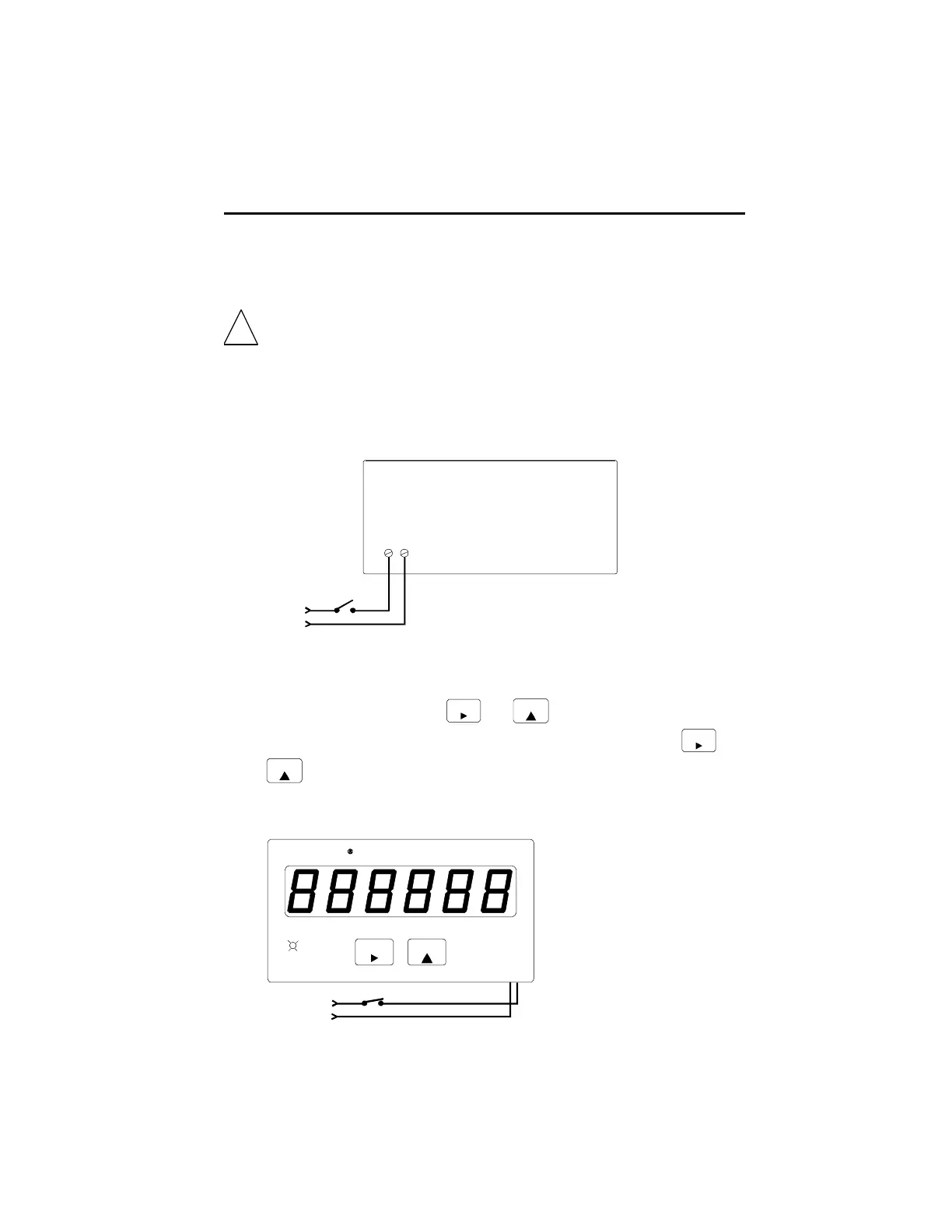
To enter the keyboard diagnostic mode,
1. Turn power to the unit OFF.
Durant
®
1
Power
In
2
2. If any control input is programmed to a lock function, remove the jumper wire
from that input to ground.
3. While holding down both the
Edi t
and
Star t
keys, turn unit power ON. After
1.5 seconds, the unit will be in the diagnostic mode. Release the
Edi t
and
Star t
keys at this time. All LED segments and the program LED will be ON. If
present, both relays will be OFF, and the analog output will be at minimum
values (4 mA and 0V).
Edit
Power
In
Durant
St art
DIAGNOSTICS cont.
!





 To Next Page