7
Settings & Controls
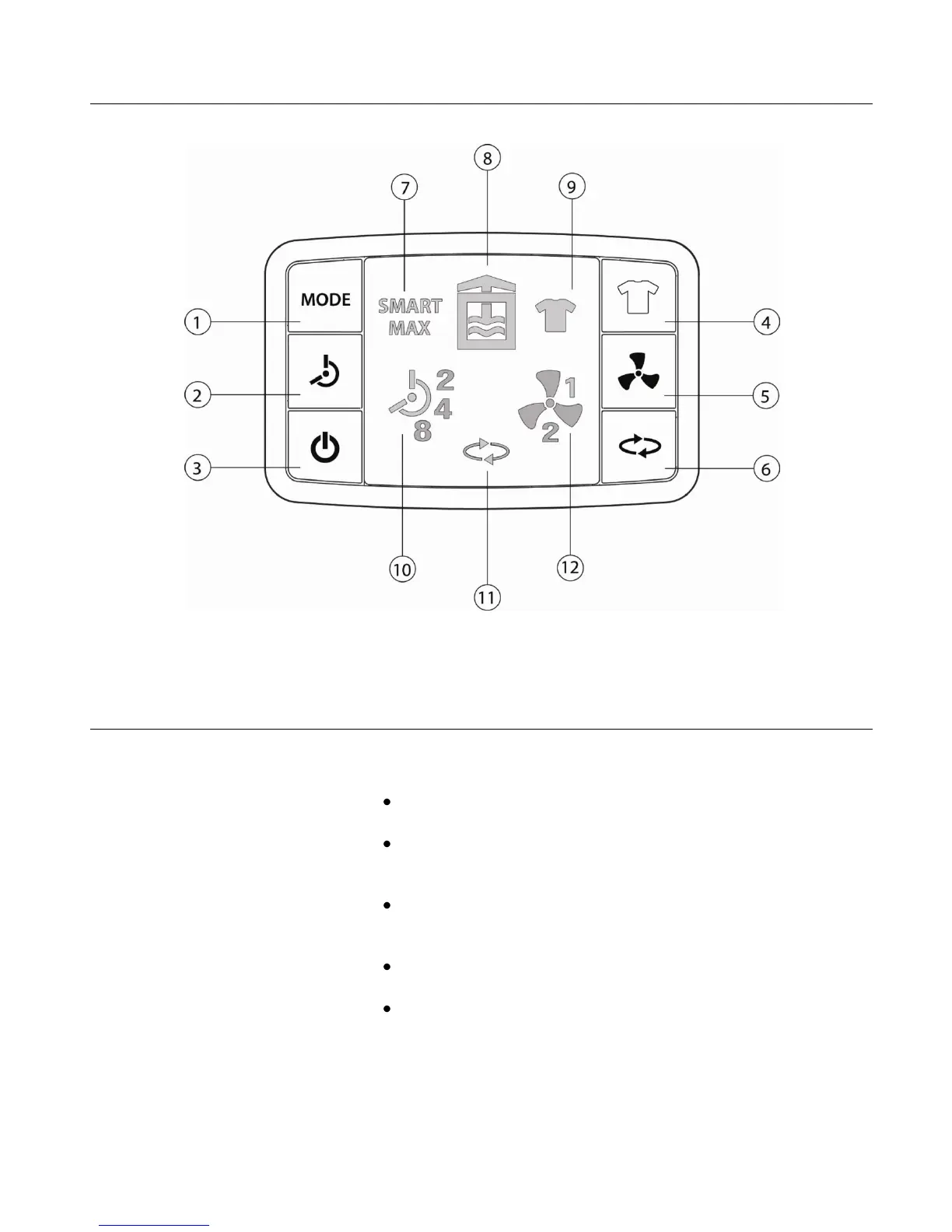
Please refer to the image above when numbers are indicated within the instructions
Switching on your dehumidifier
Stand your dehumidifier upright for a minimum of 2 hours before switching on.
Remove the bucket and plug the
unit in
The Status light (8) will be illuminated red indicating the
water bucket is not present.
This is the same red light that will illuminate when the
bucket is full.
Place the bucket in the unit and
close the door
The Status light (8) will now be illuminated orange; the unit
is now in STANDBY mode.
Press the STANDBY button (3) to
turn the unit on
The Status light (8) will now be illuminated blue; the unit is
now operating.
The unit will start running in SMART mode. We
recommend that you use this setting permanently unless
you have a problem with damp or would like to dry laundry
(see Using the Laundry Drying Function).


 To Next Page