Copyright©2012–2023, Chengdu Ebyte Electronic Technology Co., Ltd.
15
Chapter Eight Configuration Tool Instructions
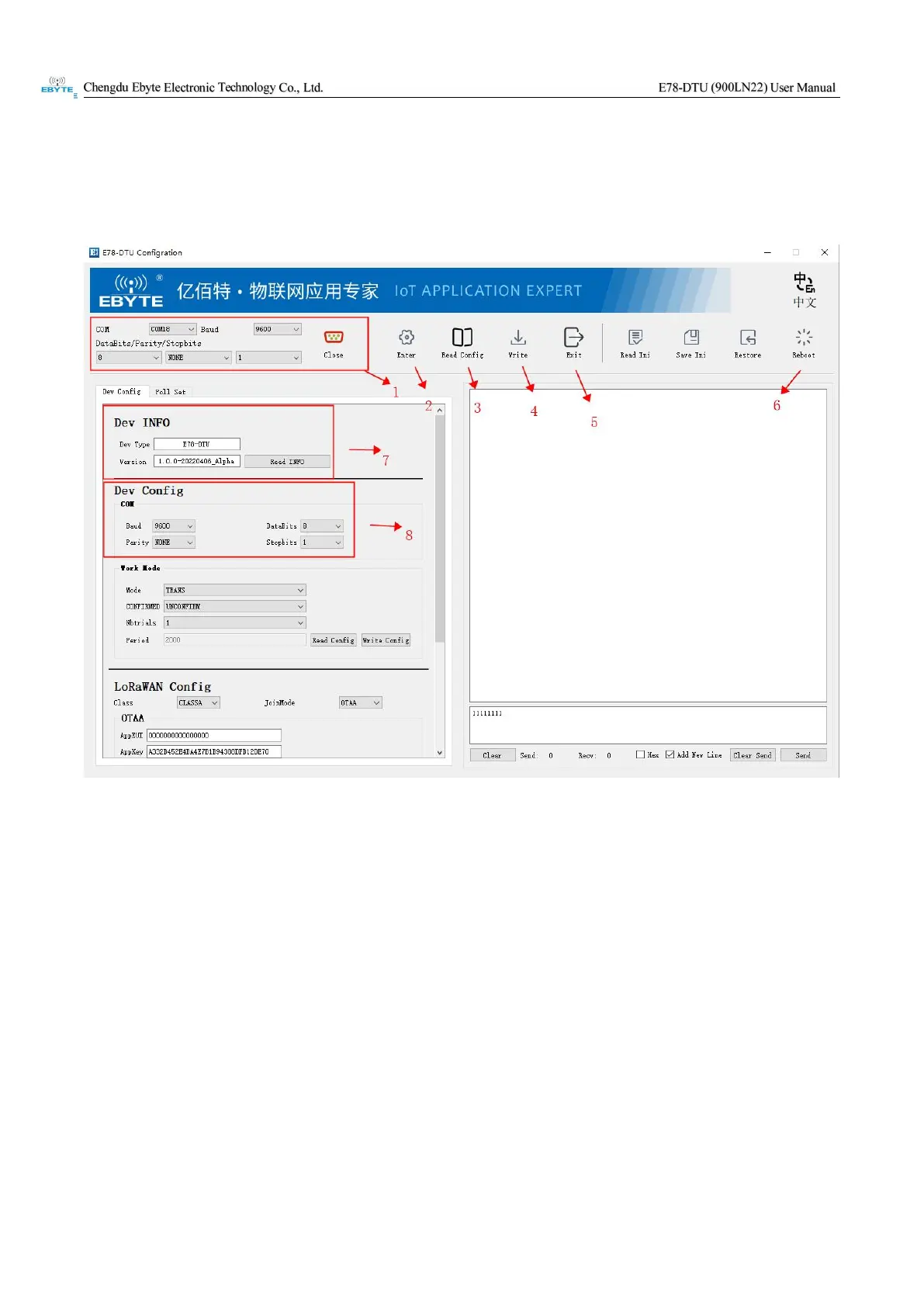
The parameters can be configured through the configuration tool, as shown in the following figure:
Arrow 1: In this area, select the port corresponding to the device and the baud rate data bit, parity bit, stop bit
Arrow 2: After selecting the appropriate port information, click to enter the configuration state
Arrow 3: After entering the configuration, click to read the device parameters
Arrow 4: After modifying the parameters, click to save the modified configuration
Arrow 5: Click to exit the configuration mode
Arrow 6: After entering the configuration, click to restart the device
Arrow 7: Read the parameters after entering the configuration to read the model and version information of the
device
Arrow 8: After entering the configuration, modify the serial port parameter information of the device in this area,
and restart the device after saving the
configuration


 To Next Page