Copyright©2012–2023, Chengdu Ebyte Electronic Technology Co., Ltd.
16
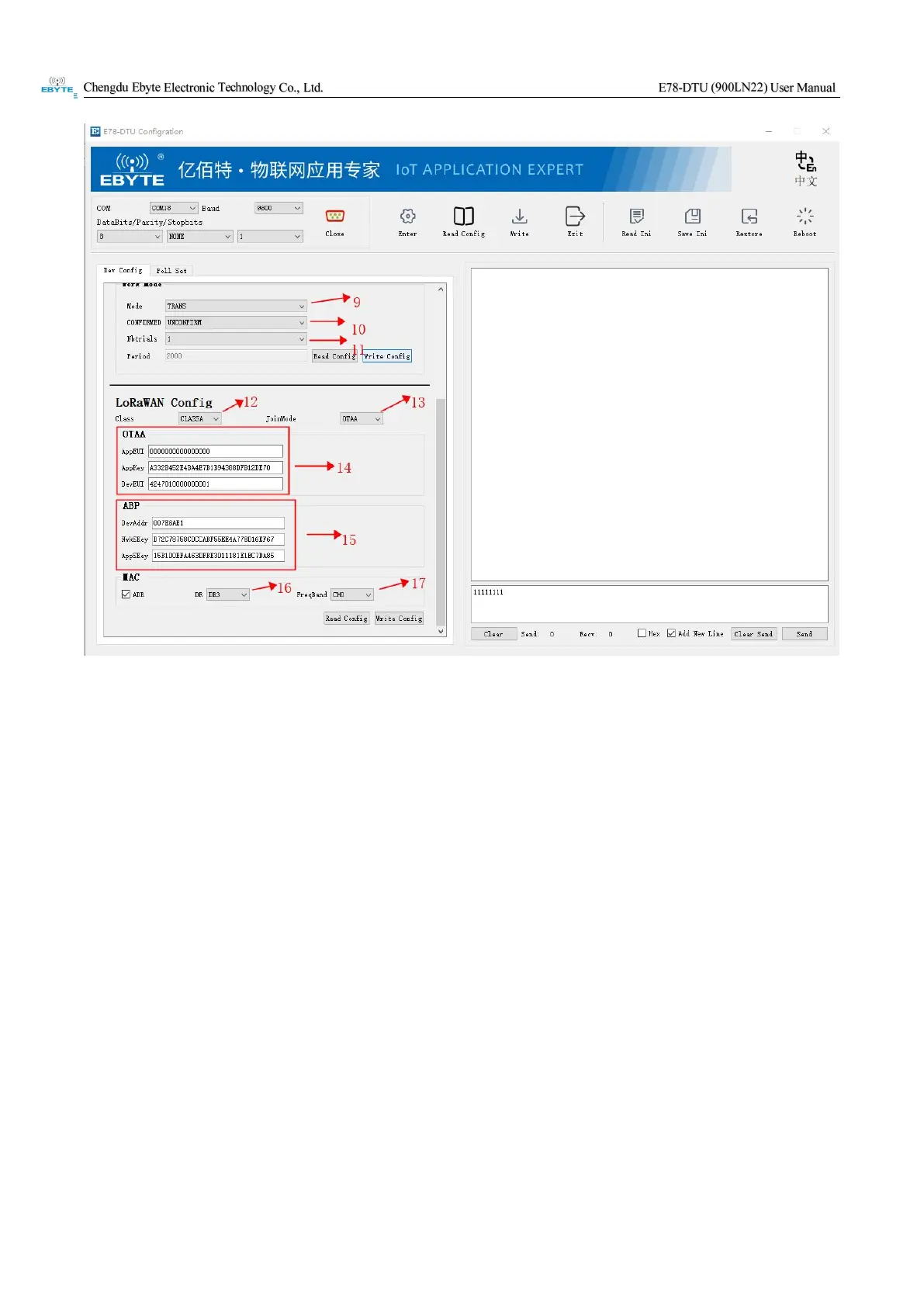
Arrow 9: Select the working mode in the drop-down box: TRANS is transparent transmission mode, POLL is
polling mode
Arrow 10: Drop-down box to select whether to confirm the data
Arrow 11: Drop-down box to select the number of times a single packet of data is sent (1-8)
Arrow 12: Select the CLASS level of the device (CLASSA/CLASSC)
Arrow 13: Select the network access method of the device (OTAA/ABP)
Arrow 14: Enter network access parameters in OTAA mode in this area
Arrow 15: Enter network access parameters in ABP mode in this area
Arrow 16: Select the DR level or the previous ADR (automatic adjustment level)
Arrow 17: Select the frequency band (CH0-CH7) under the region file


 To Next Page