GB
41
3. Turn the appliance o and unplug it, wrap the power cord around cord holder.
4. Clean the lter and return it to its place, replace the drain plug.
5. Remove the exhaust hose assembly and store it carefully.
6. Remove the batteries from the remote control and store them carefully.
7. Put the appliance in aplastic bag and store it in acool and dry place.
Do the following after long term storage of the appliance before using it again:
1. Make sure that the lter and the drain plug are in place.
2. Check the power cord for any damage. When it is damaged, do not use the appliance.
3. Insert batteries in the remote control.
4. Reinstall all accessories in accordance with the instructions for installation of the appliance.
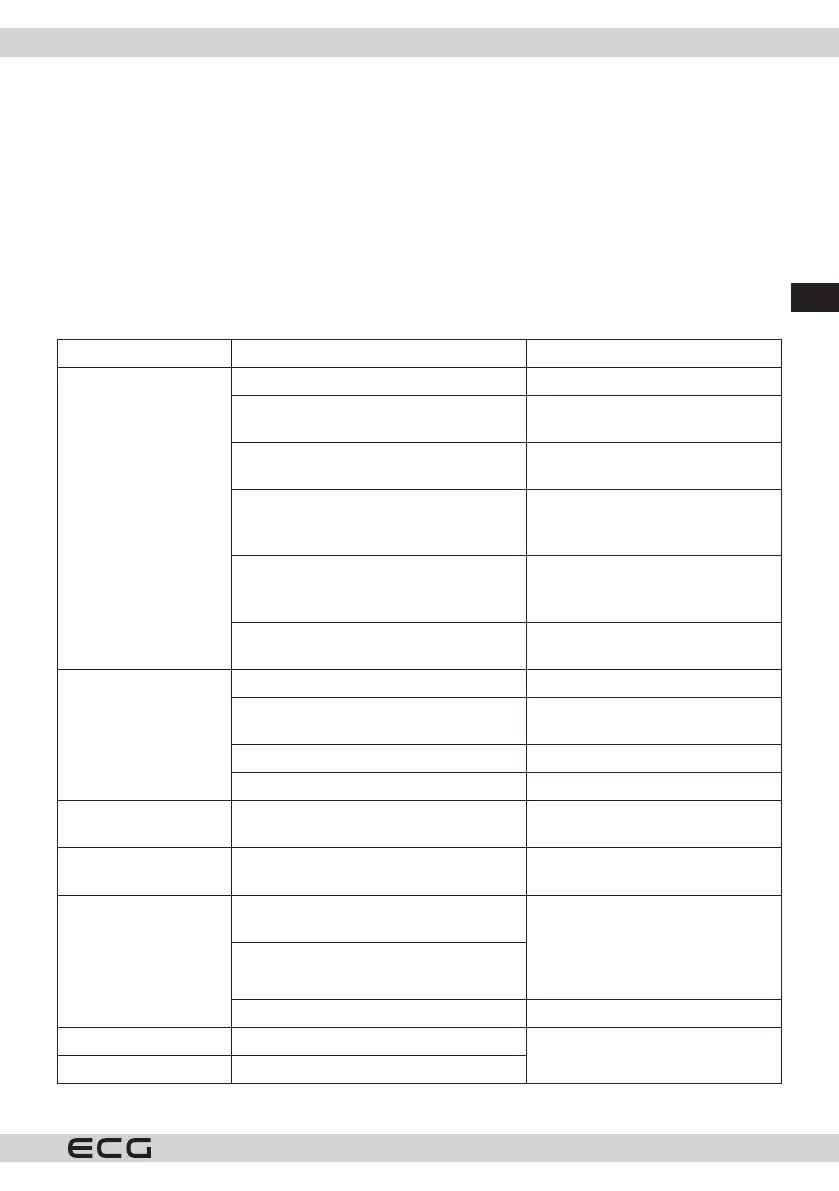
TROUBLESHOOTING
Problem Cause Solution
Air conditioner does
not work
No power Switch on power.
Display shows “FL” Switch o, drain water, switch on
again.
The timer shut-o function was activated You can turn the air conditioner
back on 3 minutes after turning o.
Temperature is too high or too low The recommended operational
temperature of the appliance is
from 7°C to 35°C.
The temperature of the room is lower
than the set temperature in the cooling
mode.
Change the temperature setting.
The ambient temperature is too low for
the dehumidifying mode.
Place the appliance in aroom with
temperature higher than 16°C.
Insucient cooling
performance of the air
conditioner
Direct sunlight Close the curtains.
Open doors and windows or too many
people or heat sources in the room
Close the doors and windows and
eliminate the heat sources.
Clogged lter Clean or replace the lter.
Blocked air intake or air outow. Remove the blockage.
The air conditioner is
too noisy
The appliance does not stand straight Place it on alevel and rm surface
and try to prevent vibrations.
The compressor does
not work
The heat protection of the air conditioner
was activated.
Wait 3 minutes and after cooling o
start again.
The remote control
does not work
Too much distance between the
appliance and the remote control.
Shorten the distance between the
remote control and the appliance
and make sure that the remote
control is directed towards the
remote control sensor.
The remote control is not pointed toward
the remote control sensor.
Empty batteries Replace batteries.
“E1” is displayed Temperature sensor coil defect. Check the temperature sensor and
the related circuits.
“E2” is displayed Defect of room temperature sensor
If the problem persists, contact an authorized service center.


 To Next Page